
New Outlook vs. Classic Outlook: Should Free Microsoft Rewards Points Tip Your Switch Decision?
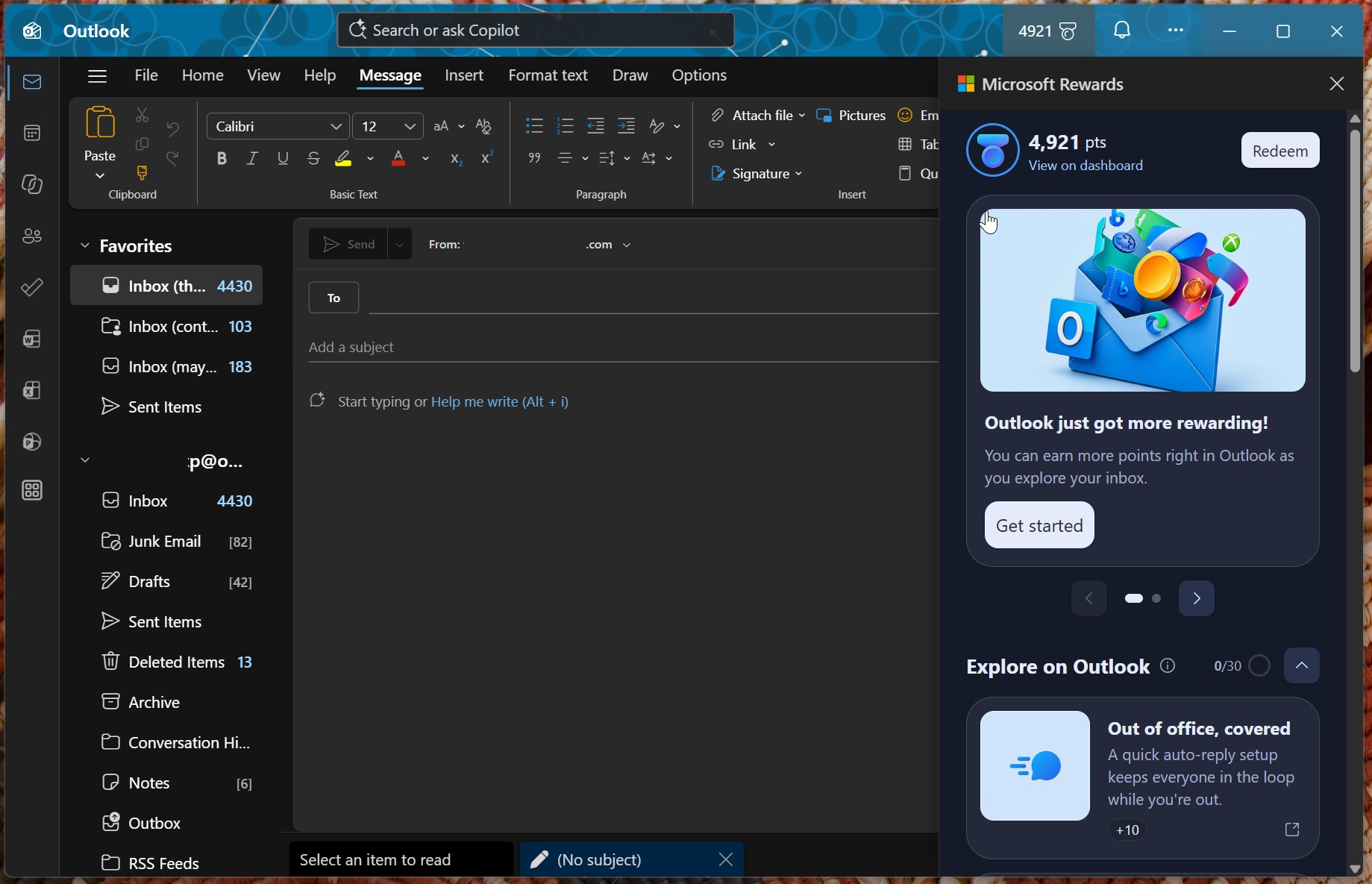
Short answer: no — the points are a nudge, not a verdict. Recently, Microsoft began offering Microsoft Rewards points to Windows 11 users who launch the new Outlook, which makes a first trial effectively free. The real decision still turns on add-ins, offline work, .pst archives and search speed: ground where classic Outlook holds measurable advantages. This comparison weighs both clients side by side and sets out a low-risk way to test before you commit.
What is Microsoft actually handing out?
Some Windows 11 users have run into a fresh promotion inside the new Outlook: a notice saying that simply starting and trying the app can earn Microsoft Rewards points. Reporting by the technology site Windows Latest on 8 November 2026 put detail on it. A Rewards icon now sits in the Outlook title bar; opening it reveals daily tasks worth as many as 30 points, and completing them takes next to no effort.
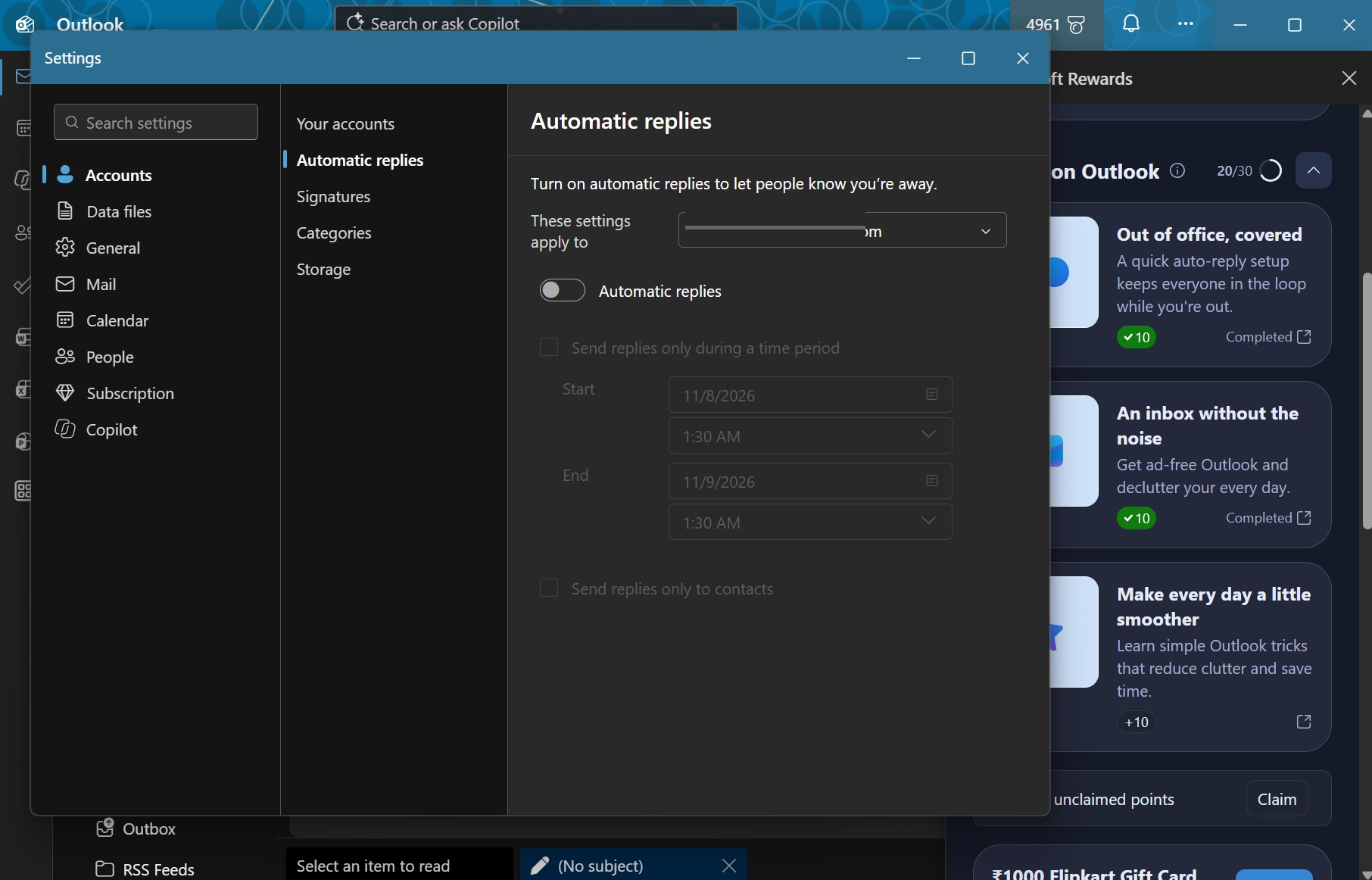
- "Out of office, covered" jumps to the automatic replies settings page. The task is marked complete even if you change nothing.
- "An inbox without the noise" opens the Microsoft 365 subscription pricing page, quietly encouraging a paid plan.
- "Make every day a little smoother" runs a Bing search for "boost your Outlook efficiency"; loading the results page is enough to qualify.
Read the routing, not the reward: one task ends on a settings page, one on a pricing page, one on a search results page. Windows Latest set the tone in its own headline — "Microsoft is begging you to ditch Outlook Classic" — a fair summary of how far the pitch has travelled from feature argument to paid nudge.
How much are 30 points actually worth?
Most coverage stops at the novelty, but the arithmetic changes the verdict. Redemption tiers set the practical ceiling: in July 2026 the personal-finance site MoneyPantry recorded the smallest Xbox gift card at $1.25 for 1,625 points, and The Penny Hoarder values Microsoft Rewards points at roughly one-tenth of a US cent each. On those published rates, 30 days of perfect task lists still falls short of the cheapest card, and a single day's payout is worth two or three cents. ITInsightsWorld treats this as arithmetic on published prices rather than a Microsoft promise: the prices move, and PureXbox reported in February 2026 that Microsoft quietly raised the points cost of several Xbox gift-card tiers.
Two practical conclusions follow. Readers already inside the Rewards economy gain a harmless bonus that lowers the cost of curiosity. Everyone else should treat the incentive as marketing noise, because a few cents cannot answer the question that matters: which client does your work better?
Why pay for trial instead of winning on features?
In recent years, Microsoft has kept steering the new Outlook toward a single goal: becoming the unified mail client for the Windows platform. The app is built on web technology and shares more core components with Outlook on the web, which lets Microsoft ship new features faster and hold the experience consistent across devices.
The incentives are the newest tool in a long kit. Microsoft has already placed a prominent switch button inside Windows, installed the new Outlook automatically on some machines, and surfaced upgrade prompts again and again. Handing out points goes one step further: the company now pays for the first session rather than merely pointing at one. Rising usage also serves Microsoft internally — more real-world feedback data, and a faster hand-over between the old and new platforms.
Architecture explains the friction. Because the client behaves like a packaged web app, startup speed and local search stay the two recurring complaints from efficiency-focused users — the same gap that re-engineered web clients elsewhere have been closing, as our note on a rebuilt web app that loads far faster shows. At the same time, Windows 11 keeps rising as the desktop system Microsoft builds around, so the new Outlook's strategic weight rises with it; our breakdown of the Windows 11 27H2 upgrade plan suggests the platform will keep evolving in place rather than being replaced overnight.
new Outlook vs. classic Outlook: where each one wins
Conclusion first: if your day depends on automation, archives or offline access, classic Outlook remains the safer tool; if you live in Microsoft 365 and want continuous updates plus one consistent interface across devices, the new Outlook is closing the gap. The rows below follow Microsoft's own published feature comparison, with status as listed in September 2026, together with vendor documentation and third-party explainers. Verify the live page before any migration.
| Capability | Classic Outlook | New Outlook | What it means for you |
|---|---|---|---|
| Modern web add-ins | Available | Available | Current plug-ins built on the modern model run on both clients. |
| COM and VSTO add-ins | Available | Not supported | Legacy line-of-business plug-ins block migration until rebuilt. |
| Custom forms and macros | Available | Custom forms not supported | Form-driven or macro-driven workflows stay on the old client. |
| .pst data files | Full support | Partially available | Big local archives may still require classic Outlook alongside. |
| Offline work | Available | Partially available | Frequent travel or weak connections still favour the classic model. |
| Files on network shares | Available | Not supported | Templates stored on a shared drive stop working. |
| LDAP directory access | Available | Listed as upcoming | Corporate directory lookups belong on the checklist. |
| Search on the local machine | Faster search using Windows Search in development | Cloud-first indexing | Microsoft recently said classic Outlook could pull results from the device when the network is poor. |
| Advanced rules and local data control | Deepest control | Improving, still narrower | Expect to rebuild rules after switching rather than import them. |
| Ads in the mailbox | None | Shown unless Microsoft 365 is subscribed | Microsoft's own ad guidance makes removal a paid benefit. |
| Interface and update pace | Familiar, slower change | Modern design, continuous updates, tighter Microsoft 365 integration | Best fit if you want the newest features first. |
Microsoft has not only been subtracting. In a push reported in September 2025, the company listed functions the new Outlook carries that legacy Outlook never offered: pinning important messages, sorting and searching meeting attendees, new themes and coloured mail folders, adding a shared mailbox as an account, Copilot-assisted inbox prioritisation and drafting, and richer newsletter formatting. For light and moderate mail users, that bundle alone can justify switching — points or no points.
The classic branch is not frozen either. Microsoft recently said it is developing faster search for classic Outlook, letting the older desktop client call on Windows Search so results can come from the machine itself in poor connectivity. That is the clearest sign that the old client still has a roadmap even as its strategic status narrows.
Who should try it first — and who should wait?
- Switch first if you mainly read and reply, work with one Microsoft account, already subscribe to Microsoft 365, and depend on no COM add-ins or .pst archives.
- Test cautiously if you handle shared mailboxes, signature templates or several accounts; check each one against the comparison table before you make either client the default.
- Wait if your day leans on automation: legacy plug-ins, macros, custom forms, rule-heavy mailboxes, or at least one offline working session a week.
- Skip the switch if the only reason would be the points — a few cents a day does not cover the cost of a relearned workflow.
Common misconceptions before you take the points
- Taking rewards means agreeing to migrate. The tasks reward opening the app; they do not lock it in as your default mail client.
- Points equal savings. Published tiers put 30 points at a few cents, and redemption costs have been trending upward.
- Feature parity already exists. Microsoft's own comparison still lists items as unsupported or only partly available in the new Outlook.
- Classic Outlook is being retired tomorrow. Nothing in Microsoft's recent communications states an end date, and the company is still building functions for it.
- The new client is just a website. It shares core technology with Outlook on the web but adds Windows-level integration; that hybrid is exactly why the speed and search debates persist.
A two-week, low-risk test plan
- Inventory your dependencies: list every add-in, rule, .pst file, shared mailbox and template you touch weekly.
- Check each item against the published feature comparison; anything marked "Not supported" is a blocker, not an inconvenience.
- Keep classic Outlook installed while trialling the new one — do not delete profiles, and write your rule logic down first.
- Run both clients for five working days each and log three numbers: cold start, time from search to answer, and minutes lost to a workflow that no longer exists.
- Decide on your log, not on the icon in the title bar. If the new client wins, retire the old setup deliberately and keep a written copy of your rules for support tickets.
FAQ
Do I have to switch to the new Outlook to keep my mail?
No. The promotion rewards trying the new Outlook, while classic Outlook still runs, still receives improvements, and remains heavily used by enterprise teams and veteran office users who need its plugin ecosystem and local data control.
What breaks first after a switch?
Automation usually does. COM add-ins, custom forms and deep rule sets are the items Microsoft's comparison treats as unsupported or only partly supported in the new Outlook.
Are the Rewards tasks worth doing at all?
If you already collect points, the effort is trivial and the tasks cost nothing beyond a few clicks. Judged purely as cash, a full daily list is worth cents.
Will I see ads?
In the free experience, ads appear in Outlook, and Microsoft's documented way to remove them is a Microsoft 365 subscription — which is also where one of the promoted tasks routes you.
Which client should a small business standardise on today?
Whichever one your add-ins and archives actually support. Firms running line-of-business plug-ins should treat classic Outlook as the dependable default; Microsoft 365-native teams gain more from the new client's steady update rhythm.
The bottom line
Points buy a first session; they do not buy a habit. For Microsoft, the Rewards push is a candid admission that argument alone has not moved people quickly enough, and that raw usage is itself the asset being chased. For readers, the sensible response is cheap: take the trial if you already sit inside the Rewards system, run the two-week test above, and let your add-ins, archives and offline days settle the question. In the coming period, Microsoft is expected to keep adding functions to the new client and to keep layering on promotional measures to complete the transition, and more Windows 11 users will judge for themselves whether it can replace the software they have relied on for years.
Sources consulted
- Windows Latest, "Microsoft is begging you to ditch Outlook Classic" — https://www.windowslatest.com/2026-11-08/microsoft-is-begging-you-to-ditch-outlook-classic-and-now-its-handing-out-rewards-points-to-try-new-outlook-on-windows-11/
- Microsoft Support, "Feature comparison between new Outlook and classic Outlook" — https://support.microsoft.com/en-us/outlook/getstarted/feature-comparison-between-new-outlook-and-classic-outlook
- Microsoft Support, "About ads in Outlook" — https://support.microsoft.com/en-us/outlook/about-ads-in-outlook
- MoneyPantry, Xbox gift-card Rewards tiers, July 2026 — https://moneypantry.com/free-xbox-live-codes/
- The Penny Hoarder, Microsoft Rewards points valuation — https://www.thepennyhoarder.com/save-money/microsoft-rewards-bing/
- PureXbox, Rewards tier price increase, February 2026 — https://www.purexbox.com/news/2026/02/microsoft-rewards-quietly-increases-its-prices-for-xbox-gift-cards
- IT Home, reporting on the Rewards promotion, 8 November 2026 — https://www.ithome.com/html/soft/1023862.htm
- Sina Finance, same reporting, 8 November 2026 — https://finance.sina.com.cn/tech/digi/2026-11-08/doc-inixyrxk4297672.shtml
- System Home, Microsoft's case for the new Outlook, September 2025 — https://m.xitongzhijia.net/news/20250918/302185.html