
Which Googlebook Owners Actually Get 3GB to 6GB Back? A Model-and-Use-Case Comparison | ItInsightsWorld General
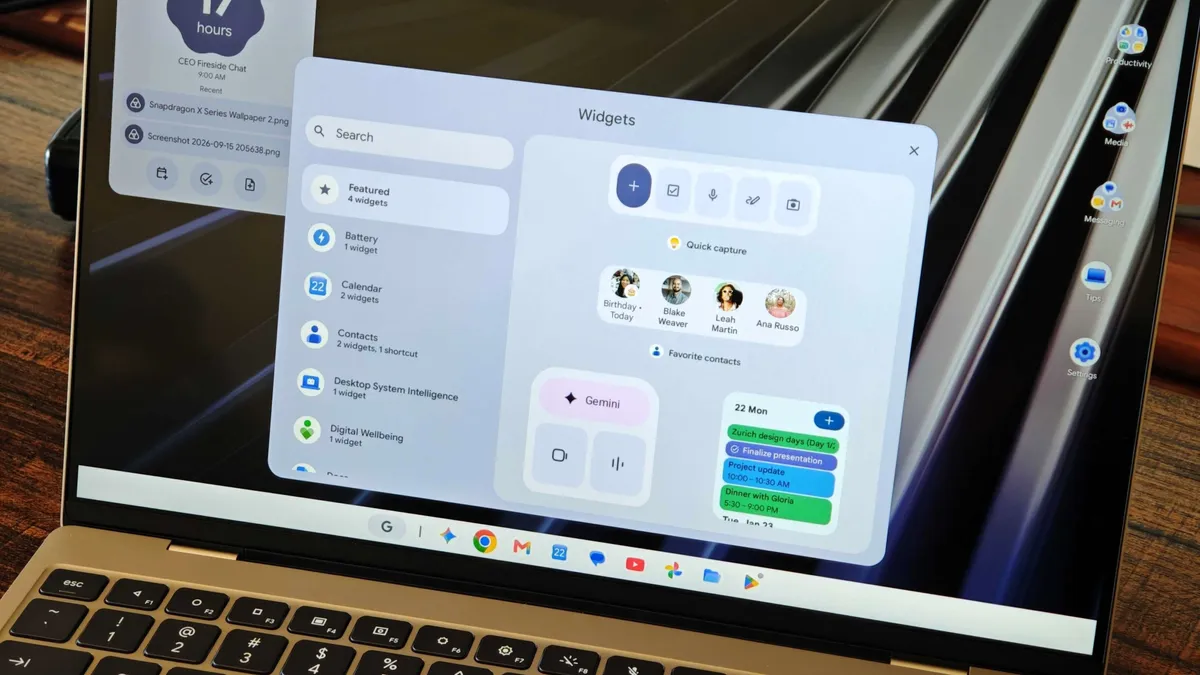
Short answer first: the November 2026 update for Googlebook, build CL3B.260622.286.R2, is less a feature drop than a refund. By rewriting the NPU driver and tightening AICore's memory management, Google returns about 3GB to 6GB of system RAM — as much as one-third of the 16GB fitted across the line. Heavy Chrome and Android multitaskers gain the most; casual users are really buying the accompanying stability fixes.
The context shapes the verdict. The first Googlebooks reached shoppers in early October 2026 through Acer, ASUS, Lenovo, HP and Dell, with United States prices from $899 to $1,299, and the launch conversation centred on a laptop platform freshly rebuilt around an Android core. This is the first large test of how fast Google closes the gap between that ambition and everyday reliability.
What exactly changed in this update?
Three things, ranked by real-world impact: memory accounting, hardware compatibility, and security posture. Nothing here raises the CPU or NPU ceiling; the update changes how the existing silicon and RAM are budgeted.
On memory, the NPU driver was refreshed and AICore's memory management improved, so on-device AI services no longer park large amounts of data in RAM indefinitely. When Chrome and other applications demand space, the system can reclaim it, freeing about 3GB to 6GB. On a 16GB machine that is up to one-third of the pool returned to the user. Chrome itself was also made steadier under load: the resource-reclaim path between background AI services and browser processes was tuned, cutting surprise tab reloads and browser crashes.
On compatibility, the release addresses a long list of field-reported faults spanning the deformable 2-in-1 convertibles, video calls, external displays and audio accessories. On security, Google shipped the November 1, 2026 Android security patch, which closes about 60 vulnerabilities, and moved the system to the Linux 6.18 kernel plus updated Ti50 security chip firmware — the combination tied to fixes for unexpected restarts, boot loops and fan noise.
Who actually feels the freed RAM, and who barely notices?
Conclusion: the benefit scales with how much memory pressure you were already generating. If your sessions never push the device, the number in the changelog is invisible to you; if you live in dozens of tabs, it is the whole point. The table below maps each owner profile against what changed and how noticeable it should be.
| Owner profile | What was happening before | What this build does | Verdict |
|---|---|---|---|
| Chrome tab hoarder, many Android apps at once | Background AI services competed with the browser, so tabs reloaded and Chrome crashed | Releases about 3GB to 6GB and improves reclaim under contention | Biggest winners |
| 2-in-1 convertible owner | Keyboard and trackpad could go unresponsive when switching between tablet and laptop mode | Input handover between modes repaired | Large, immediately visible |
| Frequent Zoom host | App crashed with virtual backgrounds, filters, blur effects and 3D avatars | Those effects paths fixed | Large for work users |
| Netflix and DRM streaming on an external monitor | Protected streams turned the external panel black | Compatibility fixed so picture displays normally | Moderate but conspicuous |
| Linux Terminal developer | Sessions unstable after wake, SSH port forwarding flaky, memory leak on closing tabs, VM upgrades wiping settings | Sessions and forwarding stabilised, leak fixed, upgrades now keep user files and custom SSH configuration | Large for the beta cohort |
| Bluetooth earbud and wireless mouse user | Audio lagged the picture; Bluetooth LE mice dropped after restart | Lower A/V sync delay, more reliable reconnection | Moderate quality-of-life |
| Light user: mail, documents, a handful of tabs | Little pain to begin with | Same headroom, rarely reached | Mostly the security patch |
Google's own release notes tie the memory work to specific hardware — the Acer Googlebook 14, the ASUS Googlebook 14 and the Lenovo Googlebook 15 are named — while the rollout itself remains phased. That matters more than the headline number, because the figure you experience depends on your model, your Android app count and how much on-device AI you actually invoke. Our model-by-model tracker of the November memory update separates confirmed recipients from machines still waiting.
How does this compare with the Windows AI-laptop rule?
Conclusion: Microsoft wrote a purchase requirement; Google is patching a runtime accounting problem. For a Windows machine to qualify as a Copilot+ PC, Microsoft requires an NPU rated at 40 TOPS or higher, at least 16GB of RAM and 256GB of storage — the bar sits on the shop floor, not in the scheduler. Googlebook hardware already clears it: launch models ship with NPUs above 45 TOPS and 16GB of memory standard, which is precisely why the November fix feels meaningful. The machines were never under-specced on paper; they were over-committed in practice, because AICore kept too much resident while Chrome asked for the same bytes.
| Dimension | Googlebook (post-November build) | Copilot+ Windows laptop | Chromebook (ChromeOS) |
|---|---|---|---|
| AI memory baseline | 16GB standard, NPU above 45 TOPS | 16GB and 40+ TOPS set as the minimum to qualify | Far wider spread; many low-memory models |
| How AI behaves locally | AICore services reclaimed on demand, about 3GB to 6GB handed back | Feature set unlocked by hardware thresholds rather than reclaimed at runtime | Browser-centric; limited local AI stack |
| Managed deployment | Consumer-first: no domain enrollment or centralized fleet management yet; full tooling expected in the second half of 2027 | Mature enterprise management | Established admin tooling, supported to mid-2034 |
| Best fit in late 2026 | Individual buyers wanting Android apps plus a desktop browser on one premium chassis | Organisations and Windows-dependent workflows | Schools and fleets that must be centrally managed now |
Google's ChromeOS and Googlebook enterprise documentation makes the trade-off explicit: the 2026 launch is designed for personal consumer use, so organisations evaluating Googlebook as a fleet device should treat management tooling, not memory, as the gating item.
What the update still does not solve
Conclusion: treat this as a strong maintenance release, not a clean bill of health. Some owners report that after installing, Chrome spell checking still misbehaves and notifications fail to sync properly when the device wakes from sleep. Google has not committed to a date for those two items, and because delivery is staged, two owners of the same model can run different code for several days.
There is also a purchasing caveat worth noting. Acer's communications lead, Kelly Odle, told The Verge at launch that the $899 opening price would be re-evaluated over time as component supply and market pressure shift, and that tight memory-chip pricing was already pushing laptop prices upward. In other words, the RAM you gain back in software is the same commodity that may cost more in hardware next quarter.
Five misconceptions about the Googlebook memory fix
- "Everyone gets 6GB back." Google describes a range of about 3GB to 6GB, with named models at the front of the list. Nobody should budget the ceiling.
- "Freed RAM means a faster machine." It means more headroom before the system starts discarding tabs. Silicon speed is unchanged.
- "This is a Chromebook update." Build CL3B.260622.286.R2 is for Googlebook devices from Acer, ASUS, Lenovo, HP and Dell. Chromebook owners remain on ChromeOS, whose updates and patches run to mid-2034.
- "A security patch means no residual risk." Roughly 30 functional fixes arrived alongside the November 1, 2026 Android patch closing about 60 vulnerabilities, yet spell-check and wake-from-sleep notification bugs are still open.
- "My workplace can standardise on this now." Centralised fleet management and domain enrollment are absent from the 2026 launch, with enterprise tooling expected later.
Should you install now? A five-step decision path
- Open system settings and check whether build CL3B.260622.286.R2 has reached your machine yet. A staged rollout that has not arrived is not a fault.
- Reboot once before installing. The kernel change to Linux 6.18 plus the Ti50 firmware update is where restart and boot-loop behaviour is addressed, and a clean host makes the upgrade safer.
- Measure your own workload after the first day: note how many Chrome tabs survive an afternoon, and whether previously reloaded tabs stay put. That, not the gigabyte claim, is the number that matters to you.
- Run the peripheral tests that used to fail — Zoom virtual backgrounds, filters, blur and 3D avatars; Netflix through an external monitor; a USB microphone; Bluetooth earbuds for lip-sync and a wireless mouse for reconnect. Owners of a 2-in-1 should flip between tablet and laptop mode twice.
- Developers should reopen Linux Terminal after wake, retry SSH port forwarding, and confirm that user files and custom SSH configuration survived the upgrade.
Do not install mid-exam, mid-presentation or mid-deadline. This is a broad systems change touching browser, audio, input and kernel paths, and the sensible window is a day when you can re-test the accessories you depend on.
FAQ: Googlebook's November memory update
How much memory does the Googlebook update free?
Google's notes describe a release of about 3GB to 6GB of system memory, achieved through an updated NPU driver and better AICore memory management. On the 16GB models that share the whole line, the upper end equals roughly one-third of total capacity.
Why was on-device AI using that much RAM?
AICore keeps local AI services resident so features respond instantly. Before this build, that residency was not balanced well against Chrome and Android apps competing for the same pool, which is why background services and browser processes clashed and tabs reloaded.
Does a Googlebook with light use still need this update?
Yes — for the security content rather than the memory content. The November 1, 2026 Android security patch closes about 60 vulnerabilities, and the Ti50 firmware plus kernel 6.18 changes address restart and boot behaviour that no usage pattern can avoid.
Is this a reason to switch from a Chromebook or a Windows laptop?
Only if you personally want Android applications and a desktop browser on the same premium chassis. If you manage a fleet, the honest answer for late 2026 is no: domain enrollment and centralised fleet management are not part of this launch.
References
- Google, "Introducing Googlebook, designed for Gemini Intelligence" — https://blog.google/products-and-platforms/platforms/android/meet-googlebook/
- Google Chrome Enterprise and Education help, "What the Googlebook announcement means for your ChromeOS devices" — https://support.google.com/chrome/a/answer/16634428?hl=en
- Microsoft, "Find Windows 11 specs, features, and computer requirements" (Copilot+ PC thresholds) — https://www.microsoft.com/en-us/windows/windows-11-specifications
- The Verge, "These are the first five Googlebook laptops" — https://www.theverge.com/gadgets/997659/googlebooks-breakdown-acer-asus-hp-lenovo-dell
- TechRepublic, "Googlebook Update Could Free Up 6GB of RAM, Fixes 30 Issues" — https://www.techrepublic.com/article/news-googlebook-november-update-2026/
- Android Central, "Google just made Googlebooks faster, more stable, and less crash-prone" — https://www.androidcentral.com/chromebooks-laptops/google-just-made-googlebooks-faster-more-stable-and-less-crash-prone