
Lighthouse 100 in Every Category: A Step-by-Step Engineering Walkthrough of Replacing Next.js with Hono on a Static Blog

An audit sheet that reports 100 in every category usually looks like vendor marketing until you have to produce one yourself. On this project the acceptance criterion was agreed before the first commit: run the URL through pagespeed.web.dev and see a clean sheet with no asterisks. Delivering that took four work packages — publishing platform screening, cache and CDN topology, asset handling, and JavaScript payload removal — and the last package ended in a framework swap. What follows is the delivery log, reordered the way an engineering team would repeat it.
The written requirements were: light, fast, uncluttered, able to run several blogs from one codebase, and accessible. What nobody predicted was the cost. Removing Next.js, the framework I had used most, turned out to be the most painful step in the whole delivery.
Screening existing publishing platforms against the budget
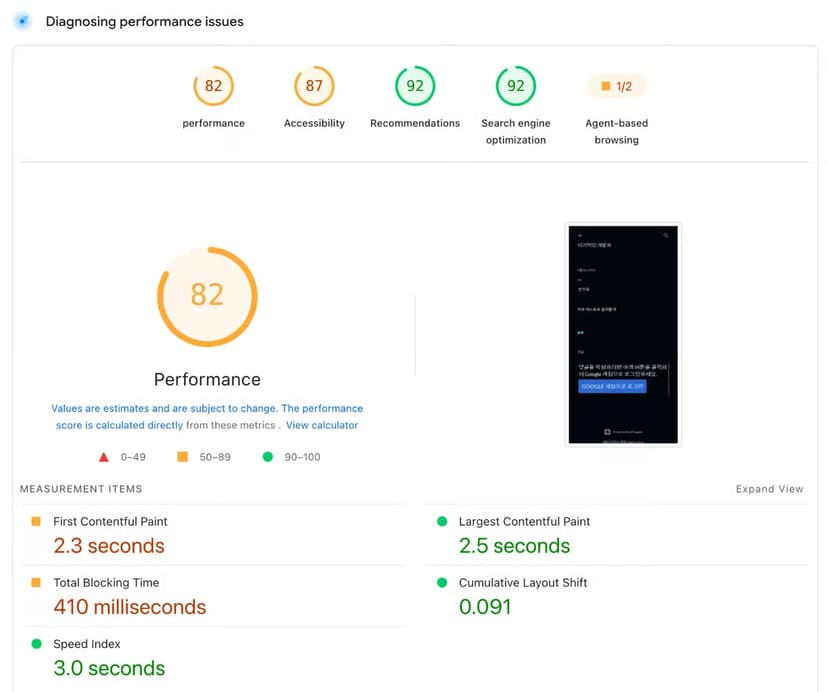
Any conversation about blog infrastructure drags Medium, Blogger and Ghost into the room. All three were evaluated; all three failed. Medium and Blogger carried far more product surface than a text site needs, and their measured performance was disappointing.
Blogger, as captured by the audit tool:
Medium, same test, same expectations:
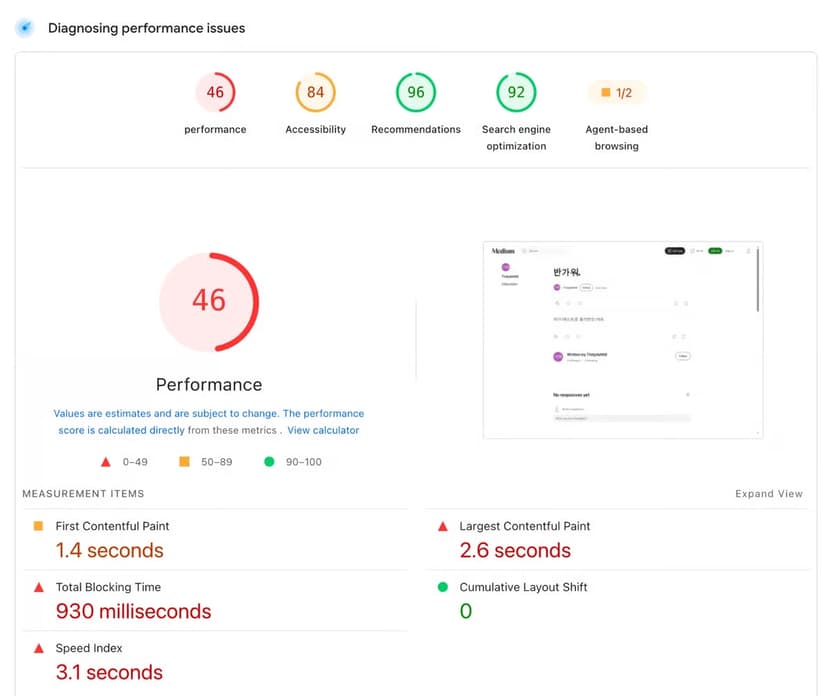
Those numbers ended the hosted-platform track quickly. The second blocker was workflow: staying close to the raw markup that engineers actually enjoy — Markdown, HTML, CSS — remained cumbersome there.
Every figure quoted in this article was taken with pagespeed.web.dev, so the shortlist was compared on one repeatable tool instead of impressions. The wider field was recorded like this:
| Platform evaluated | Blocking issue recorded during the trial |
|---|---|
| WordPress | Plugin hell; I did not enjoy it |
| Ghost | Self-hosting required; ghost.org felt much too expensive; editor problems after version upgrades made updates annoying |
| Hugo | Strongest of that group, but setup still required effort |
| Bear Blog | Extreme minimalism became a drawback; editor UX did not suit me; no AdSense, no free image attachments |
| Next.js (self-built) | Framework runtime JavaScript shipped to static pages kept the score below a clean 100 |
Looking back, the requirement list described something SaaS-like: as fast as Bear Blog, with a little more functionality and better usability. The build that answers it is bloffy.co. The rest of this article is how the performance was earned.
The seven-step process that closed the gap
- Fix one measurement tool. Baseline every candidate with pagespeed.web.dev so comparisons stay honest.
- Screen hosted platforms before writing code. Reject on measured numbers and on editor or markup workflow, not on brand.
- Put caching in the framework layer. ISR plus the framework's fetch caching options did most of the early work.
- Push delivery to a CDN. Global visitors pay network latency that same-region caching cannot remove.
- Treat images as a pipeline, not a per-file chore. Resize variants, compression and CDN delivery in one managed service.
- Read the leftover audit items literally. Legacy JavaScript and unused code pointed straight at the framework runtime.
- Cut what cannot be tuned. Migrate to a lighter runtime (Hono here), then re-verify the full audit.
Caching topology: where Next.js genuinely helped
Caching is essential. Handled well, it improves performance dramatically, and Next.js made it convenient: ISR on one side, a next option that extends fetch with caching on the other. Using those two features properly already moves a site far ahead of the field.
The complication is geography. The site is reachable from anywhere, so regional visitors get fast cached responses while visitors in other regions still pay network latency. That is the job a CDN exists for. Deploying a Next.js app to Vercel hands you a CDN automatically; I do not dislike Vercel, and it is very convenient. The trade-offs are still real: the Pro plan starts at a high price, serverless cold starts remain a problem, and dependence on the Vercel ecosystem cannot be ignored.
Cloudflare was the better fit here — large-scale infrastructure plus most of the application can run on it for free. Once that layer was in place, Next.js caching stopped earning its keep: publishing one post meant invalidating two caches, and cache management became painful. For a static website, a CDN alone seemed enough. That was reason number one for not needing Next.js.
Image optimisation without running your own pipeline
Modern images routinely arrive over 10MB, and pushing those files to the web unchanged destroys performance. The work behind a single image is also tedious: resized variants per device, compression, and then another CDN to manage. On an earlier project that whole pipeline was hand-built — a serverless function on AWS Lambda compressing and resizing on arrival in storage on S3, with CloudFront in front as the CDN. Full control, but it needed regular maintenance.
For this blog the choice was Cloudflare’s Image Transformations. Even the free tier includes 5,000 images, so it gets used without hesitation. At this point I may sound like a Cloudflare sales rep, but I am only an ordinary solo developer.
With caching and images handled, the Next.js build produced this score sheet.
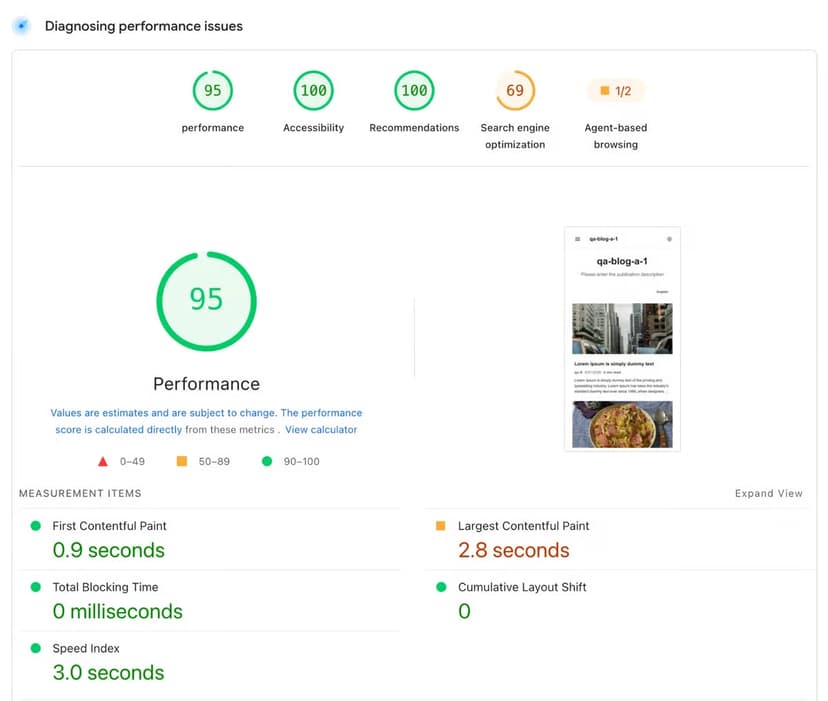
For reference, this was Next.js 16.1.6. The scores were pretty high, but not enough: I wanted a clean 100, with no asterisks, so the remaining audit items had to be chased down.
The stubborn gap: runtime JavaScript you never wrote
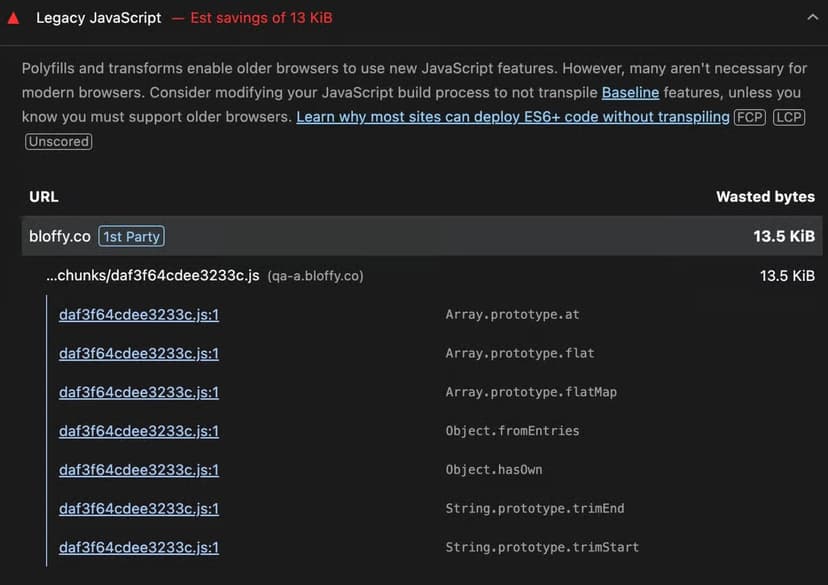
The report flagged a substantial amount of legacy JavaScript, and none of it was code I wrote. It came from the framework runtime that Next.js ships in its bundle. The frustrating part was that the page was static with zero interaction, every page was pre-rendered with ISR, and the official Next.js guidelines had, as far as I could tell, been followed properly.
So the experiment was: remove every client component in the app, leave only server components, measure again. The score did not budge.
Hydration was the first suspect, and it was not the whole story. The real cause is the client runtime Next.js always ships, even for static pages. With server components only, the runtime chunks, hydration, and the RSC payload for the router all remain, because next/link and next/image are themselves client components ('use client') — those two alone are enough to pull the runtime in and trigger hydration.
Strip out next/link and next/image as well, and the App Router's own runtime — the router, the error boundaries — is still there. There is no official way to reduce it to zero; the only option was a hack: pulling the scripts out of the rendered HTML. That is when it hit me: “If I’m going to do that, why am I even using Next.js?”
Then there was the unused code.
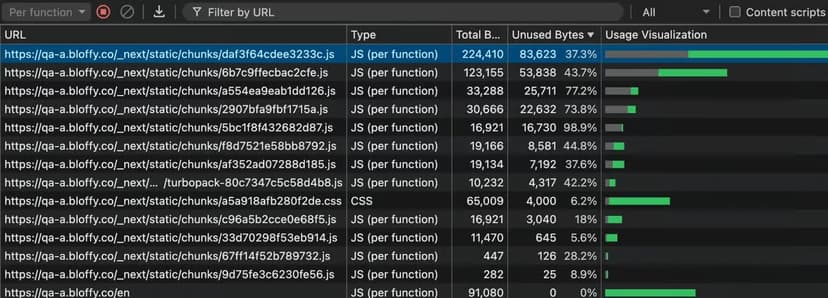
The bulk of the JavaScript was code that was not needed. Unused code alone came to 230,460 bytes. That is not good. Most static websites do not need JavaScript at all, and unused JavaScript is needed even less.
This was the genuine agonising point: was dropping Next.js for the sake of 5 points the right call, after all the hours poured into the public-facing web app?
Four misconceptions this audit corrected
- “Server components mean no client JavaScript.” They do not. The runtime chunks, hydration and the RSC payload still ship unless you hack the rendered HTML.
- “A static page can't have a long task problem.” The pre-render long task on Next.js measured 309.3ms before anything appeared on screen.
- “More framework features is always the safer default.” For a static blog the excess features were never going to be needed, and removing them cost build time and bytes, not capability.
- “Framework caching is mandatory for a fast site.” Once the CDN layer carries delivery, a second cache in the framework mostly multiplies invalidation work.
Migrating to Hono: the decision, then the verification
In the end, quality won: even if the gap was only 5 points, Next.js came out entirely, because the framework's excess features would not be needed in the long run either. Going fully vanilla was considered and rejected — the productivity and infrastructure benefits of a framework were still wanted. The right fit had to be found.
The choice was Hono, because of its technical philosophy. The phrase “Fast and simple” was exactly the solution needed most, JSX support came as a bonus, and the migration cost did not look too big.
Finally, 100.
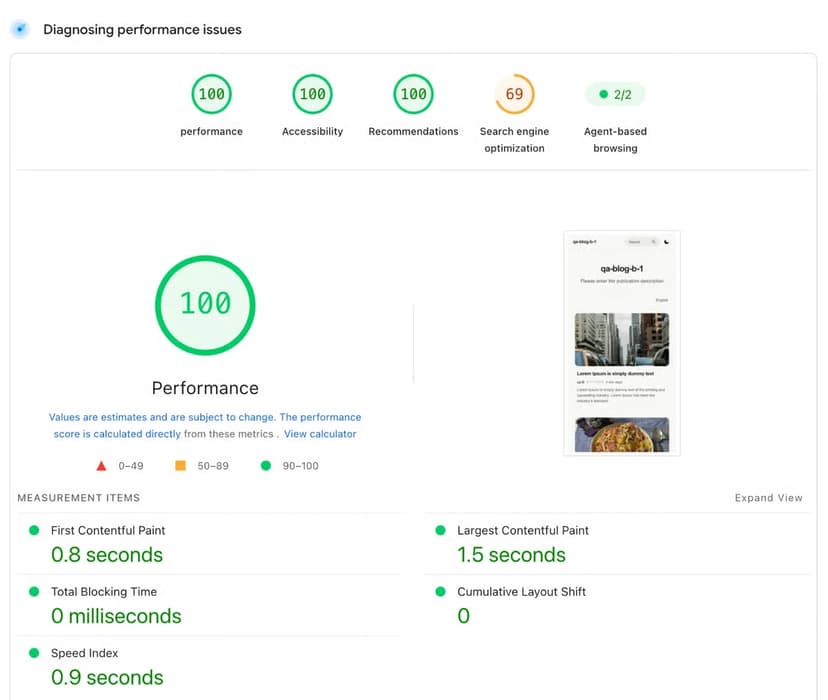
Just like that, the blog reached 100 across the board — and the page you are reading now can be run through pagespeed.web.dev as a check.

There is no JavaScript on the page, and unused code dropped sharply to 407 bytes. As a bonus, build time went down by about 40%. Two notes on that screenshot: the SEO score of 69 belongs to a site built for testing that deliberately blocks search indexing — that is why it reads 69. And if you score 100 on everything in DevTools, Lighthouse actually sets off fireworks for you.
Hono vs Next.js: the same page, measured side by side
| Next.js Performance (server components only) | Hono Performance |
|---|---|
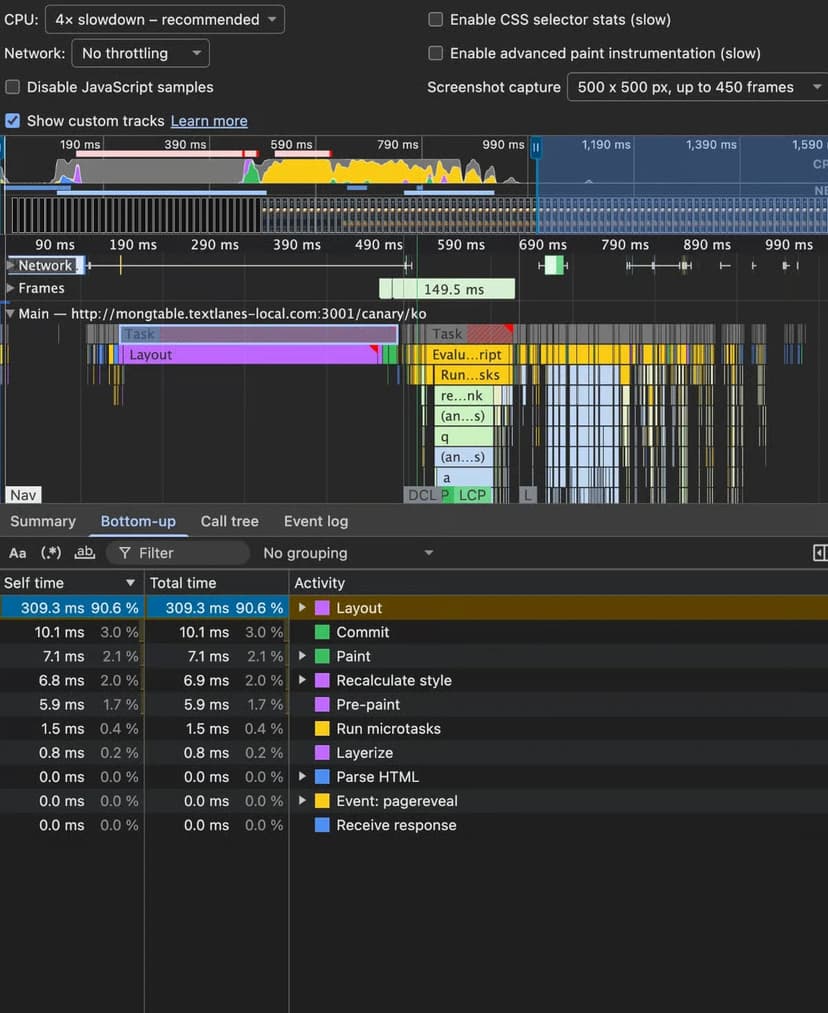 | 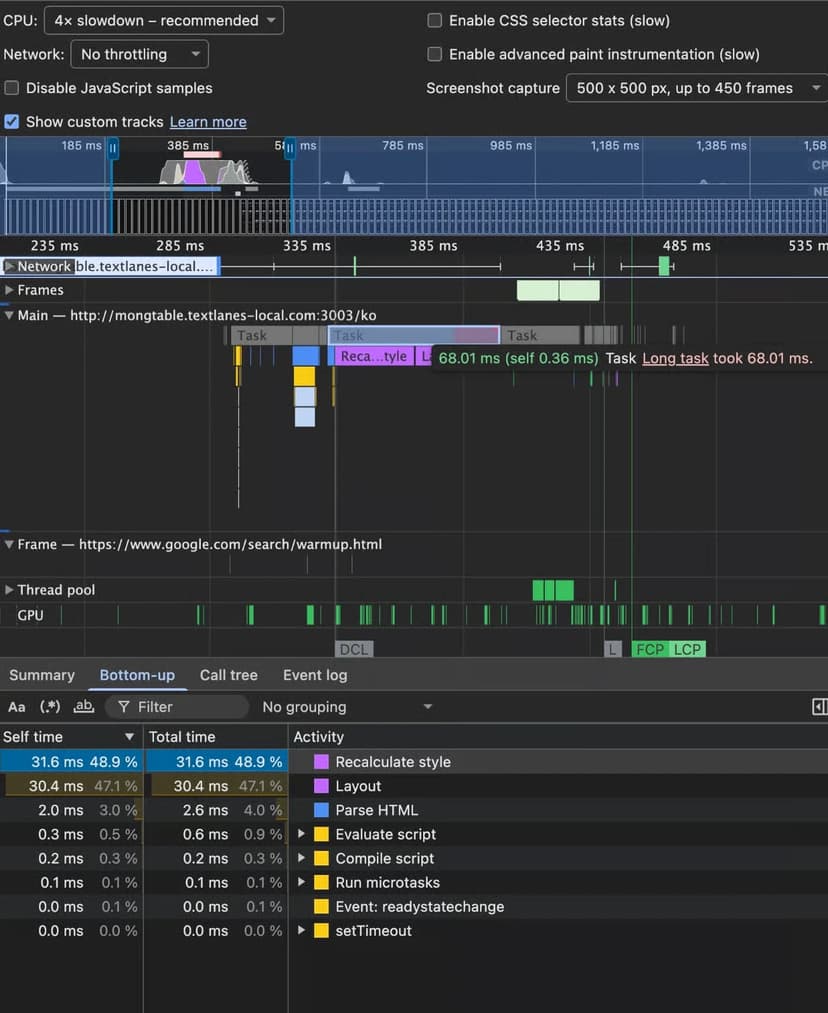 |
The long task that runs before anything is rendered on screen took 309.3ms on Next.js. Building the same page with Hono took 68.01ms — roughly a 78% improvement on that single metric, which is what the last few audit points were actually made of.
FAQ: the questions this rewrite kept getting
Does a static site need a React framework runtime at all?
Is a JS payload, hydration included, really doing a static site any good? I do not think so. It leaves behind unnecessary JavaScript, so in most cases I think it is simply not needed.
Should teams delete Next.js from every project?
No. For an interaction-heavy app, Next.js can be a great framework — the management app for this very blog is built with Next.js.
Is Vercel the wrong choice for Next.js?
It is convenient and hands you a CDN automatically, but the Pro plan starts at a high price, serverless cold starts remain a problem, and ecosystem dependence cannot be ignored.
Why two cache layers is a maintenance problem?
Because publishing a single post requires invalidating both. For a static website, the CDN alone looked sufficient.
Why is the Hono screenshot showing SEO at 69?
That particular site was built for testing and deliberately blocks search indexing; that is why it scores 69.
Action checklist before you schedule a framework migration
- Write the acceptance target as a number and a tool, then refuse to argue about taste.
- Do the cache and CDN work first — it is the cheapest jump in the audit sheet.
- Move images into a managed transformation pipeline instead of hand-maintaining one on serverless functions.
- Run the client-components-only experiment before deciding: if the score does not move, the runtime is the problem, not your components.
- Read the unused-bytes line as a decision input, not a warning — 230,460 bytes down to 407 bytes is the whole argument.
- Scope the migration by what you will never use: excess features are cost, not insurance.
- Re-measure on the published artefact, not on a local build, and keep the before/after screenshots in the ticket.
Framework choice is a delivery decision, not an identity. In this build the framework that had carried the most previous work was the one thing standing between a high score and a full one, and the audit trail above is repeatable: measure on one tool, remove the two easy bottlenecks, read the leftover JavaScript items as a runtime signal, and only then decide whether the migration is worth the last few points. On this site it was, and the check is one URL and one click away in pagespeed.web.dev.