
ItInsightsWorld SoftwareDevelopment: Git-Backed Markdown Task Files for Agent-Assisted Delivery
For developers and technical leads reading this ItInsightsWorld SoftwareDevelopment guide, the practical question is not whether AI coding agents can write code; it is whether they can see the work they are supposed to do. When requirements sit only outside Git, in Jira or Redmine, the agent must rely on copied context, manual links, or a human summary. Tasks as Code brings that context into one versioned space beside code and documentation, making the repository the place where implementation, plans, and results can be reviewed together. Today, that approach is becoming a concrete workflow for teams that already use Docs as Code.
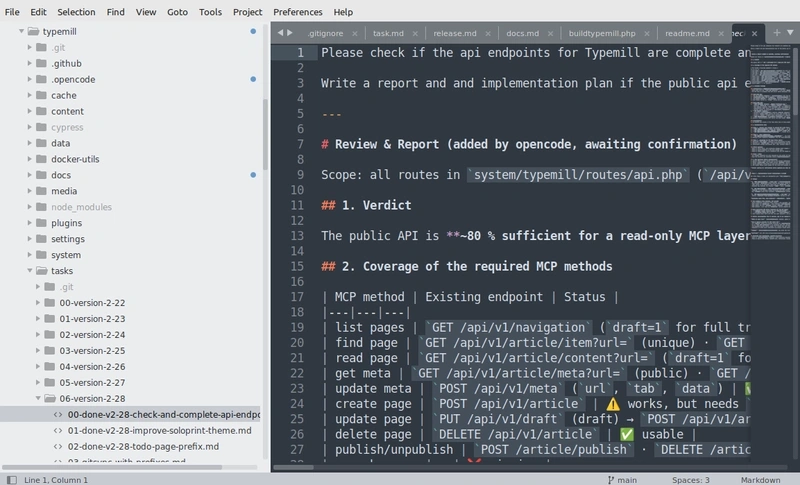
Why task files belong beside the code
In an AI-assisted development loop, the repository behaves like the agent's working context. If task Markdown files live in Git, they are available to the same inspection process that reads source code and documentation. That availability matters: the agent can see what is requested, what is constrained, and what has already been done without a person acting as a bridge from a ticketing system.
From Docs as Code to task-aware repositories
Standalone documentation has already moved into Git repositories as Markdown, often under a /docs folder. Docs as Code treats documentation as part of the software product, not as a late handoff. AI coding agents make that pattern more valuable because they can consult the documentation, modify code, and revise related docs in one pass.
Spec-Driven Development adds the planning layer
Spec-Driven Development (SDD) already uses Markdown specifications to describe intended behavior before an agent implements it. Tools such as Spec Kit support that model, but the smaller version is simply a task file treated as the specification. The detail level can match the work: a maintenance item may need a short description, while a complex feature may need acceptance criteria, technical decisions, dependencies, and testing requirements.
Step-by-step: five steps for a task file workflow
The workflow below has five simple steps:
- Describe the task. Record a brief description of the change or feature to implement.
- Analyze the requirements. The agent reads the task and inspects the relevant code and documentation.
- Create an implementation plan. The agent adds a proposed solution and identifies the changes it intends to make.
- Review and approve. A developer reviews the plan and authorizes implementation.
- Implement and report. The agent changes the code, updates the documentation where necessary, and appends an implementation report to the task file.
Keeping the description, plan, and report in one Markdown file lets reviewers compare the request, the intended approach, and the delivered change without jumping between tools.
The approval step keeps people in control: the agent does not jump from a request straight to implementation. A developer can correct the plan first.
Example layout: three repositories and one ignored folder pair
One example setup uses three separate Git repositories: code, documentation, and tasks. This separation reflects access rules. Documentation may be public, while tasks may contain unfinished security fixes, internal planning, or features that are not yet announced.
On a local machine, the developer clones the documentation and task repositories into folders inside the code repository. The parent .gitignore excludes those folders, so each cloned repository keeps its own Git history while remaining available in the working tree.
/code-repo
/src
/tests
/docs                 # Separate documentation repository
/user-guides
/admin-manuals
/developer-docs
/tasks                # Separate private task repository
/release-123
task-551-something-descriptive.md
task-552-something-descriptive.md
.gitignore            # Excludes docs and tasks
All information is now available to a local coding assistant such as Claude Code or OpenCode. When a task is implemented, the agent reads the task, analyzes the code, makes the change, updates relevant documentation, and appends the implementation report to the task file. Code changes stay in the code repository; the task file remains the link between the requirement and the commit. Referencing the task filename in a Git commit helps connect the implementation to the original requirement.
When tasks are organized into release folders, the agent can use completed tasks and Git history to draft the changelog and release notes, and to identify documentation that may need updating.
Interfaces around the files: IDE, GitHub, and Typemill
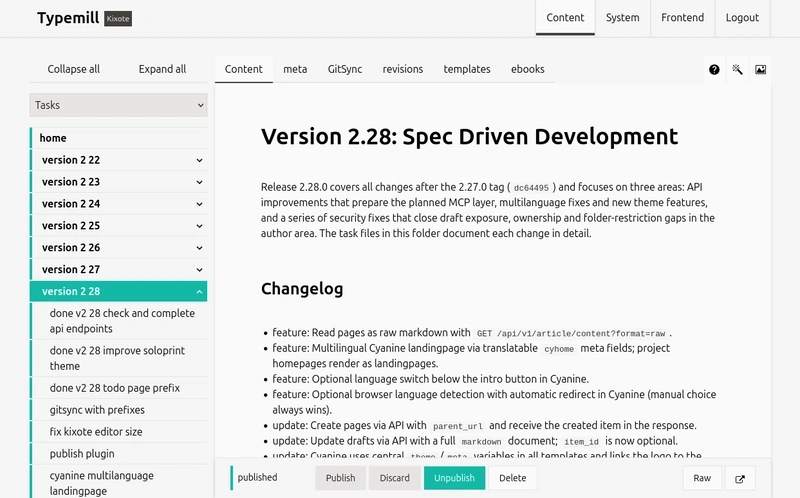
Git and an AI coding agent are sufficient to run this workflow. A browser-based interface adds another way to browse, edit, and organize the files without replacing Git as the underlying version control system. Typemill can synchronize content with Git repositories. Because it supports multiple repositories, you can configure a separate project for private tasks alongside the documentation project.
Tasks:
Documentation:
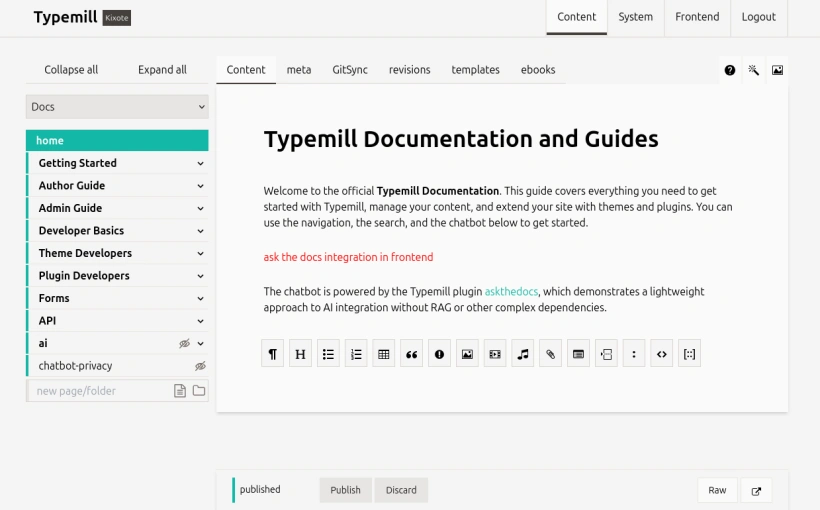
The same files can be reached through three interfaces:
| Interface | Typical user | What it supports | Does it replace Git? |
|---|---|---|---|
| IDE | Developers and AI agents | Direct work with local repositories, implementation, and code inspection | No |
| GitHub | Contributors and reviewers | Repository-level collaboration, review changes, and edit files | No; Git remains the source |
| Typemill browser CMS | Product owners and technical writers | Read and manage tasks and documentation without command-line work | No; it synchronizes with Git |
Each interface has a different role. The IDE supports implementation, GitHub provides repository-level collaboration, and the CMS offers a content interface and publishing platform for non-technical users such as product owners and technical writers. Git remains responsible for version history and synchronization. This setup shows that the interface does not have to own the data.
FAQ for software development teams
Do Markdown task files replace Jira or Redmine completely?
Not necessarily. The point is that tasks no longer need to stay outside Git for AI coding agents to use them. A team may keep ticketing for some audiences, but for the agent workflow the task file becomes the shared artifact that the agent reads and updates.
Can teams start with only one folder of Markdown files?
Yes. Any setup that keeps Markdown files in Git and gives agents access to them will work, and you can start with nothing more than a folder of task files.
Should docs and tasks be in the same repository?
They can be, but separate repositories give independent access control. Documentation may be public, while tasks may contain unfinished security fixes, internal planning, or unannounced features.
What makes a task file detailed enough?
The detail depends on the work. A small maintenance task may need only a short description. A complex feature may require acceptance criteria, technical decisions, dependencies, and testing requirements.
Which tools are mentioned in the example workflow?
Git stores the files, the agent can be a local coding assistant such as Claude Code or OpenCode, Spec Kit is cited as a tool for Spec-Driven Development, Typemill provides a browser interface that syncs with Git, and GitHub provides repository-level collaboration.
Common misconceptions to avoid
- Thinking the interface owns the data: Typemill or another browser CMS is a way to work with files; Git remains the version history layer.
- Assuming every task needs a full specification: The level of detail should match the change; a small maintenance item may need only a brief description.
- Letting the agent move from request to code without review: The plan can be reviewed and corrected first, keeping people in control.
- Forcing non-technical contributors into the command line: A synchronized web interface can let product owners and technical writers stay involved.
- Keeping all task context outside Git: When tasks are external, agents and developers lose the ability to inspect and update them as one versioned set of files.
Action advice for your next iteration
- Choose one repository area where documentation already lives as Markdown.
- Add a tasks folder or a separate private tasks repository, matching the access rules your team needs.
- Create a task file with a short description, then expand it with acceptance criteria and testing notes when the feature warrants it.
- Run the five-step loop: describe, analyze, plan, approve, implement and report.
- Reference the task filename in commits so Git history connects the code change to the requirement.
- Let product owners and technical writers use a synchronized interface, while developers and AI coding agents use the local repository.
For ItInsightsWorld readers focused on delivery, the appeal is practical: task context, implementation evidence, and review history can live in one repository-backed workflow. The question is not whether AI coding agents need external ticket copies; it is how teams will design the shared, file-based space where developers, product owners, technical writers, and agents meet. Git-native files, separate access rules, readable Markdown, and a browser layer are concrete parts of that answer.