
Evergreen Teardown: How a Small GitHub App Automates Quarterly Access Reviews and Stale-Repo Archival | ItInsightsWorld SoftwareDevelopment
Delivery pipelines get dashboards, budgets and on-call rotations; repository administration gets postponed. Outside collaborators linger after an engagement ends, permissions drift as a project changes shape, and repositories that have served their purpose stay active and unowned. For a development team that is not paperwork — it is standing technical debt with a security surface attached, and it behaves like any other debt: the longer the interval between reviews, the more expensive every individual review becomes.
The pattern worth stealing is to hand that backlog a schedule, an owner and a testable failure mode. What follows is an engineering walkthrough of one implementation, Evergreen, built as a GitHub App on native platform primitives and decomposed into trigger design, state model, reviewer interaction contract, failure semantics, rollout playbook and the traps that show up only at organization scale. The scope stays deliberately narrow: what a team can lift into its own delivery workflow this quarter.
What Evergreen automates, and what it refuses to touch
Evergreen is a GitHub App that handles organization hygiene through two workflows:
- Outside collaborator access reviews. Every quarter, each repository's outside collaborators are reviewed: keep the people you still need, and everyone else is removed.
- Stale repository detection and archival. Repositories with no human activity past a configured threshold get flagged, get warned, and, if nobody touches them, get archived.
The build target was a shared organization where GitHub employees — Hubbers — collaborate with customers and partners on product trials and professional services engagements. It is the same shape as most vendor, agency and platform teams: many repositories, temporary external contributors, owners who rotate off the project.
Two constraints that decided the architecture
- Fail secure. If nobody responds to an access review, permissions do not stay in place out of inertia. Access is revoked. The safe outcome is the default outcome, so a forgotten review costs the organization nothing in exposure.
- Never destroy anything. No repository and no content is deleted. Archived repositories are recoverable, and every access change is written into that repository's tracking issue, so reverting a mistake is as easy as a copy-paste to Copilot.
For anyone selecting tooling, that pairing is the transferable lesson: automation that touches permissions needs a deterministic default plus a cheap undo, or reviewers will route around it.
Architecture: One brain, many hands
The runtime is deliberately boring — a small Go webhook server running in a container. The interesting engineering is the choreography, because every moving piece is a stock feature. Four scheduled GitHub Actions workflows, the GitHub App itself, webhooks, issues, custom properties and plain files in a repository do the work that a custom control plane would normally assign to a job queue and a database.
A controller repository that keeps time
A dedicated controller repository acts as both clock and memory. Four scheduled GitHub Actions workflows fire repository_dispatch events on a quarterly cadence, and the app wakes up and does the work:
| Day | Workflow | What happens |
|---|---|---|
| 1st | Stale repo review | Flag repositories with no recent human activity, open a warning issue |
| 8th | Access review | Snapshot outside collaborators, open a checklist issue per repository |
| 16th | Stale repo cleanup | Archive repositories still stale after the grace period |
| 23rd | Access cleanup | Auto-revoke access for any review left unanswered |
Two scheduling decisions are worth copying directly: reviews open two weeks before their matching cleanup run, and a hard grace period is baked in so a stray manual invocation can never fast-forward the destructive step. Each workflow also accepts workflow_dispatch, so any single stage can be triggered by hand during testing or incident recovery.
Persistence as files: state you can git blame
Every repository's status is tracked as one JSON file per repository, committed to the controller repository under state/repos/repo_id.json. The snapshot of who had access, when the review opened, the deadline, who decided and what happened all live there.
In one completed review, a Hubber kept access for Alice and let Bob lapse. The state file records repo_id 123456789, full_name "the-org/acme-trial", last_seen_at 2026-04-13T00:05:00Z, deadline 2026-04-27T00:00:00Z, status "renewed", collaborators Alice Example and Bob Example, renewed_logins "alice", decided_by carol-hubber, decided_at 2026-04-15T16:42:10Z, and tracking_issue number 42.
The engineering payoff is that the commit history is the audit trail. Want to know why someone lost access last spring? git log the state file. There is no separate database, no bespoke audit pipeline and no reconciliation job to babysit — the trail is versioned together with the data it describes.
IssueOps as the only user interface
Evergreen does its talking through issues inside each repository. When an access review kicks off, every repository receives a checklist issue:
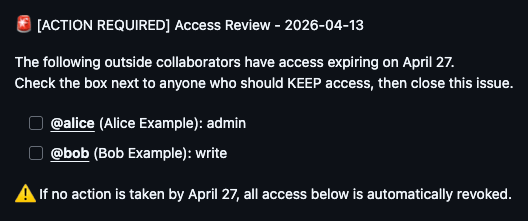
The interaction model is two actions: check the boxes for who stays, then close the issue. On the issues.closed webhook event the app reads the checkboxes, retains the checked collaborators, revokes the rest, and posts a receipt comment listing exactly what it kept and what it removed.
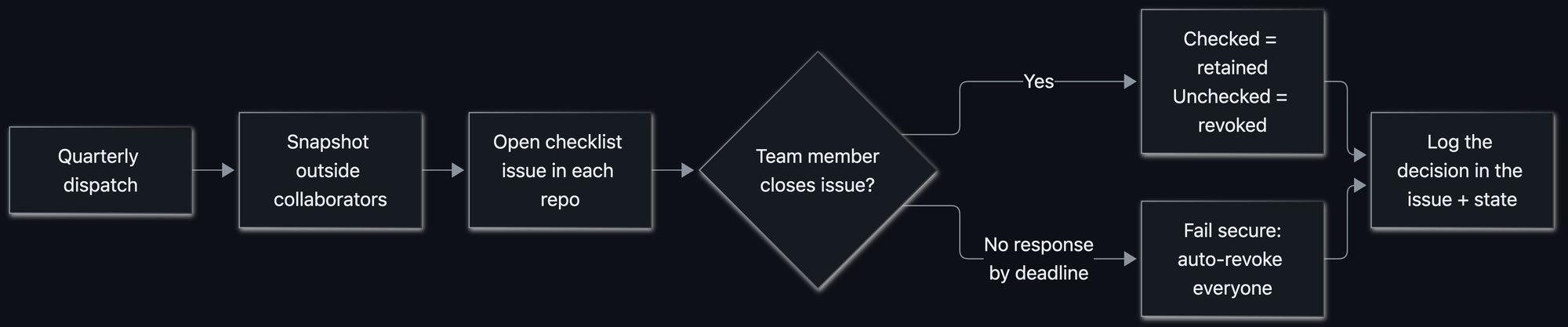
Measured as developer experience, this beats a dashboard by a wide margin: the review lives in the same toolchain as the code, the context switch is zero, and the artefact stays searchable afterwards. Meet people where they work.
Authorization on the write path
Closing an access review issue is a privileged action, so the app guards it. If someone who is not a Hubber closes an issue, Evergreen quietly reopens it and posts a note explaining why. Decisions only count when they come from the people authorized to make them — the permission check sits on the state transition, not merely on the API call.
Routing to the right human without a spreadsheet
The hard part of any periodic review is routing. The team knew the responders had to be Hubbers, but did not always know which Hubber or Hubbers owned a given repository. Evergreen resolves notify targets through a fallback chain:
- If a repository sets an evergreen_repo_owner custom property — a @user or @org/team — use it.
- Otherwise, look at recent issue and commit authors and cc the ones who are on the access review team, in practice the Hubbers actually working in that repository.
The result is that owners get pinged automatically, nobody does "who owns this?" archaeology, and no one maintains a list of "who owns what."
Failure semantics: fail secure and fail closed
When a review deadline passes with no response, the cleanup run revokes every collaborator in the snapshot. The edge case that matters in code is partial failure: what if some removals succeed while others hit a transient API error? Marking the review "done" while a removal is still outstanding would be a quiet inconsistency.
So Evergreen fails closed. If any removal fails, the review stays pending and the issue stays open, and the next run retries the stragglers. It only records "revoked" once every removal actually succeeded. Whatever gets removed is written into the issue, so restoring access is a matter of re-adding the handles it listed.
Common misconceptions about automated hygiene
| Misconception | What the implementation actually does |
|---|---|
| Automated housekeeping is a smoke alarm: loud, ignorable, and always going off while you are cooking something fine. | It comes to you as an issue in your repository, tags the right people, states the ask plus the exact deadline plus precisely what happens if you ignore it, and posts a reminder comment before the deadline so there are no surprise revocations. |
| Logs exist only for debugging. | Logs are a revert button. Writing every change into the issue turned "oops" into "paste these three handles into a Copilot session." |
| You need a purpose-built admin UI, a queue and an audit store. | Issues, webhooks, custom properties and git history did the work of a bespoke UI, a job queue and an audit database. |
| Rate limits are an edge case you handle later. | At organization scale, rate limits are not an edge case: they are the design constraint — content creation is capped at 80 requests/minute and 500/hour. |
| Fail secure means being aggressive with people's access. | Make the safe path the default path, then make responding easy enough that failing secure rarely triggers. |
| One announcement is enough before you flip the switch. | When you are telling a large group the same thing for the seventh time, that is often when many are still hearing it for the first time. |
Rollout playbook: steps that keep the first run boring
Automation that manages access and archives repositories deserves a careful rollout, especially into a large, active organization — here that meant 1,400+ Hubbers and many more customers and partners, with the explicit goal that the very first run be a complete non-event. The ordered steps:
- Ship behind a dry run. Evergreen has a DRY_RUN mode that logs every write it would make without touching a single collaborator or repository. Run it against the real organization and read the logs until you trust the decisions it wants to make.
- Overcommunicate before enabling. Broadcast what is coming, when it lands, and what each person needs to do, so the first issue anyone sees is not a surprise.
- Instrument everything. Structured logfmt logs go to a dedicated Splunk index. That observability is how edge cases surfaced in the wild — empty collaborator lists, unusual permissions, repositories with issues disabled — and how the logic was tightened before they mattered.
- Design around the platform's speed limits. Opening issues and posting comments across every repository in a big organization hits GitHub's secondary rate limits for content creation: 80 requests/minute and 500/hour. Pace the job by construction: process repositories in batches, space out each content-creating call by a couple of seconds, sleep between batches to let the rolling window clear, and count only the repositories that actually create content so a quiet quarter still runs fast.
- Choose proactive avoidance over reactive back-off. Retry storms are a symptom, not a plan.
- Give owners an escape hatch. Org owners can opt out with the evergreen_exempt_from_access_review or evergreen_exempt_from_archive custom properties, so a legitimate exception is a configuration change rather than a workaround.
- Keep manual control of every stage. workflow_dispatch on each workflow means a single step can be run or re-run by hand.
Tooling choice at a glance: native primitives versus a bespoke control plane
| Concern | Native GitHub primitives (what Evergreen uses) | Bespoke control plane |
|---|---|---|
| Scheduling | Scheduled GitHub Actions workflows plus repository_dispatch | External cron, job queue and worker pool |
| State | One JSON file per repository committed under state/repos/repo_id.json | Database schema, migrations, backups |
| Auditability | Git history on the state files, plus issue receipts | Separate audit pipeline to track |
| Interface | Checklist issues and receipt comments, already in the developer's path | Custom admin UI nobody opens |
| Routing | evergreen_repo_owner custom property with a recent-author fallback chain | Ownership service or a maintained spreadsheet |
| Safety valves | DRY_RUN mode, grace period, fail-closed cleanup, exemption properties | Bespoke feature flags and runbooks |
FAQ from an engineering review
Does Evergreen ever delete anything?
No. It never deletes a repository or its contents; archived repositories are recoverable, and every access change is recorded in the repository's tracking issue so it can be undone.
What happens if a reviewer ignores the checklist issue?
The review deadline is enforced. At cleanup time the app revokes every collaborator in the snapshot, after a reminder comment has landed before the deadline. Failing secure is the designed default, not a punishment.
What happens if part of a revocation fails?
The review stays pending and the issue stays open. The next run retries the stragglers, and the status only becomes "revoked" once every removal succeeded.
Who is allowed to close a review issue?
Only authorized Hubbers. If anyone else closes it, the app reopens the issue quietly and posts an explanation, so an unauthorized close never changes access.
How do I keep one repository out of scope?
Through custom properties: evergreen_exempt_from_access_review and evergreen_exempt_from_archive for exemptions, and evergreen_repo_owner to control who gets notified for a repository.
What breaks first when you scale this pattern?
Content-creation rate limits: 80 requests/minute and 500/hour. Batch, space each call by a couple of seconds, sleep between batches, and only count repositories that actually create content.
Where should a small team start?
Start with one recurring access or archival task, then use GitHub Apps, scheduled actions, issues, webhooks and custom properties to automate the problem away. The safe, dull thing should happen on a schedule.
Action checklist you can take into the next sprint
- Inventory which repositories hold outside collaborators and name who is allowed to approve their removal.
- Give every review request a written deadline and a written consequence for missing it.
- Store state as files so history doubles as your audit trail.
- Reduce the reviewer's job to ticking boxes and closing an issue.
- Emit a receipt comment for every automated change, listing what was kept and what was removed.
- Run the first cycle in dry mode against production data before any write is enabled.
- Send structured logs to Splunk or an equivalent index, and hunt edge cases before enablement.
- Treat platform rate limits as a design input, not a post-launch incident.
- Ship exemption properties on day one so owners never need to fork your logic.
Teams rarely fail at hygiene because the work is hard; they fail because it is dull, ownerless and always outranked by the next feature. The fix is not a heroic cleanup sprint — it is making the boring, safe thing happen on a schedule, wrapped in an interface people already use, with an undo button attached to every automated decision. That is the whole trick, and it is assembled from parts the platform already ships.
That is why the Evergreen case earns a place in our SoftwareDevelopment column at ItInsightsWorld: it is a compact, inspectable example of delivery-work engineering — scheduling, state, authorization, failure semantics and rollout discipline — solved with two workflows and a controller repository instead of a new internal platform. Pick one unowned maintenance task in your own organization, give it a cadence and a deadline, and let the schedule do the nagging.