
CVE-2026-83844 on Windows 11: A Field Guide to Proving Microsoft Paint Is Really Patched
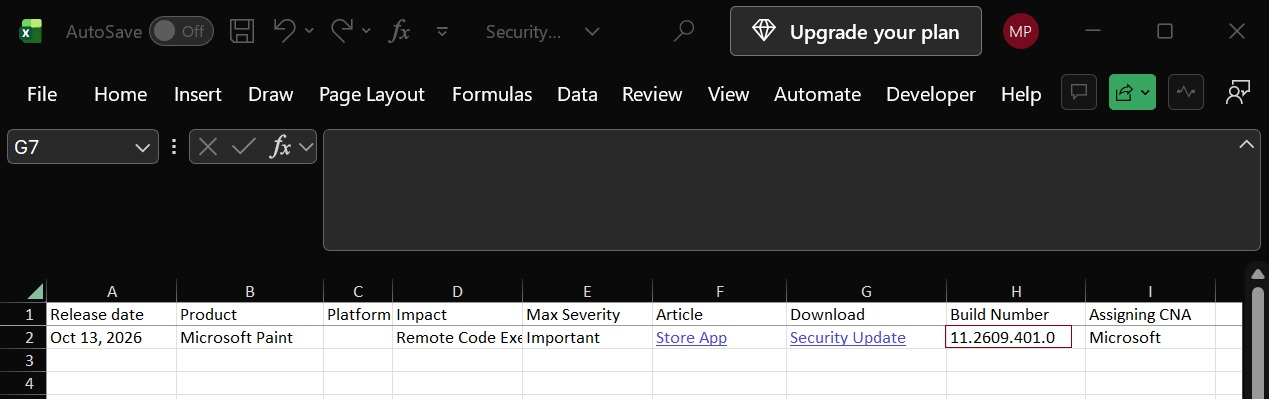
Microsoft Paint on Windows 11 is protected from CVE-2026-83844 only when the installed package reports version 11.2609.401.0 or later, and that build ships through Microsoft Store rather than Windows Update — so a fully patched operating system proves nothing about the app, and the only reliable test is reading the package version in Windows PowerShell.
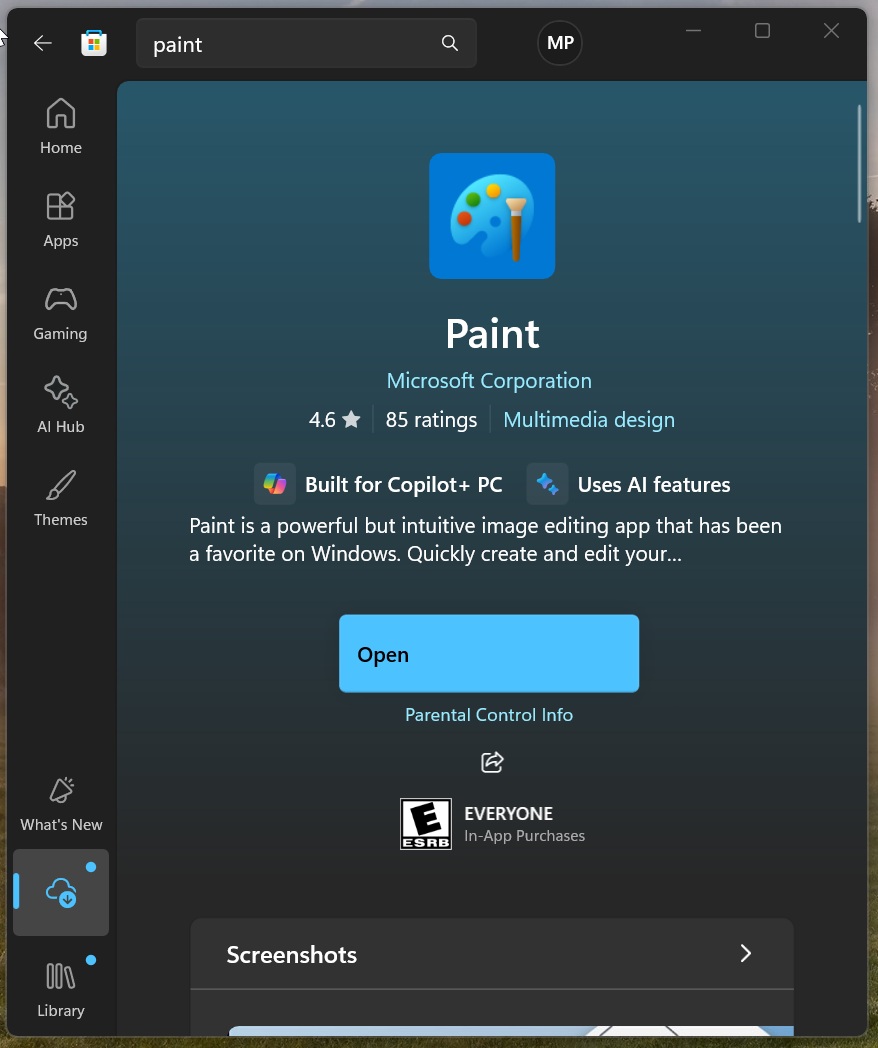
Microsoft published the advisory on October 13, 2026, grading the flaw “Important” at 8.1 on the 10-point scale. Recently, the outlet Windows Latest and several IT administrators reported the awkward part: machines with Store automatic updates switched on were still running Paint 11.2603.251.0, with no security update visible anywhere in the store. For a security operations team, that combination — a high-scoring remote code execution bug plus a delivery channel that quietly fails — is the real story. The sections below cover what the bug is, how to verify one endpoint and a whole fleet, which assumptions to retire, and how to hold risk while the fix stays unreachable.
What kind of flaw is CVE-2026-83844, and why 8.1 instead of Critical?
It is an out-of-bounds read in Windows Paint that an unauthenticated attacker can escalate into code execution across a network: the severity number measures blast radius, while the “Important” label measures how hard the attack is to pull off.
Microsoft's description is that the application reads data beyond the memory region it was allotted. Depending on what that read exposes and how the surrounding code consumes it, an attacker may be able to steer execution and run self-authored code on the affected machine. Because the trigger is a specially constructed network packet sent to an affected service, no malicious document needs to be opened and no user interaction is required — the property that earned the bug the “zero-click” tag in coverage, including Windows Latest's reporting.
The other half of the picture matters just as much for triage. Microsoft stated that practical exploitation carries real difficulty, and as of that reporting no in-the-wild abuse of CVE-2026-83844 had been recorded. The company's own guidance, as relayed by Windows Latest, was that users should confirm patch status without treating the flaw as a reason for panic. Read as an operational instruction, that means schedule the fix, verify it landed, and keep the ticket open — do not launch an emergency maintenance window at the expense of the flaws that are genuinely being exploited.
Why “my Windows is up to date” does not mean Paint is fixed
Because Paint is serviced as a store package, not as part of the operating system build, the two update paths answer to different clocks and different failure modes.
Microsoft's October 2026 Windows security release remediated more than 1,000 issues on its own, and Rapid7's monthly review of the same event counted 1,413 vulnerabilities across Microsoft products, 1,102 of them in Windows. None of that volume reaches Paint. Installing the cumulative OS update does not touch an app whose binaries live in a separate Microsoft Store package and are versioned independently. Even if a fleet is on the newest Windows 11 build, the Paint risk persists until the app itself moves to 11.2609.401.0.
| Dimension | Windows cumulative update (OS) | Microsoft Store package (Paint) |
|---|---|---|
| What it fixes | OS components, and more than 1,000 issues were closed in the October 2026 release | Only the app's own code; CVE-2026-83844 needs 11.2609.401.0 |
| Where you verify it | Settings > Windows Update, or the build number in winver | Windows PowerShell: Get-AppxPackage -Name Microsoft.Paint |
| Who controls delivery | Windows Update, WSUS, Update for Business policies | Microsoft Store catalogue sync; Intune must have the app assigned |
| Typical silent failure | Reboot pending, deferral ring not yet due | Advisory lists a build the store has not offered, as reported by Windows Latest |
| Workaround for blocked delivery | Manual check, peer caching, media refresh | Install the highest available version; obtain MSIX through a managed channel |
How do I check the Paint version on a single machine?
Run one PowerShell command and compare the returned number against 11.2609.401.0; that single value decides whether the endpoint is remediated or still exposed.
- Open Windows PowerShell. No elevation is required to inspect the packages in your own profile.
- Execute
Get-AppxPackage -Name Microsoft.Paint | Select-Object Name, Version. - Read the version. Microsoft's security documentation treats 11.2609.401.0 and anything above it as remediated; lower builds remain vulnerable.
- If the number looks stale, open Microsoft Store, go to Downloads and updates, run Check for updates, then repeat step 2. A store page that shows nothing is not evidence that the system is current.
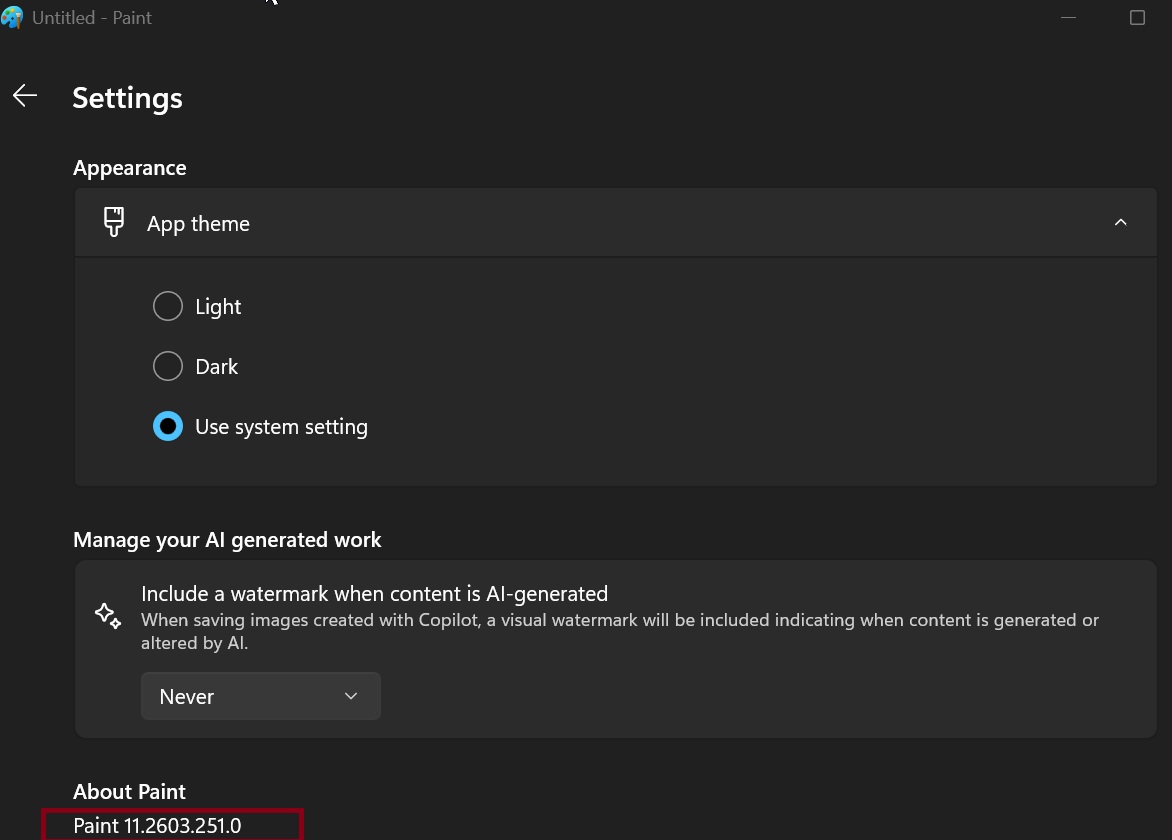
- Cross-check inside the app itself — Windows Latest's editor reached Paint's settings page and found 11.2603.251.0 displayed there, which is exactly the discrepancy admins should be hunting.
- On shared or multi-user workstations, repeat the check per profile, since packaged apps are installed per user; an all-users inventory requires an elevated session and is best reserved for support staff.
- Record the observed version, the check date and the source of the value in your asset notes. “Store shows no updates” is not a defensible remediation record.
How do I prove coverage across a fleet of Windows 11 devices?
Point a single query at every endpoint and export the answers, so the patch state becomes a reportable number instead of a collection of anecdotes.
A practical pattern: pull the host list from your asset inventory, then collect the package version remotely and ship it to CSV, for example Invoke-Command -ComputerName (Get-Content .\hosts.txt) -ScriptBlock { Get-AppxPackage -Name Microsoft.Paint | Select-Object Name, Version } | Export-Csv paint-cve-2026-83844.csv -NoTypeInformation. Anything below 11.2609.401.0 becomes an exception line with an owner and a due date. Where endpoints are managed by Intune, note that Microsoft's own documentation makes Store-served apps keep current only when the app is assigned to the device or user — an unassigned package receives no delivery path at all, which is one more way a fleet can look healthy and remain exposed.
Three additional fleet-level checks are worth building into the same report:
- Hardening baselines that block or sign users out of Microsoft Store. Such settings stop the app patch as effectively as they stop games, so any Store restriction must carry a documented exception for security-critical packages.
- Gold images and provisioned packages. A Paint build baked into an image reappears on every newly deployed machine; refresh the image rather than chasing per-device updates.
- Servicing status of the OS underneath. October 2026 was the last monthly security update for Windows 11 version 24H2 Home and Pro, according to Microsoft's servicing notes, and its release date, October 13, 2026, is the same day MSRC published the Paint advisory. On those devices, the store channel is now the only place certain fixes can arrive, which raises the cost of a stalled app update. Check the Microsoft lifecycle page before assuming an endpoint still has an OS update path.
Which assumptions are hiding unpatched Paint installs?
Most misses in this class of incident come from six habits, not from missing tooling.
- “Automatic updates are on, so I am covered.” Windows Latest's own test, with Store auto-updates enabled, found no available Paint update and a build of 11.2603.251.0.
- “The OS is patched, so the apps are too.” Paint is maintained separately through Microsoft Store; the cumulative update and the app package never share a delivery path.
- “No update shown means nothing to fix.” The absence of an offer can mean the fixed build is not being distributed, or that the version cited in the advisory is wrong. Treat it as an open item.
- “Paint is a toy, so the risk is trivial.” The base score of 8.1 on the 10-point scale exists precisely because a basic app can still become an execution entry point.
- “Removing Paint for the user ends the exposure.” Removing a package from one profile does not re-author the image or the provisioned package; the app can return for other users. This is analytical guidance rather than vendor instruction, but it is how packaged apps behave.
- “Zero-click means emergency.” Microsoft said exploitation is difficult and no in-the-wild use was reported, so the correct response is verified, scheduled remediation with a documented exception — not the abandonment of higher-priority work.
What should I do while 11.2609.401.0 cannot be installed?
Install the newest Paint build you can obtain, reduce exposure around the affected service, and convert the undeployable patch into a tracked, evidenced risk rather than an invisible one.
None of the following is vendor instruction for CVE-2026-83844; they are standard risk-reduction steps applied to a known, unpatched-but-not-exploited flaw.
- Apply the highest Paint version Microsoft Store will offer today. Partial progress still narrows the delta to 11.2609.401.0.
- Track the channel, not the rumour: re-check MSRC's Security Update Guide entry and the store listing on a fixed cadence. It remains unresolved whether Microsoft withdrew the fixed build or mislabelled the target version in the advisory.
- Confirm exploitation status from authoritative sources before changing priority — MSRC severity and wording, plus whether the CVE appears in CISA's Known Exploited Vulnerabilities catalogue.
- Cut inbound noise at the perimeter and on host firewalls. The trigger is a crafted network packet reaching an affected service, so default-deny inbound rules for workstations shrink the surface that any such path depends on.
- Add detection logic around the app: alert when Paint spawns command interpreters, scripting engines, or makes outbound connections it has no business making.
- Restrict or reassign Paint on high-value endpoints — build servers, jump hosts, kiosk and engineering workstations — until the version baseline is proven.
- Write the exception down: affected hosts, current builds, compensating controls, owner and review date. Auditors ask for that artefact more often than they ask for the patch itself.
How do I prioritise this against the rest of the queue?
Score it on delivery confidence as much as on severity: an 8.1 “Important” bug with no observed exploitation and a broken patch channel belongs in this sprint, but not ahead of actively targeted flaws from the same October 2026 release.
Windows Latest's coverage of the same Patch Tuesday cycle and BleepingComputer's roundup both noted that October 2026 brought zero-day activity, including flaws already exploited — those deserve the emergency window. CVE-2026-83844 sits differently: high impact, difficult exploitation, no reported abuse in the wild, and the practical problem is not “can we fix it” but “can we get the fix”.
FAQ: Microsoft Paint, the store channel and CVE-2026-83844
Is my Windows 11 PC vulnerable right now?
Check the package version. Paint 11.2609.401.0 or newer is patched per Microsoft's security documentation; 11.2603.251.0 and other older builds are not. Nothing else — no Store banner, no OS build number — answers this question.
Does Windows Update eventually deliver the Paint fix anyway?
No. Paint is serviced independently through Microsoft Store, so the OS cumulative update and the app patch follow separate paths, and the October 2026 fixes for more than 1,000 OS issues do not include the app.
Why can't I see the update even though auto-updates are enabled?
That is the unresolved part of this incident. Administrators reported the same symptom as the Windows Latest editor: no security update offered, and third-party tooling used to pull MSIX packages failed to locate the fixed build. Either the distribution of the patched package is faulty or the version cited in the advisory is wrong.
Should I uninstall Paint to be safe?
Only where a business case exists. A per-profile removal does not necessarily persist across users or reimaged devices, and it trades a managed patch for an unsupported workaround; containment steps above are usually the better fit.
Can home users do anything more than wait?
Yes: verify the version, install the highest build offered, keep the device's inbound exposure minimal, and re-check the store on a schedule rather than assuming the issue self-resolves.
Two-week action plan
- Day 1-2: script the
Get-AppxPackage -Name Microsoft.Paintcheck and export fleet versions to a report. - Day 3-4: build the exception list for every device below 11.2609.401.0, with owner and due date.
- Day 5-7: review Store-blocking and Intune-assignment policies that could suppress app security patches.
- Week 2: add hunting rules for Paint child processes and outbound connections; document compensating controls.
- Ongoing: re-verify MSRC and Microsoft Store status on a fixed cadence until the delivery gap is explained.
Reference sources
- Microsoft Security Update Guide entry for CVE-2026-83844: https://msrc.microsoft.com/update-guide/vulnerability/CVE-2026-83844
- CVE Program record for CVE-2026-83844: https://www.cve.org/CVERecord?id=CVE-2026-83844
- Rapid7, Patch Tuesday review for October 2026: https://www.rapid7.com/blog/post/em-patch-tuesday-october-2026/
- BleepingComputer, October 2026 Patch Tuesday roundup: https://www.bleepingcomputer.com/news/microsoft/microsoft-october-2026-patch-tuesday-fixes-1-411-flaws-3-zero-days/
- Microsoft servicing note on Windows 11 version 24H2 and the October 2026 update: https://support.microsoft.com/en-us/servicing/os/windows-11/2026/10/kb5127648-windows-11-24h2-25h2-26h2-security-update
- Microsoft Windows 11 lifecycle page: https://learn.microsoft.com/en-us/lifecycle/products/windows-11-home-and-pro
- Microsoft Intune documentation on Store app deployment and updates: https://learn.microsoft.com/en-us/intune/app-management/deployment/add-microsoft-store
- Neowin coverage of the Paint remote code execution flaw: https://www.neowin.net/news/microsoft-paint-cve-2026-83844-lets-hackers-hack-windows-11-pcs-over-internet/
Written by James Hartley for the ItInsightsWorld Security desk. Corrections, patch-status data from managed fleets and requests for the fleet-audit script notes are welcome at contact@itinsights.com, or via IT Insights at https://itinsightsworld.com.