
Verify, Contain, Isolate: A Security Ops Checklist for Synology SA-26:13 and the DSM Machines Still Waiting on the Patch
By James Hartley · IT Insights Security desk
The Line That Normally Saves You Is Blank
Every triage workflow leans on one field of a vendor advisory: the workaround you can switch on while the change board debates a maintenance window. Synology published Synology-SA-26:13 on September 18 and left that field empty — its Mitigation entry reads None. One word, and the familiar sequence collapses. There is no feature to disable, no boundary filtering rule to insert, no holding measure that keeps a device alive until the upgrade is approved. Two of the 8 vulnerabilities closed by that update carry a CVSS 3.1 base score of 9.8 — CVE-2026-13684 and CVE-2026-13639 — and the remedy on offer is the update itself, nothing else.
Six weeks on, the operational picture is more instructive than the score. As of October 29, more than a month after disclosure, the fixed builds exist; what varies from box to box is whether the machine can take one, whether anyone actually looked, and whether a usable restore point would still exist if the look came too late. What follows is written for that reality: confirm the build, shrink the reachable surface, then prove that the backup is separate in fact and not in intention.
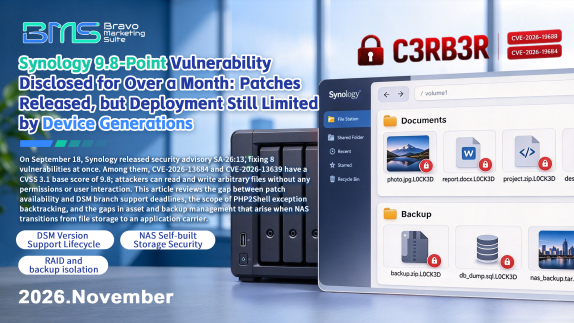
(Advisory mapping for the two 9.8-rated DSM flaws and the patch branches that carry them.)
Step 1 — Establish the Real Build, Not the Dashboard Impression
“Is the NAS patched?” is the wrong question for an audit log. The correct one is narrower: which build number sits on which serial number, and who recorded it on what date. Run the verification as a repeatable procedure rather than a memory test.
- Sign in to DSM and open Control Panel → Update & Restore → DSM Update. Read the full version string; the status icon is not evidence.
- For headless or remotely managed units, open an SSH session and inspect
/etc.defaults/VERSION(the productversion, buildnumber and smallfixnumber fields) so the reading is machine-verifiable and can be pasted into a register. - Compare the result against the four fixed builds named in the advisory, not against a branch label such as “DSM 7.3”.
- If no update is offered, do not wait passively. Synology’s Knowledge Center documents a manual route — download the DSM package from the Download Center and use Manual DSM Update — and its update-settings page explicitly recommends configuring the NAS to install important updates automatically. Automatic installation is a setting and its availability differs across model generations and DSM releases, so confirm the switch per device instead of assuming you inherited it.
- Enter the outcome, the date, the owner and the next recheck in the asset register. A patch programme without a verification record is a rumour.
| DSM branch | Fixed build per SA-26:13 | Support status as of October 2026 | Ops consequence |
|---|---|---|---|
| DSM 7.4 | 7.4-90075 | Inside the regular security update window | Patch, then enable automatic important updates |
| DSM 7.3 | 7.3.2-86009-4 | Inside the regular security update window | Patch; plan the migration to 7.4 before this window closes |
| DSM 7.2 | 7.2.2-72806-9 / 7.2.1-69057-12 | Maintenance phase ended December 2025 | Install the build, then treat the device as frozen: no further fixes are promised |
| DSM 7.1 / 7.0 | Outside the advisory’s fixed-version list | Extended support ended June 2025 | Compensating controls plus replacement or isolation from any reachable interface |
| DSM 6.2 | Outside the advisory’s fixed-version list | Extended support ended September 2024 | Assume permanent exposure; remove from production paths |
Step 2 — Read SA-26:13 as Eight Items, Not Two
Media coverage narrowed this advisory to its two 9.8-rated entries, which is a distortion of the workload. The CVE list published with the advisory runs beyond them — CVE-2026-13635 appears alongside CVE-2026-13684 and CVE-2026-13639 in Synology’s own security listing — and the update itself closes 8 items in a single build. For an administrator this cuts both ways: the upgrade is the efficient path because one reboot resolves eight findings, but it also means a register entry that says only “patched for the 9.8 flaw” hides the other six. Record the build number and you cover all of them at once.
Why 9.8 Translates Into “No Preconditions”
The advisory is unusually precise about classification. CVE-2026-13684 sits in the SCGI component of DSM and is catalogued as improper output encoding and escaping (CWE-116). CVE-2026-13639 sits in the login logic and is catalogued as insufficient entropy (CWE-331). Both are described with identical impact: a remote attacker can read and write arbitrary files and cause denial of service.
Both share one vector: CVSS:3.1/AV:N/AC:L/PR:N/UI:N/S:U/C:H/I:H/A:H. Under CVSS 3.1 rules, attack vector, attack complexity, privileges required and user interaction are already at their worst values; the distance from 9.8 to the maximum 10.0 is scope alone. If impact could cross a security boundary, the same metric set would score 10.0. Plan on the assumption that anything DSM itself can touch is writable.
Two consequences matter for a Security operations backlog:
- PR:N — no prior identity is needed, so the weakness does not live in password strength, account lockout or admin credential hygiene.
- UI:N — nobody has to open a file or click a link, so awareness training provides no protection on this path at all.
Step 3 — Shrink the Reachable Surface While the Window Is Being Approved
Exposure reduction is not a substitute here, because Mitigation is None. It is still worth an hour, since it removes the opportunistic noise around a device whose real flaw remains open until the build is applied.
- Take the DSM management interface off any port-forwarded public address. Serve remote administration through VPN or a zero-trust access layer, and nothing else.
- Turn on Auto Block, which stops an IP address at the IP layer once a configurable number of failed sign-in attempts is reached.
- Enforce two-factor authentication for administrative accounts, and review DSM’s adaptive MFA policy so exemptions are deliberate rather than inherited.
- Disable Telnet and SSH by default; re-enable them only for a named maintenance session, then close them again.
- Schedule Synology Security Advisor weekly and treat its findings as a checklist, not as a dashboard.
- Retire any web-facing package installed on the storage device that has no owner in the application inventory; a NAS hosting a public site is a web server wearing a storage badge.
- Keep a distinct administrative account for platform work; never run daily file duties from it.
The Lifecycle Gap Is the Real Register Entry
The constraint is not whether a fix exists but how long a branch will keep receiving them. Under Synology’s software lifecycle policy, maintenance for DSM 7.2 ended in December 2025, extended support for 7.1 ended in June 2025, and extended support for 6.2 ended September 2024. As of October 2026, only 7.3 and 7.4 sit inside the regular security update window.
Rack-mounted NAS units are typically depreciated over five years, while eight to ten years of service is normal, because the consumable part is the drive: swap one disk and the box keeps working, so full replacement is rarely justified. A single major DSM release, by contrast, is supported for three to five years. Hardware still in production with software past its support window is the gap that procurement never models, and it is the reason a fixed version and a support status can point in opposite directions on the same device.
For branches such as 7.1 or 7.2 the practical reading is uncomfortable but simple: the device can install the patch, and nothing after that patch is promised. Record two dates against every storage device — hardware warranty end and DSM branch support end — and treat the earlier of the two as the refresh trigger.
PHP2Shell: What a Backport Tells the Planning Team
One out-of-cycle patch is the best available measure of how large an unpatched population really is. On October 22, Synology published a public statement covering two high-severity PHP vulnerabilities, CVE-2026-109618 and CVE-2026-109619. After investigation by its Product Security Incident Response Team, the company confined PHP2Shell impact to systems running certain PHP dependent packages and named them: Calendar, IDrive, Joomla, KodExplorer, MailStation, MediaWiki, phpMyAdmin, vtigerCRM, Web Station and WordPress.
On the day the statement appeared, the PHP security update covered DSM 7.4 and 7.3. It was revised twice: October 28 added DSM 7.0 and 7.1, and October 29 added DSM 6.2 — all three already declared end-of-life by Synology. Backporting to an unmaintained branch is exceptional, and the fact that it was necessary shows the population still running those versions has reached a scale that cannot be ignored. The exception is also selective: one component’s patch can be pushed backwards, but the advisory makes no comparable commitment that the fixes for all 8 vulnerabilities in SA-26:13 will reach every branch.
The statement draws one more distinction that changes day-to-day checks. PHP built into DSM serves internal systems and, by design, exposes no externally accessible module, so its risk is assessed as minimal and fixes are scheduled only for later DSM releases. That makes “the device is on the latest version” and “PHP has been patched” two independent states, each needing its own confirmation.
There is now an external prioritisation signal to work from. CISA added both PHP flaws to its Known Exploited Vulnerabilities catalog on October 26, 2026, with a remediation due date of October 29, 2026 for US federal civilian agencies — a short fuse that is a useful ordering rule for anyone running NAS-hosted PHP packages: work the KEV-listed items first, then the internal queue.
The PHP Nobody Inventoried
On October 21, 2026, the PHP project fixed two unauthenticated remote code execution vulnerabilities rated 9.2 under CVSS v4.0. W3Techs data from the same day put PHP at 69.3% of websites that use a known server-side programming language, with 34.8% of those running branches the project no longer updates (PHP 7 at 27.0%, PHP 5 at 7.7%). PHP instances living on storage devices are part of that 34.8%, and they usually fall outside both website asset inventories and application security testing scopes.
Update channels do not help. Packages arrive through Package Center while the runtime ships with system updates, and the two differ in release cadence and in when changes take effect. In the PHP2Shell statement Synology notes that dependent packages restart automatically once the PHP update completes, whereas MailStation has to be updated by hand — so even an administrator who ran the update still has to walk the dependent components one by one.
Common Misconceptions That Cost Recovery Budget
- “RAID protects the data.” RAID guards against disk failure. It does nothing about encryption, accidental deletion or operator error, and ransomware encryption looks like ordinary writes at the file-system level, so the array faithfully replicates the damage across every member disk.
- “We keep a backup on the NAS.” A copy inside the same chassis fails the isolation test on both physical and permission grounds. The single most common pattern in small and mid-sized organisations is one device acting as production storage and backup at once.
- “The patch came out in September, so we are covered.” Availability is not installation. Confirm the build, and confirm whether the device was even offered one.
- “A firewall rule or configuration change buys us time.” With Mitigation recorded as None, nothing at the configuration layer closes this path.
- “Our phishing training covers this.” UI:N means no user action is required, so behavioural controls do not participate in the attack chain.
- “We can decrypt later.” Once files are encrypted, technical recovery is not realistic; restoration depends on a copy held somewhere the attacker could not reach.
- “Latest DSM equals fully patched stack.” Package-level state, such as PHP, is a separate line item.
Backup Independence: Turn a Noun Into a Test
Sophos’s “State of Ransomware 2026” supplies the cost side of the argument. The report is the seventh edition in the series, based on a survey run from January to March 2026 among 2,158 IT and security leaders in 17 countries, at organisations of 100 to 5,000 employees. Its headline figures: 56% of attacks succeeded in encrypting data, average recovery cost came to US$1.7 million, and the median ransom payment was US$769,000.
The bridge between those numbers and a self-built storage box is backup homogeneity. When production data and its backup live on the same device, the encryption process makes no distinction between them. A backup is only as good as its isolation from production, physically and in permission terms. Turn that claim into tests you can run:
- Does the backup target require credentials that are separate from the source device’s admin account? If one compromise deletes both, they are one asset.
- Is at least one copy immutable — a snapshot or replication target whose retention window cannot be shortened, altered or deleted, even by a compromised administrator? Synology’s own backup-resilience guidance published on July 7, 2026 frames immutability as the property that decides whether restore points survive an incident.
- Is at least one copy offline or object-locked, as CISA’s #StopRansomware Guide requires alongside its instruction to maintain encrypted backups of critical data?
- Has a restore been rehearsed this quarter, with the elapsed time and the responsible signer recorded? Testing availability and integrity is part of the same CISA guidance, not an optional extra.
- Can the device under attack see the backup at all — over NFS or SMB mount, over a replication role, or through a shared Synology account?
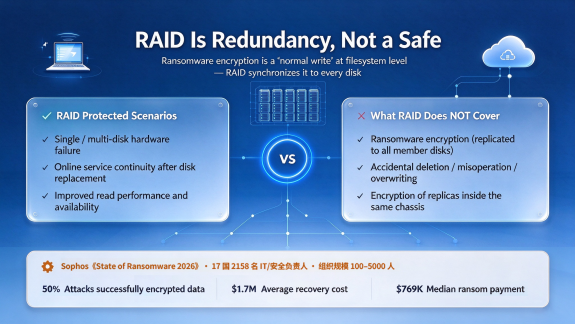
(RAID covers hardware failure only; backup value is set by isolation from the production path.)
Evidence First: Fix Logging Before the Upgrade Reboots the Box
Post-incident investigation is the most immediate weakness on this class of device. Audit logging is usually switched off, or logs are kept locally for only a few days. Both 9.8-rated flaws permit writes to arbitrary files, and at the file-system level such writes leave no anomalous signature. Incident handling has a fixed order — establish whether a compromise occurred, decide whether a reporting obligation is triggered, then clean up and restore — and once the records have been overwritten the first step cannot be completed at all.
- Forward authentication events and file-access logs to a collector outside the NAS before you schedule the upgrade; DSM restarts during patching, and locally held buffers go with it.
- Snapshot a baseline on the day you patch: installed package list and versions, local users and groups, scheduled tasks, listening ports, and shares with their permission sets.
- Diff that baseline after the update. A package that disappears from the register is a finding; so is a scheduled task nobody created.
- Keep the pre-patch and post-patch records for the retention period your reporting obligation assumes, not for convenience.
From File Shares to an Asset Register
Even when everything above is handled — device on a supported branch, no web applications hosted, backups independently deployed — the management model a NAS provides stays limited to directories and permissions. It controls who may enter a folder and read or write inside it. That model can answer whether a file can be opened; it cannot answer whether the asset is correct, current or cleared for use.
Take a single published key visual. The real questions are how many revisions stood behind it and who approved each one, which territories and what licence term cover the asset, where the same file appears across multilingual sites, storefronts and printed collateral, how far one change propagates, and which external partners may pull it at which downloadable specification. Those are attributes and states of an asset, not coordinates in a volume. A directory tree supports manual retrieval; it carries no rules.
One test settles it. At your last brand refresh, how long did it take to replace the asset on every channel and every piece of collateral, and who signed off completion? If assembling that answer needs several people, you are still at file management, and your security inventory is being reconstructed by interview every time an advisory lands. Where a commercial digital asset management platform is already in use, this is the seam where the security asset register and the marketing asset register should meet, so that a single query returns hosting role, owner, support status and licence state together.
FAQ
Our NAS never showed an update notification. Does that mean we are safe?
No, and it does not mean you are exposed either — it means you do not know. Verify the installed build against the fixed builds named in the advisory, and if nothing is offered use the manual update path from the Synology Download Center. Delivery of DSM updates is a policy setting and its availability varies by model generation, so a silent console is a check item, not a verdict.
Can we block external access to DSM and defer the patch to the next window?
Removing public reachability is worth doing immediately, but it is not a mitigation, because the advisory lists none. If the device also hosts a PHP-backed package that must stay reachable, one exposed path can still outrank the closed management port. Defer the window only when both conditions hold: no reachable service on the box, and the branch is still inside a support phase.
The box sits on DSM 7.1 and the patch installs fine. Where is the problem?
In what comes after. Extended support for 7.1 ended in June 2025, so installing the SA-26:13 build buys a fixed state and no future fixes. Treat these devices as frozen: no new packages, no public reachability, and a dated replacement or migration plan.
Is a device reached only through QuickConnect still at risk?
Yes. Absence of port forwarding reduces who can find the service, not whether the weakness is reachable; CVE-2026-13639 sits in the sign-in logic itself, which is exactly the path remote access exercises. Patch, enforce 2FA, and enable Auto Block.
Files on a device are encrypted and the extension has changed. What is the first move?
Isolate without re-imaging, preserve volatile state and logs, and go to your independent restore point — not to a decryption tool. Encrypted data is generally not recoverable by technical means without a key you do not hold; the practical question is whether an isolated copy exists that the attacker could not reach. Then decide the reporting obligation before cleanup begins.
Does the classic 3-2-1 rule answer the isolation question?
Only if you can name the credential domain and the immutability property of each copy. Two copies on two devices that share one admin account, one directory service and one chassis are a single failure domain wearing three numbers.
Action Plan
First 48 hours
- Enumerate every NAS, its model, serial, installed build and branch, and whether any interface is reachable from outside.
- Patch every device on 7.3 and 7.4 to 7.4-90075 or 7.3.2-86009-4, then verify the build number rather than the notification.
- Enable automatic installation of important updates on every device that supports it, and record where it is unavailable.
- Remove port forwarding for DSM management, enable Auto Block, enforce 2FA on admin accounts.
- List installed packages against the ten PHP2Shell-affected names and mark each as required, migratable or redundant.
Two weeks
- Move one backup copy to an immutable or offline location and rehearse a single file restore, timed and signed.
- Forward authentication and file-access logs off the device, and store the pre-patch baseline as evidence.
- Add a support-end date for the DSM branch next to the hardware warranty date in the asset register.
- Write an exception register for frozen devices: business owner, residual risk accepted, review date.
One quarter
- Retire storage devices whose branch support ended — December 2025 for 7.2, June 2025 for 7.1, September 2024 for 6.2.
- Move hosted web applications off storage hardware onto properly maintained server or managed hosting paths.
- Turn advisory response into a runbook: verify, patch, expose, prove the restore — with named owners and a quarterly drill.
Sources Checked
- Synology security advisory Synology-SA-26:13 and the Synology Product Security Advisory index (synology.com) — advisory identifiers, fixed builds, PHP2Shell statement and its October 28 and October 29 revisions.
- Synology Knowledge Center, DSM Update and sign-in protection documentation (kb.synology.com, synology.com) — automatic installation of important updates, manual DSM update path, Auto Block and 2FA/MFA enforcement.
- CISA alert “CISA Adds Two Known Exploited Vulnerabilities to Catalog”, October 26, 2026, and the #StopRansomware Guide (cisa.gov) — KEV addition for CVE-2026-109618 and CVE-2026-109619 with the October 29, 2026 federal due date, and offline/encrypted backup plus restore-testing guidance.
- Sophos, “State of Ransomware 2026” — survey parameters and cost figures quoted above.
- W3Techs server-side programming language usage data, October 21, 2026 — PHP adoption and unsupported-branch share.
The patch did not create a two-tier fleet; it revealed the tier that was already there, running hardware long past the support horizon that was priced at purchase. Upgrades are the only fix these two flaws have, isolation is the only recovery they leave you, and a register with verified build numbers is the only place both can be demonstrated to a board, an insurer or an auditor. For a second opinion on a fleet inventory, a support-branch audit or a backup isolation review, write to the IT Insights Security desk at contact@itinsights.com.