
ItInsightsWorld Security Brief: Prefetch Files and Privacy — What Microsoft Incident Response Says About Windows Startup Records
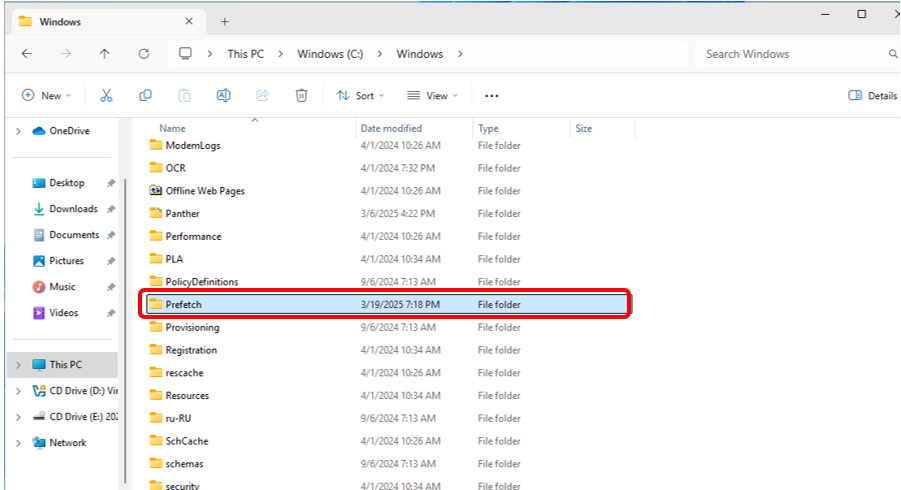
On Windows machines, a folder path known as C:WindowsPrefetch stores small files whose records are tied to application startup. The files carry a PF suffix. They note the files and directories an application accessed when it was launched, allowing Windows to read the same needed content more quickly when the application starts again. The Microsoft Incident Response team explains in the referenced document that this collection of access information normally occurs within 10 seconds after application startup.
That simple performance purpose is why many users never interact with the folder. For a security audience, however, the subject is worth reviewing because the same records can reveal which applications were launched, how recently they were launched, how many times they ran, and what paths they touched. In other words, a speed optimization can become a local privacy consideration and, in the right circumstances, a source used during incident response.
Why the Microsoft Security Team Discussed a Performance File
The Microsoft Incident Response team sits within the security domain, which can make a note about startup records look unusual at first glance. The reason is straightforward: Prefetch files are system records that may affect privacy. The source also notes that incident investigation and forensic response may need to extract Prefetch files. This is why the Microsoft Security team’s guidance is not only about disk maintenance; it is also about how an operating system stores traces of program activity.
What Prefetch Files Do Not Do
The original explanation is careful to correct several possible misunderstandings.
- Prefetch files are not copies of applications.
- They do not cause a full application to be loaded into memory.
- They are read when the corresponding application starts, so the cache is tied to the app that matches the record.
- If an application has not been launched for a long period, its record does not keep occupying running memory.
What Happens When You Delete Prefetch Files
If you clean the folder, the startup records that already exist are removed. That action does not mean applications stop working. It means the cached information used to speed later launches is gone. When an affected application is run again, Windows needs to collect the accessed files and directories again and rebuild the Prefetch file. That rebuilt file then supports future starts with a new cache.
The source also states that system-generated Prefetch files usually do not occupy a large amount of system space. For that reason, the article’s position is that users do not need to proactively delete them. The practical trade-off is between preserving startup convenience and reducing traces on the local machine.
Keep or Delete: A Security Desk Decision Table
| Consideration | Keep Prefetch Records | Delete Prefetch Records |
|---|---|---|
| Startup experience | Existing access records remain available for faster future reading. | Next launch needs the system to recollect access information and rebuild a new record. |
| System space | The files usually do not take much space. | Space savings are not the core reason identified by the source. |
| Privacy footprint | Records remain available, including app run counts, recent run times, and accessed paths. | Already-created records are removed, which can be useful for users who want fewer local traces. |
| Investigability | Potentially usable during incident response or forensic work. | Existing Prefetch data is deleted; later launches may create new records. |
| General recommendation | Suitable for most users, who do not need to delete them. | Can be a privacy choice for users who prioritize reducing activity traces. |
Operational Checklist for ItInsightsWorld Readers
- Identify your priority: if your goal is normal application startup behavior, do not treat the folder as a required cleanup target.
- If your goal is privacy, review what the records may contain: run counts, recent run times, and accessed paths.
- Understand the effect of deletion: the records are removed, and later application starts may rebuild them.
- Use the documented cleanup path: open C:WindowsPrefetch, select all files, delete them.
Common Misconceptions
- "Prefetch files are backups of installed software." The source says they are not application copies.
- "Deleting Prefetch will make programs unusable." The source says applications can run again; Windows only needs to rebuild the cache.
- "Every Windows user should delete them for maintenance." The source says users do not need to proactively delete them, because the files usually do not consume much space.
Frequently Asked Questions
Are Prefetch files a form of application cloning?
No. The article explicitly distinguishes Prefetch records from application copies and says they are not loaded as the whole application into memory.
When is the access information collected?
The Microsoft Incident Response team states that the mechanism usually collects access information within 10 seconds after an application starts.
Does deleting Prefetch files remove application launch information?
Yes, for the existing records. The deleted Prefetch data can no longer provide its cached startup information until an application is launched again and a new record is rebuilt.
Why do security readers care about this topic?
Because Prefetch records may be relevant to privacy and incident investigation. The source notes that forensic response may extract these files.
Should I delete the files every day?
No. The source recommends deletion only as a possible choice for privacy-focused users; it does not present routine deletion as a normal requirement. Since the files usually do not take much space, most users can leave them untouched.
Action Recommendation
The main recommendation from the original guidance can be summarized for the ItInsightsWorld Security audience in two lines: keep Prefetch if you value the built-in startup cache; clean it if you value a lower local activity footprint. For most users, the first option is sufficient. For users who want to reduce stored traces, the second option is feasible, but it is not a one-time way to erase all future evidence, because new launches can rebuild the records. The folder contains a useful performance mechanism, and any cleanup should be understood as a privacy-driven choice rather than a general maintenance step.