
ItInsightsWorld Security Guide: Anthropic Claude Feedback Retention for Claude for Work, Anthropic API, and Claude Gov
Security teams often discover that the most consequential privacy decisions sit behind simple user interface actions. This ItInsightsWorld Security briefing analyzes how Anthropic handles feedback from Claude for Work, the Anthropic API, and Claude Gov, including what is retained for up to 5 years, when chats and coding sessions may become part of model training, and how owners of a Team or Enterprise plan can constrain member feedback. It also distinguishes commercial scope from consumer scope for Claude Free, Pro, Max, and Claude Code accounts, and points to the Trust Center and Commercial Terms as the authoritative contact and policy references.
It is written for IT administrators, security operators, developers, and technical leads who need a checklist-oriented reading rather than a product announcement. The source-level facts are summarized in three practical questions: what data exists, how long it exists, and who can turn collection off.
Scope map: commercial and consumer references
| Scope | Products or account types named | What the guide covers |
|---|---|---|
| Commercial | Claude for Work, the Anthropic API, Claude Gov | Feedback submission, retention, de-linking, organization controls, and the default stance toward model training. |
| Consumer | Claude Free, Pro, Max, and accounts on those plans that use Claude Code | Identified as a separate audience; readers should consult the consumer-specific guidance referenced by Anthropic. |
| Policy reference | Trust Center, Commercial Terms | Further detail for commercial offering use and privacy-related contact paths. |
The commercial focus matters because the article’s central retention and control statements are attached to Claude for Work, the Anthropic API, and Claude Gov rather than to consumer plans. The consumer sentence is not analyzed here beyond scope identification, because no consumer retention detail is provided in the source text.
Default training posture for commercial inputs and outputs
In the commercial offerings discussed, inputs and outputs are not used to train Anthropic models by default. This is a governance baseline: if an organization only uses normal chats, coding sessions, or API work without sending a deliberate feedback signal or otherwise allowing data use, model training is not the stated default outcome.
The default changes when a user actively contributes feedback or a bug report. The example given is the thumbs up or thumbs down control. If a user chooses that action, or otherwise allows Anthropic to use their data, the related chats and coding sessions may be used for model training.
What a feedback signal stores
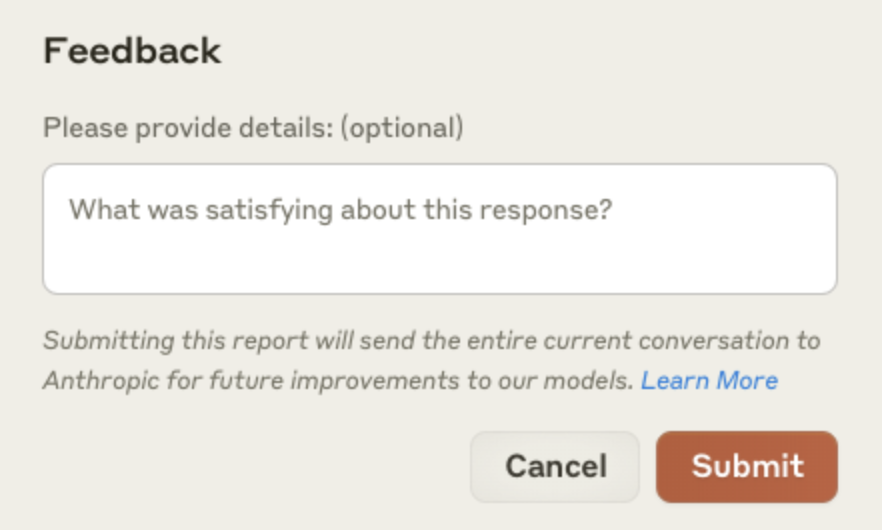
The retention trigger is not limited to the rating itself. When feedback is provided through the thumbs up / down button, the complete related conversation is stored in secured back-end storage for up to 5 years. The conversation may include content, custom styles, conversation preferences, or model settings.
- The stored object is the related conversation, not only the selected rating.
- The retention period is expressed as up to 5 years, which should be treated as a maximum window rather than a guaranteed shorter window.
- Possible fields include content, custom styles, conversation preferences, and model settings.
- The storage location is described as a secured back-end, not a local browser artifact.
The example below shows the feedback report interface that appears at claude.ai after the thumbs up/thumbs down button is used.
Connector boundaries and copy-paste risk
Feedback data does not include raw content from connectors such as Google Drive, including remote and local MCP servers. However, the same material may appear in feedback if it has been directly copied into the user’s conversation with Claude. For security teams, that creates a practical boundary: connector access is not the stated trigger; conversation insertion is the stated trigger.
Therefore, a document that remains outside the conversation is treated differently from text that is pasted into the conversation, because the pasted text becomes part of the related conversation that may be stored for up to 5 years when feedback is submitted.
Pre-use de-linking, permitted uses, and non-combination
Before feedback is used by Anthropic, it is de-linked from user and customer IDs. The stated permitted uses include analyzing service effectiveness, conducting research, studying user behavior, and training AI models as allowed under applicable laws. The source also states that feedback is not combined with the user’s other conversations with Claude.
| Processing point | What the source states | Security interpretation |
|---|---|---|
| Identity linkage | Feedback is de-linked from user and customer IDs before use. | Analyst-facing review should distinguish initial storage from later use. |
| Use cases | Service effectiveness analysis, research, user behavior study, and AI model training within applicable laws. | Feedback should be classified as product telemetry plus possible training data, not merely support metadata. |
| Conversation isolation | Feedback is not combined with other conversations. | Exposure assessment can be scoped to the rated conversation and any directly pasted connector content. |
Team and Enterprise feedback disabling
Organizations on a Team or Enterprise plan can prevent members from sending feedback to Anthropic through the thumbs up / down button. The control belongs to a Primary Owner or Owner. It is located in the Rate chats setting under Organization settings > Data and Privacy.
- Role required: Primary Owner or Owner.
- Plan types explicitly named: Team and Enterprise.
- Control name: Rate chats.
- Navigation path: Organization settings > Data and Privacy.
- Effect described: members cannot submit feedback through the thumbs up / down button.
The control affects the feedback button pathway. The source does not state that it disables every possible form of data sharing or other feedback channels, so administrators should treat it as a targeted interface setting rather than a blanket data-sharing switch.

Common misconceptions
- “A thumbs down is only a rating.” The source states that the entire related conversation is stored when feedback is provided, and that conversation may include content, custom styles, conversation preferences, or model settings.
- “Connector data never reaches feedback.” Raw connector content from Google Drive, remote MCP servers, or local MCP servers is not included, but directly copied material inside the Claude conversation may be included.
- “Commercial chats always train models.” The stated default is that inputs and outputs from commercial products such as Claude for Work, the Anthropic API, and Claude Gov are not used to train models.
- “Training use happens the moment feedback is submitted.” Before feedback is used, it is de-linked from user and customer IDs. The use may include service analysis, research, behavior study, or training, subject to applicable laws.
- “Only individual users can manage feedback.” A Primary Owner or Owner on a Team or Enterprise plan can disable member submission through Rate chats.
- “Disabling Rate chats eliminates all data sharing.” The described effect is the thumbs up / down feedback pathway; the source does not extend that setting to every possible feedback route.
FAQ
Does Anthropic use Claude for Work chats to train models by default?
No. The source states that inputs and outputs from commercial products such as Claude for Work, the Anthropic API, and Claude Gov are not used to train models by default.
What user actions can change that default?
Explicitly reporting feedback or bugs, such as through the thumbs up / down feedback button, or otherwise choosing to allow Anthropic to use the data, can make related chats and coding sessions eligible for model training.
How long is feedback-related conversation data stored?
The related conversation is stored in secured back-end storage for up to 5 years when feedback is provided through the thumbs up / down button.
What conversation elements may be included?
Possible elements include content, custom styles, conversation preferences, or model settings.
Is Google Drive connector content included in feedback?
Raw content from connectors such as Google Drive is not included, including remote and local MCP servers, unless the material is directly copied into the conversation with Claude.
Is feedback merged with unrelated conversations?
No. The source states that Anthropic does not combine the feedback with other conversations with Claude.
Can a business prevent members from submitting thumbs up / down feedback?
Yes. A Primary Owner or Owner of a Team or Enterprise plan can disable the thumbs up / down feedback capability by using the Rate chats setting under Organization settings > Data and Privacy.
Action checklist for security and platform teams
- Confirm which users fall under commercial scope: Claude for Work, the Anthropic API, and Claude Gov. Separate consumer accounts, including Claude Free, Pro, Max, and Claude Code use on those plans, should be routed to consumer guidance.
- Record the default training position in an internal risk register: normal commercial use is not stated to feed model training by default.
- Map feedback pathways to data retention: a thumbs up / down submission creates a related-conversation record retained for up to 5 years.
- Review what the related conversation may contain: content, custom styles, conversation preferences, and model settings.
- Define copy-paste controls for connector material from Google Drive, remote MCP servers, and local MCP servers, because directly pasted content may become part of a stored conversation.
- Assign responsibility for the Rate chats setting to a Primary Owner or Owner in Team or Enterprise environments.
- Decide whether member feedback is acceptable under the organization’s data policy, then configure the setting under Organization settings > Data and Privacy.
- Document the policy references: consult the Trust Center and Commercial Terms for commercial offering details and privacy contact guidance.
- Validate the interface assumption by reviewing the claude.ai feedback report example and the Team or Enterprise settings screen in your environment before deployment.
Bottom line
For ItInsightsWorld readers, the important point is not that a feedback button exists, but that it can create a bounded, retained data trail. A single thumbs up / down action may cause the entire related conversation to be kept for up to 5 years, while the default commercial training posture remains non-training unless feedback or permission changes the treatment. Governance becomes manageable when the facts are separated: commercial scope, connector paste boundary, de-linking before use, Team or Enterprise control, and authoritative references in the Trust Center and Commercial Terms.
By James Hartley, IT Insights. This ItInsightsWorld Security briefing is based on the referenced Anthropic feedback data practices; for site follow-up, contact contact@itinsights.com.