
ItInsightsWorld General: A Playful Chrome Tab Experiment Where Overgrowth Captures Forgotten Pages
20/10/2026 — the other day, a word-centered creative exercise used "Overgrowth" as its seed. The first mental image was not an interface idea, but a ruined, plant-eaten world reminiscent of The Walking Dead and The Last of Us.
From that image, attention shifted to a digital equivalent of an abandoned place: the browser tab left unread. The playful question was whether hidden tabs could be reclaimed by creeping growth, requiring the user to cut through foliage before access.
The answer took the form of a small Chrome extension. It does not promise stricter reading habits, and the creator accepts that.
Demo and repository
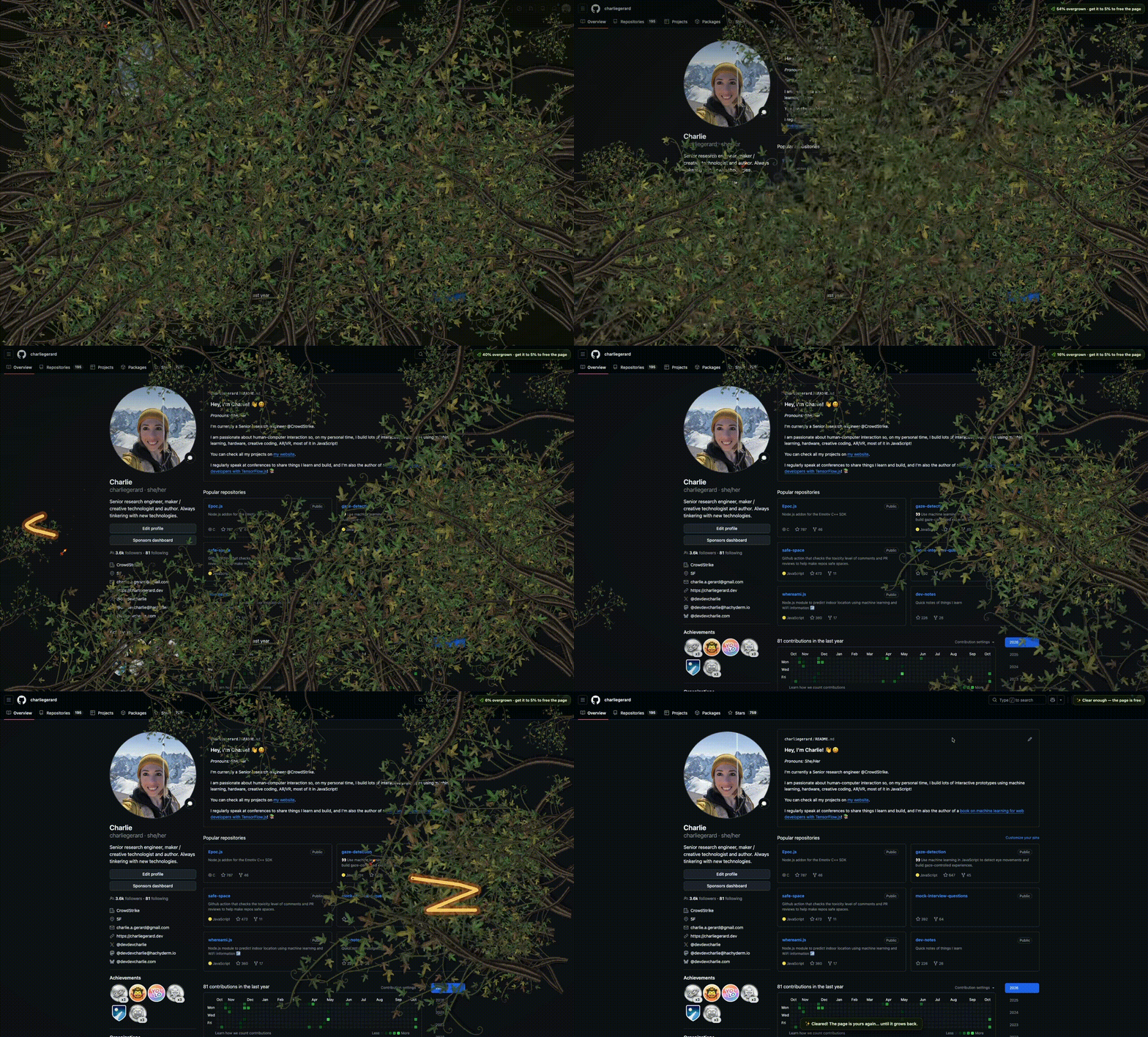
A repository link is shown with the demo.
How the experiment works
- Each tab has a neglect clock. It advances while the tab is hidden and stops when the tab is visible.
- The longer the neglect period, the heavier the plant cover, with vines spreading inward from the outer edges.
- When coverage is above 5%, the page behind the vines is locked: scrolling still works, but clicking, selecting, and dragging are blocked.
- The user frees the tab by dragging the mouse across the vines. Once the cover falls back to 5%, the remaining plant pieces drop away.
- If the tab is left abandoned again, the jungle can begin growing anew.
Options kept playful
The slashing tool can be picked from a rusty machete, a chainsaw, or a flamethrower. The time needed for a tab to reach full overgrowth is adjustable. An early stricter rule, which would have stopped users from closing overgrown tabs until all plants were slashed, was dropped because it felt too annoying. 😅
Code layout in 3 parts
The source is divided into 3 areas: background behavior, the tab overlay script that paints plants and animation, and the popup folder that contains the extension controls.
Background worker
background.js initializes a jungle on every tab that is open and drops that tab's state once the tab closes.
Popup UI
This folder supplies interface pieces: a growth-time control, a weapon picker, a tab list, and the status display.
Overlay content
Inside content, the extension stores SVG plant and weapon assets, places and grows vine groups, tracks the neglect clock, and plays sounds.
Why this project mattered
The experiment also served as a gentle return to building after some time away. Written on a new computer, the creator reports "only" 22 tabs open, while 14 of them are already completely overgrown. The point is not better reading discipline; it is that slashing through vines makes returning to forgotten tabs more fun. 🪚🌿