
Microsoft AI PC Tier Comparison: 8GB, 16GB and 128GB Tradeoffs
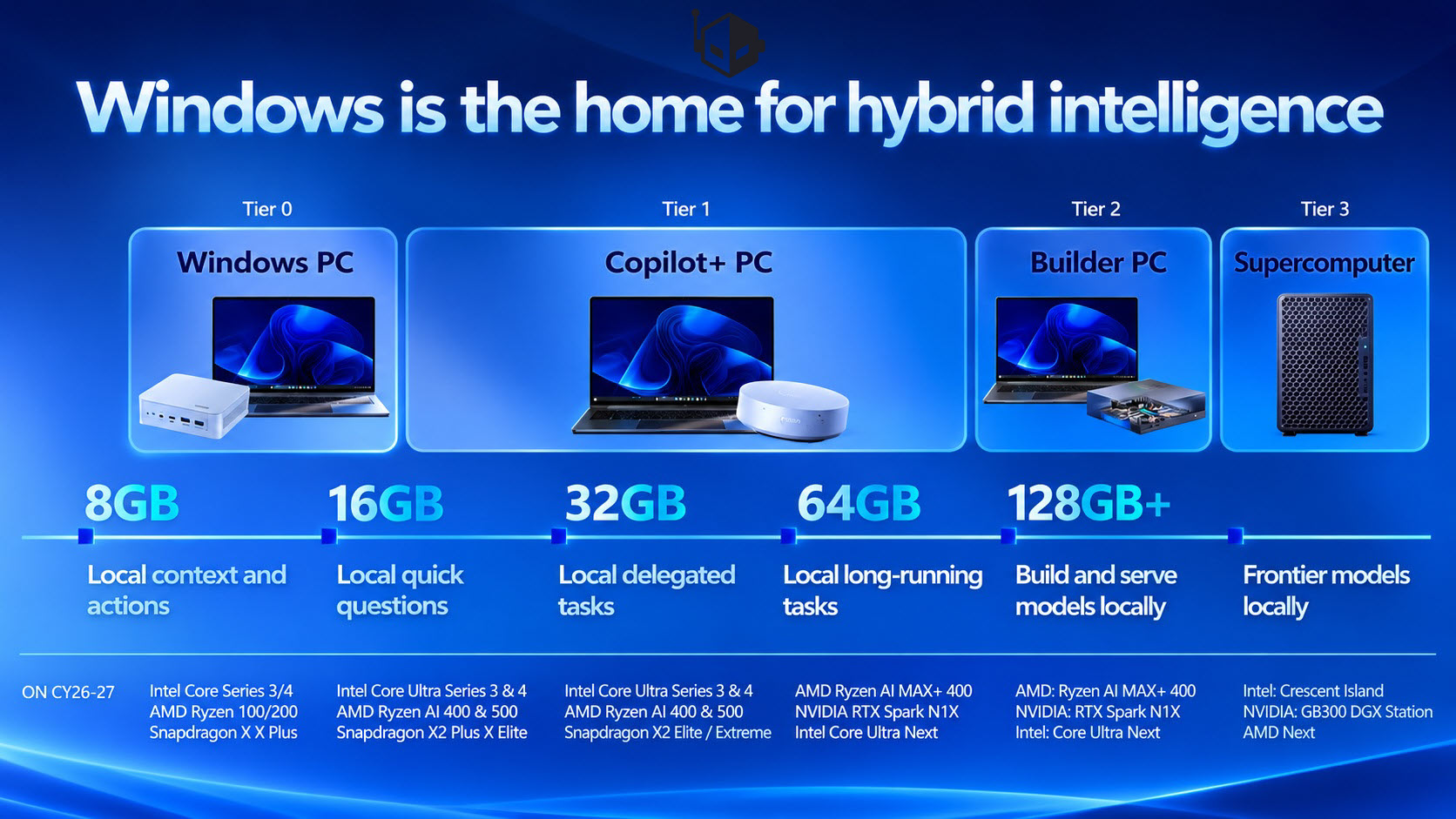
Microsoft’s AI PC plan is easier to use as a shopping filter than as a technology slogan. Its roadmap frames the idea that Windows is the home of hybrid intelligence, then divides machines into practical performance bands instead of treating every notebook with an AI key as an equal. The result is a tiered system that stretches from 8GB to 128GB and above, with different tradeoffs for price, local inference, cloud dependence, privacy and upgrade life. The practical question is not whether a PC is called an AI PC, but which tasks it can keep on the device and which ones will still need a remote model.
The comparison below follows Microsoft’s three broad bands: entry Tier 0, mainstream Tier 1, and high-end builder or supercomputer-class machines. It also adds one external reference point from official hardware documentation: a Copilot+ PC is not just a label. According to Microsoft Learn and Copilot+ PC guidance, the category is built around sufficient system memory, modern storage and a dedicated neural processor, commonly described around a 40 TOPS NPU. That definition helps explain why Tier 1 begins at 16GB.
Side-by-side: which AI PC tier matches your work
| Decision layer | Hardware profile | Good local fit | Watch the limits |
|---|---|---|---|
| Tier 0 | 8GB memory, around $500, Intel Wildcat Lake, AMD Ryzen 100 and Ryzen 200 series products, Qualcomm Snapdragon C, Snapdragon X and Snapdragon X Plus | Email triage, office documents, video calls, light browsing, basic context understanding | Multitasking pressure, large models, long-running local agents |
| Tier 1 | 16GB to 64GB, Copilot+ PC standard, Intel Core Ultra 3 Panther Lake, AMD Ryzen AI 400 Gorgon Point, Qualcomm Snapdragon X2 Plus and Snapdragon X2 Elite | On-device context, agent tasks, sustained AI workloads, reduced cloud dependence | Price, thermals and software optimization as workloads grow |
| Builder and supercomputer class | 64GB and above, 128GB or higher, future AMD and Intel AI processors plus NVIDIA-class graphics platforms | Larger model runs, developer experimentation, professional computing, content production | Cost, availability, power draw, compatibility and overkill for routine office use |
Tier 0: the around $500 compromise for everyday AI
Tier 0 is the floor of the Windows AI PC plan. It assumes 8GB memory and aims at inexpensive machines, often around $500. Microsoft lists Intel Wildcat Lake processors, AMD Ryzen 100 and Ryzen 200 series products, plus Qualcomm Snapdragon C, Snapdragon X and Snapdragon X Plus platforms. Some of these products are already in the market, which makes the category feel real rather than speculative.
The appeal is clear: cheap hardware can still handle basic AI-assisted chores such as email triage, document editing, video meetings, light browsing and simple local context understanding. The limitation is equally clear. Eight gigabytes is close to today’s practical floor, and multitasking can turn it into a bottleneck. A Tier 0 machine may open a browser, a meeting app, a spreadsheet and a local assistant, but it should not be expected to behave like a larger memory system when tasks get heavier.
From a decision-making point of view, Tier 0 is best when the buyer wants the Windows ecosystem to be AI-ready without paying for model-capable capacity. It is not the best tier for creators, developers or households with many simultaneous applications. If the main job is cloud Copilot-style chat and ordinary office work, the lower spec may be acceptable. If the user wants local agents to remain responsive over hours, the math becomes harder.
Tier 1: where Copilot+ PC becomes the practical mainstream
Tier 1 covers the mainstream AI PC band, with memory from 16GB up to 64GB. These systems meet the Copilot+ PC standard, which is the difference between a nominal AI PC and a device that can sustain more on-device intelligence. Microsoft places this category at the center of the future ecosystem because it can move selected workloads away from the cloud without requiring a workstation.
The processor roadmap is more aggressive than the entry band. Microsoft names Intel Core Ultra 3 Panther Lake, AMD Ryzen AI 400 Gorgon Point, Qualcomm Snapdragon X2 Plus and Snapdragon X2 Elite. Later products such as Intel Nova Lake and AMD Ryzen AI 500 Medusa Point are also part of the longer plan. That spread matters: the tier is not tied to one chip vendor, and buyers will need to compare Windows machines by memory, NPU support, battery life and sustained performance rather than by a single brand promise.
The practical benefit is local context. Tier 1 devices can do more than understand a prompt; they can support local agent tasks and longer-running AI workloads. This is where hybrid intelligence starts to feel like a user experience rather than an architecture diagram. A small model can handle routine extraction or summarization on the device, while a larger cloud model takes the heavier reasoning step. The tradeoff is price and platform maturity. 16GB may be enough today, but a heavy multitasker may prefer 32GB or more.
High-end AI PC: when builder and supercomputer-class capacity changes the conversation
Above the mainstream tier, the roadmap becomes more about capacity than about convenience. Microsoft describes future machines with 64GB and above, with some platforms moving to 128GB or higher. These are positioned as builder PCs and supercomputer-class AI PC options for developers, research teams, content creators and enterprise users who want to keep more model weight and context close to the desk.
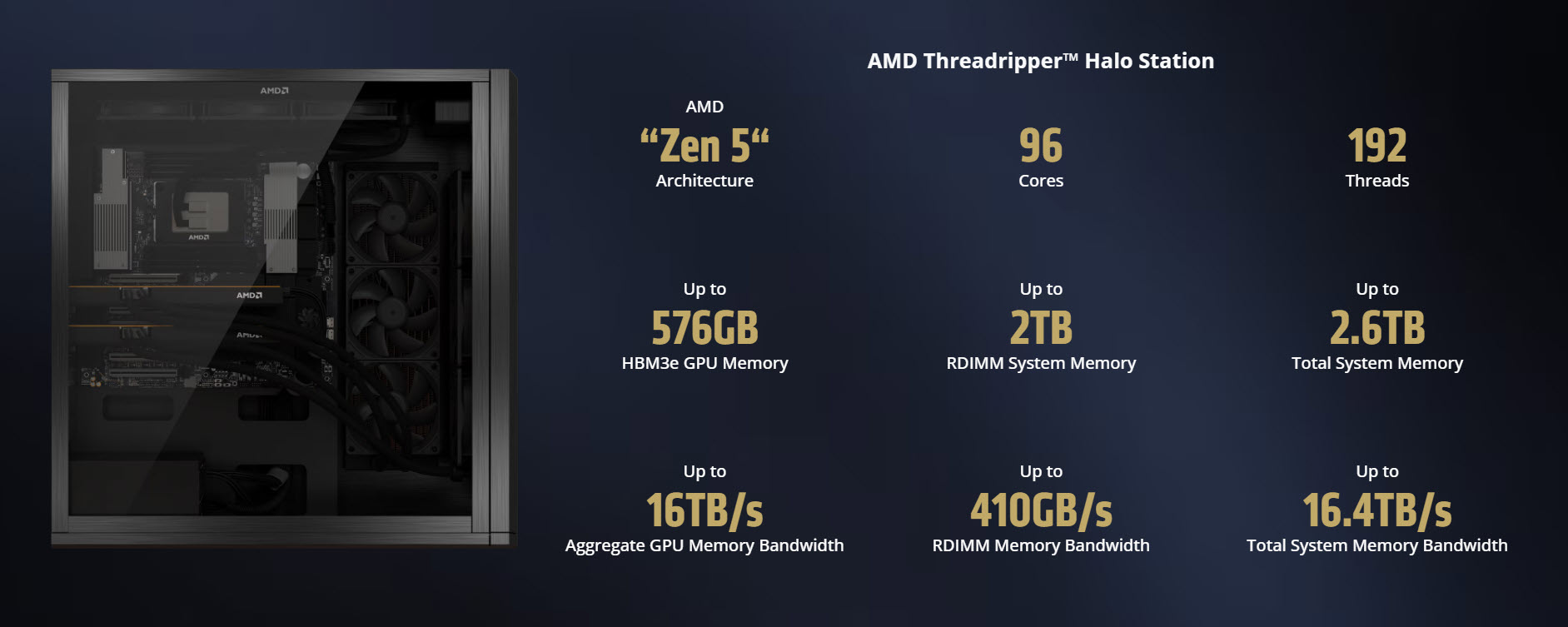
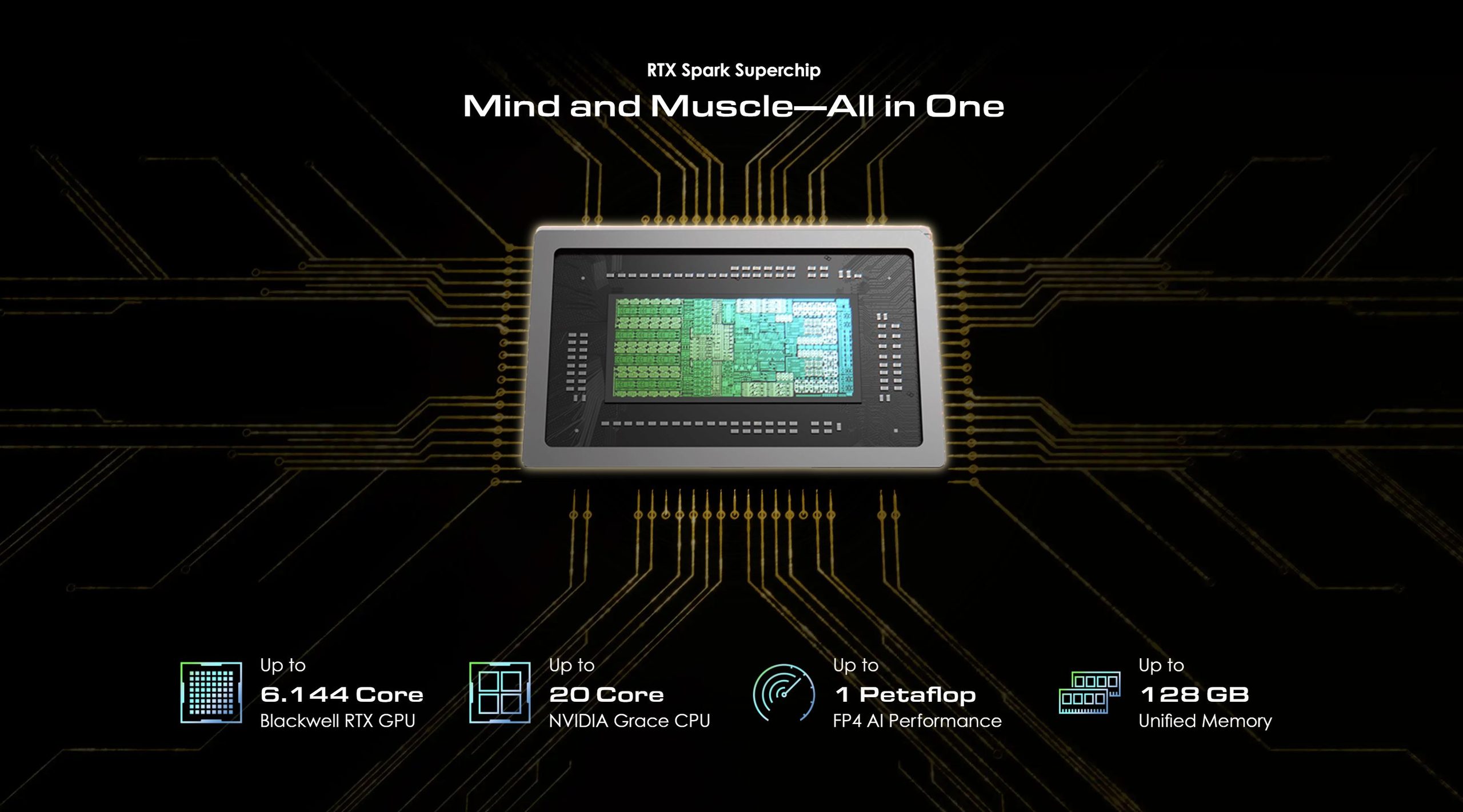
Here the hardware comparison becomes less like laptop shopping and more like workstation planning. Local generative AI needs memory bandwidth, model loading space and thermal stability, not just a fast launch time. Microsoft points toward future AMD and Intel AI processors, while also opening the upper band to stronger graphics platforms and NVIDIA-related solutions. That is important because NVIDIA is not only a GPU supplier in the consumer sense; its developer hardware has already made 128GB-class local AI machines visible. NVIDIA’s DGX Spark, for example, is described in its official listing as a personal AI supercomputer with 128GB of unified memory for large-model work.
The caveat is not to treat the high-end band as a normal consumer upgrade. Builder PCs make sense when a model, dataset or agent workflow has a commercial or research reason to remain local. For a typical office user, jumping from 8GB to 128GB may create cost, power and compatibility burdens without making email or video calls meaningfully better. The high-end tier is for users whose work changes when local memory changes.
Scenario fit: choose the tier by the job that keeps failing
- If your pain is price: Tier 0 with 8GB can be rational, but choose it for simple tasks and predictable cloud use, not for local model experiments.
- If your pain is context switching: Tier 1 is the cleaner starting point because 16GB or more gives Windows room to keep small models and agent state closer to the foreground workload.
- If your pain is model size: Look at 64GB and above, not because the label sounds premium, but because model files, context windows and cache space consume memory quickly.
- If your pain is privacy: Local execution helps, but it is not magic. A capable tier reduces unnecessary uploads; good account, file and application hygiene still matter.
- If your pain is upgrade regret: Buy for the workload you expect to repeat daily, not for the feature name printed on the retail box.
Common misconceptions
- An AI PC label guarantees local AI performance. It does not. The Windows roadmap separates basic Tier 0 assistance from Copilot+ PC mainstream systems and higher tiers.
- More memory always means a better AI experience. Memory must be paired with CPU, NPU, storage, software and model size.
- Cloud AI can be avoided completely. Hybrid intelligence assumes both local and cloud execution; the best setup routes work where it makes sense.
- Windows is waiting for a Windows 12 style reset. The tier plan suggests evolution through hardware capability and Copilot+ ecosystem alignment, not necessarily a new operating system identity.
A practical checklist before buying an AI PC
- Identify the task you want to run locally, then match it to a tier: basic assistance, sustained agent work, or large-model development.
- Check memory before marketing copy. Tier 0 means 8GB, Tier 1 means 16GB to 64GB, and the high band begins at 64GB and above.
- Confirm whether the machine is actually a Copilot+ PC, because that is the line Microsoft treats as capable of richer on-device experiences.
- Compare the processor family against your workload. Intel, AMD and Qualcomm all appear in the roadmap, but their device classes matter more than the logo.
- Decide how much of your workflow must stay off the network. The more local context you need, the more you should move above the Tier 0 ceiling.
- Assume price and memory are linked. The around $500 range buys access, while larger AI capacity is a different purchase category.
FAQ
Is 8GB enough for a modern AI PC?
For light use, yes. Tier 0 can support email, documents, meetings and simple assistance. But 8GB is close to the modern Windows floor, so users with many browser tabs, local models and agents at once may feel constrained.
Should everyone buy a Copilot+ PC?
No. A buyer who mainly uses cloud AI and ordinary productivity tools may not need the tier immediately. Someone who wants local agents, longer-running tasks and less network dependence should treat Copilot+ PC capability as a meaningful baseline.
Why does 128GB matter if the machine is not for gaming?
Because large language models, long contexts, development workloads and multiple agents can consume memory very differently from traditional applications. That is why the upper band is described as builder PCs and supercomputer-class AI PC territory.
What does hybrid intelligence change for an ordinary buyer?
It shifts the question from one raw benchmark to a routing question: what runs locally, what runs in the cloud, what stays private, what remains responsive when the network is slow, and what pays for itself through less repeated cloud calls.
The most useful takeaway is not that Microsoft is naming a few processor families. It is that Windows is turning AI PC selection into a workload decision. The roadmap is a comparison chart for buyers: choose whether you need a basic assistant, a Copilot+ PC mainstream machine, or a builder class system. Over the next few years, Windows ecosystem competition may move away from simple CPU clock comparisons and toward local AI compute, NPU performance, memory ceilings and large-model running ability. Microsoft’s layered plan, from 8GB to 128GB and above, suggests the company wants the Copilot+ ecosystem to be both broad enough for affordable machines and deep enough for professional work.