
iOS 27.3 iCloud Link Checks Explained: Which Sharing Option Fits Your Risk?
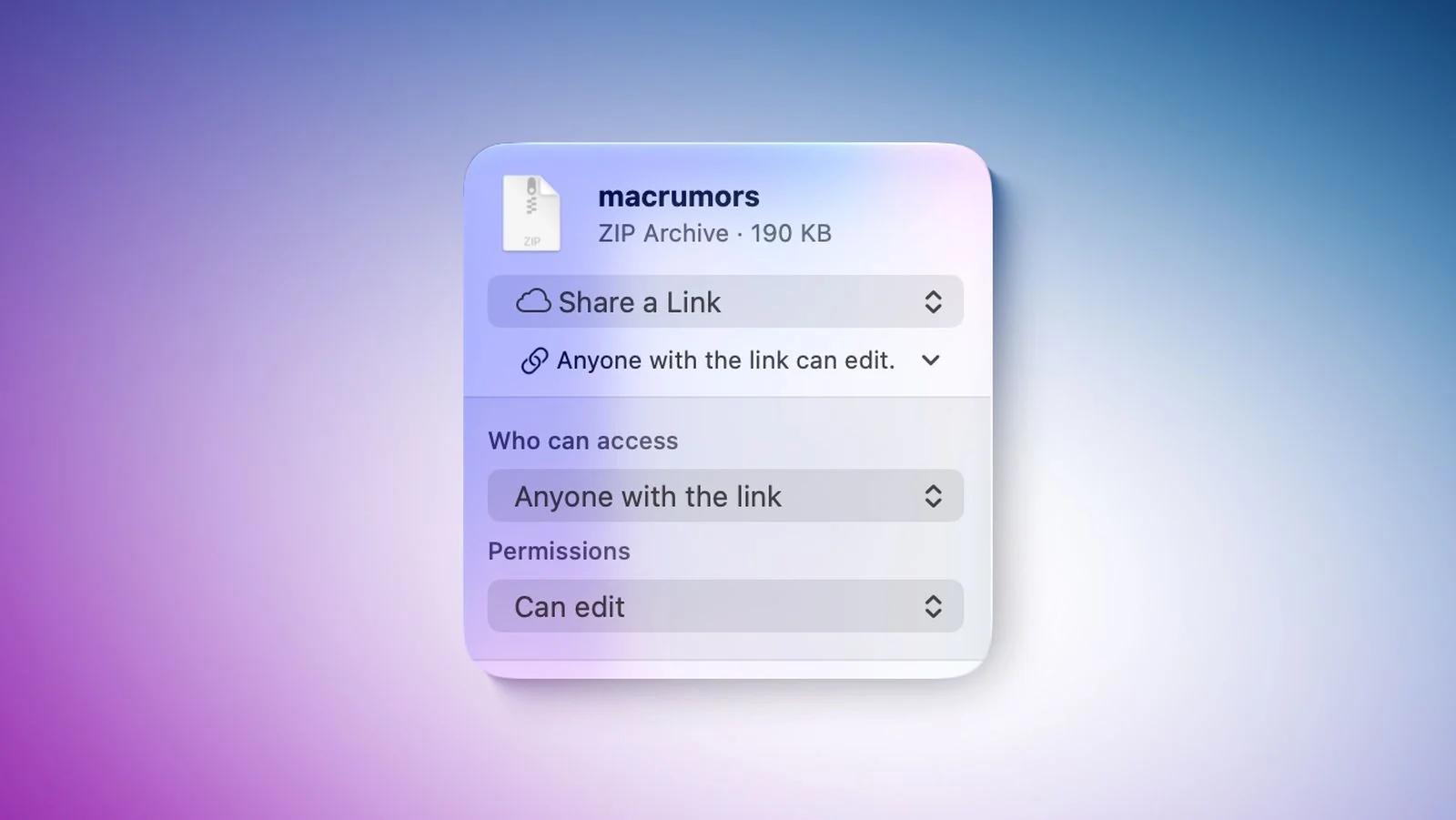
From iOS 27.3 onward, Apple will review what you publish through iCloud's fully public links. Anything shared with the "Anyone with the link" option in iCloud Photos or iCloud Drive stops being end-to-end encrypted and may be checked for harmful content, with file removal or Apple Account restrictions as possible outcomes. Send a Copy and links limited to named people stay outside the new review. For ordinary users the question is therefore not whether to abandon iCloud, but which sharing mode to use, file by file.
Developer builds of iOS 27.3, iPadOS 27.3, macOS 27.3 and visionOS 27.3 are already circulating, and Apple Inc. is expected to push the updates to everyone this December. This ItInsightsWorld guide maps the change, the enforcement consequences and a short decision framework you can run before copying any link.
What does iOS 27.3 actually change in iCloud sharing?
Short answer: one door is now watched, and it is the widest one.
Under the revised Apple wording, selecting the option that lets anyone holding a URL open an item in iCloud Photos or iCloud Drive also grants Apple access to that item so a content check can be performed. Coverage published on November 4, 2026 by MacRumors, 9to5Mac and AppleInsider describes the same scope: the check applies to links open to the world, not to links addressed to named recipients.
Private sharing paths keep working as before. That continuity is exactly why the choice of mode now matters far more than it did before the 27.3 generation of system software.
Why is Apple scanning public links, and what counts as harmful content?
Apple has not published a precise definition, so the list below follows its existing service terms rather than a new rulebook.
- malware
- dangerous files
- illegal or abusive material such as child sexual abuse content
If the situation calls for it, Apple may also work with law-enforcement agencies. A practical reading: public cloud links are a favourite distribution route for phishing payloads and illegal media, because one URL can be reposted across forums, chat apps and spam mail within minutes. Screening at the storage layer is cheaper than handling thousands of abuse reports after the fact — and, as this is analysis rather than an official statement, the exact method remains unconfirmed.
What happens if a shared file gets flagged?
The consequences escalate in clear stages, and only the first one touches the file itself:
- Content action: Apple keeps the right to move, refuse, modify, remove or delete the material at any time.
- Link action: the URL simply stops resolving for everyone who tries to open it.
- Account action: the linked Apple Account can be restricted or deactivated.
- Re-registration action: Apple may block creation of a new Apple Account using the same email address or telephone number.
- Escalation: in specific cases the matter is referred to law enforcement.
Two iCloud sharing methods: which ones are reviewed?
iCloud still gives users two ways to hand over a file. The new review touches only one branch of one of them.
| Sharing mode | What the recipient gets | In scope for the check? | Best fit |
|---|---|---|---|
| Send a Copy | A duplicate delivered straight to the recipient | No — no public URL exists | One-off handoffs to a known person |
| Share a Link + specific people access | Access restricted to named people | No | Client folders, family albums, team docs |
| Share a Link + Anyone with the link | Open access for whoever holds the URL | Yes — and end-to-end encryption is switched off | Public portfolios, press kits, event photos |
Read as a risk ladder, the ranking is obvious: Send a Copy, then specific people access, then the public link last.
How does the Apple rule compare with other file-sharing services?
Conclusion: scanning public links is not new in cloud storage; what is notable is that Apple, historically the most encryption-forward mainstream vendor, is openly narrowing its own encryption promise.
- Google Drive grants access through permissions on your live file instead of delivering a duplicate. Independent comparisons such as Yungle's 2026 Drive-versus-WeTransfer piece warn that Drive links are easy to over-share and quietly go stale — the same over-sharing failure mode the iCloud rule targets.
- WeTransfer leans on transport security: its own comparison material states that transfers are encrypted in transit with TLS and at rest with AES-256 and are reachable only through a unique link, with an optional password on top. Fast.io's January 2026 WeTransfer-versus-Dropbox review adds that free WeTransfer links expire after seven days, while Dropbox keeps files online indefinitely.
- Apple's Advanced Data Protection has always had exceptions. Its platform security guide counts 25 end-to-end encrypted categories but excludes Shared Albums and live collaboration in Keynote, Numbers and Pages, because those features require keys on Apple servers.
- The Electronic Frontier Foundation's guide to enabling Advanced Data Protection notes that iCloud Mail, contacts and calendar events are not end-to-end encrypted and that some metadata stays with Apple.
Verdict for general readers: if you need an expiring, password-gated URL, a dedicated transfer service is still more predictable; if you need a file to stay in sync across your own devices, iCloud remains the natural choice — just stop publishing it to everyone.
Does Advanced Data Protection still protect you?
Yes for stored and privately shared data; no for anything you make public. Apple states that once content is shared in the fully open Anyone with the link form, it no longer benefits from end-to-end encryption even when Advanced Data Protection is enabled. That removal of encryption is the technical precondition that makes any content review possible in the first place.
What Apple has not answered yet
- Whether public iCloud links created before the release are retroactively covered — Apple has not said, and this remains the most important open detail for anyone with old links in circulation.
- Whether review happens automatically, on Apple servers, or only after a report — not specified in the announcement.
- Whether an appeal path exists after a file is removed or an Apple Account is restricted — not specified.
Common misconceptions about the 27.3 change
- "Apple is now scanning my whole iPhone." No: the check is tied to the public-link path, not to your library as such.
- "Advanced Data Protection makes public links invisible." No: publishing removes that protection by design.
- "Send a Copy is safer, so always use it." It is out of scope, but once the duplicate lands on the other device you cannot revoke it — a link can be turned off, a copy cannot.
- "Switching to specific people access is only cosmetic." No: it keeps the item outside the new review.
Checklist: five questions to ask before you copy a link
- Do I know every recipient by name? If yes, choose specific people access instead of a public URL.
- Would this file embarrass, expose or harm me if it appeared on a public forum? If yes, do not use Anyone with the link.
- Is the content purely creative or promotional, with no personal data, no credentials and no private images? That is the safest profile for a public link.
- Do I really need a live link? For a one-off handoff, Send a Copy is simpler and avoids the review path entirely.
- Have I audited links created before this December? Revoking anything you no longer recognise is the cheapest insurance while Apple's position on older links is still unstated.
FAQ: what readers ask most
Does iOS 27.3 give Apple access to all my iCloud photos?
No. The review is triggered only by items you publish through the Anyone with the link option in iCloud Photos or iCloud Drive. Your private library remains outside that mechanism.
Is Send a Copy monitored as well?
It is not the target of the new rule. Send a Copy hands the recipient a duplicate rather than hosting a public URL, so the content never enters the link-review flow.
What is the worst realistic outcome of a false positive?
Based on Apple's stated powers, removal of the item plus restriction or deactivation of the Apple Account, including blocks on re-creating an account with the same email address or telephone number. Appeal procedures are not described in the announcement, which is why prevention matters more than remedy.
When does this take effect?
Betas of iOS 27.3, iPadOS 27.3, macOS 27.3 and visionOS 27.3 are with developers now; the public release is expected this December.
The trade-off in plain terms
Apple has not tightened iCloud across the board; it has attached a visible price to one specific behaviour — publishing a link that anyone on earth can open. Users who keep sharing to named people or to a copy of their own choosing will barely notice the update. Everyone else now trades a few seconds of convenience for the possibility that a file disappears and an Apple Account follows it. Treat a public iCloud link the way you would treat a post on a public timeline: check what is attached, then decide whether the world really needs it.
Written by James Hartley for IT Insights (ItInsightsWorld). Corrections and tips: contact@itinsights.com.
Sources
- Apple, Advanced Data Protection for iCloud — platform security guide: https://support.apple.com/en-nz/guide/security/advanced-data-protection-for-icloud-sec973254c5f/1/web/1
- Apple, How to turn on Advanced Data Protection for iCloud: https://support.apple.com/en-us/108756
- MacRumors, "Apple Will Check Public iCloud Links for Harmful Content" (November 4, 2026): https://www.macrumors.com/2026/11/04/ios-27-3-icloud-link-check/
- 9to5Mac, iOS 27.3 public link change (November 4, 2026): https://9to5mac.com/2026/11/04/with-ios-27-3-apple-will-start-checking-icloud-public-links-for-harmful-content/
- AppleInsider, iCloud's Anyone with the link option triggers content checks: https://appleinsider.com/articles/26/11/04/iclouds-anyone-with-the-link-option-will-trigger-apple-content-checks
- Electronic Frontier Foundation, How to Enable Advanced Data Protection on iOS: https://www.eff.org/deeplinks/2023/05/how-enable-advanced-data-protection-ios-and-why-you-should
- WeTransfer official comparison material: https://wetransfer.com/resources/comparison/why-use-wetransfer-instead-of-google-drive
- Fast.io, WeTransfer vs Dropbox (January 2026): https://fast.io/resources/wetransfer-vs-dropbox/
- Yungle, WeTransfer vs Google Drive for sending files: https://yungle.co/blog/wetransfer-vs-google-drive