
Google Search /goto Redirect Checks vs Instant Links: A Practical Comparison for Users and AI Scrapers
A search result should move a reader from question to answer. Recently, Google has made that movement slower for some people: after clicking a result, users may land on a page reading Verifying your request and wait a few seconds, or even more than ten seconds, before the destination opens. ItInsightsWorld compares this /goto waiting layer with the older instant-link path, because the real story is not simply a technical glitch. It is a trade-off between search-result protection and human reading flow.
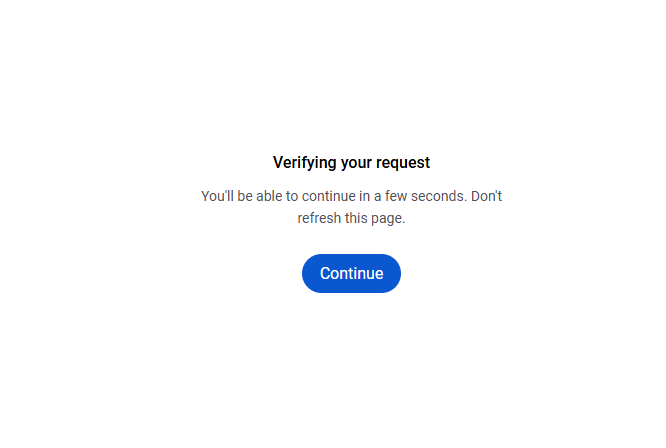
What changed: direct destination versus a Google-side hop
Before the visible rollout of encrypted result addresses and /goto redirects, a result link could often be read by the browser, a link checker, an extension or a crawler without an extra Google stop. The click still carried tracking parameters, but the final page could be identified before the user arrived. Under the newer path, the click goes to Google first. Google then decides when to release the request to the final page. In reported tests, the intermediate page completes after a wait; in one case cited in Google's official community, a verification interstitial cleared after 12 seconds.
Two facts anchor the change. First, Google is the company operating the /goto page. Second, the user experience is not always a traditional puzzle or challenge; it may feel like a timer. Search technology company RESONEO tested the mechanism and described the page as executing a countdown before redirecting, even though the visible text uses the word verification. That distinction matters: a countdown gives Google time to score traffic and slows bulk access, but it also penalizes curious humans who open several tabs quickly.
Human readers versus automated fetchers: how the same change feels different
The same /goto page can be a small irritation, a workflow interruption, or a structural wall, depending on the user and the access pattern. The table below separates those scenarios. It is a practical comparison, not a proof of Google's internal policy.
| Comparison axis | Casual reader | Heavy research user | Automated tool |
|---|---|---|---|
| What the click feels like | Usually one page load; sometimes Verifying your request interrupts it. | Multiple quick clicks may produce repeated waits; in one reported case the interstitial cleared after 12 seconds. | The client must follow a redirect chain many times, which makes extraction slower and less reliable. |
| Typical trigger pattern | Occasional wait after a fast tap or a suspicious network environment. | Chrome without a Google account was reported to show verification pages more often. | Proxy IP, browser fingerprint, request frequency and login state can change the outcome. |
| Main cost | Minor patience cost. | Broken rhythm, delayed comparisons, repeated refreshes. | Need to decode or follow many opaque links; SEO analytics tools may become unstable. |
| Practical takeaway | Wait a few seconds, then reload if needed. | Slow down tab opening and reduce parallel searches. | Use APIs, licensed sources, or compliant workflows instead of brute-force scraping. |
Why the wait is more likely about AI and scraping than ordinary browsing
For years, search engine results pages have been a high-value data source. AI systems, rank trackers, lead-generation robots and content scrapers often need the real URL behind each result. When those URLs are visible, an automated client can collect many destinations at once. When they are routed through /goto, the visible address becomes an encoded token. Google reportedly uses Base64-style transformation and extra parameters, so a client cannot simply decrypt the result locally and must ask Google to resolve each one.
That design choice shifts the cost curve. A human reading one or two pages may tolerate the wait. A bot that needs hundreds or thousands of results must pay in time, bandwidth, proxy changes and failed requests. SEO analytics services can also be disrupted, because their normal task of following result links becomes slower and less predictable. The trade-off is clear: stronger protection for search data can mean weaker convenience for legitimate human browsing.
Reports citing a Google response to Seroundtable on Aug. 27, 2026 described the goto parameter as a gradual anti-abuse rollout rather than a sudden global switch. SEO monitoring platform Nozzle said it observed near-total coverage in several residential IP provider environments. If those observations are correct, the change is not a rare edge case; it is becoming the normal route between a Google click and many final pages. Source: seroundtable.com.
Is this a captcha, a rate limit, or a forced wait page?
These concepts overlap but should not be confused. A captcha asks a human to prove they are human by solving something. A rate limit says: slow down, you have made too many requests. A /goto interstitial, based on the available user reports, appears closer to a server-controlled pause: the page waits, then redirects. The exact trigger may combine behavior speed, account state, browser, IP reputation and network environment.
Google has not published a public specification for the Verifying your request interstitial, so certainty is not possible. The safer interpretation is that Google may collect behavioral signals through the intermediate page, submit them to a server, receive a required waiting period, and release the click when the timer ends. This would explain why some clicks are instant while others take much longer.
A separate but related point: Google's official crawl documents discuss how Googlebot adjusts crawling based on server response codes such as HTTP 429, 500 or 503. That documentation is about Google crawling websites, not about users clicking Google search results. Confusing the two mechanisms can make the problem seem more predictable than it is. Source: developers.google.com.
Common misconceptions before you decide whether it matters
- The wait page means the device is infected. That is usually too simple. Request speed, network pattern, login state and browser fingerprint can matter more.
- Google has explained every detail of the new page. It has not. The /goto redirect rollout is public enough to discuss, but the interstitial's exact logic remains inferred from user reports and tests.
- Logging in is a guaranteed fix. Some reports suggest anonymous browsing may see more friction, but Google does not promise that account status determines the result.
- The mechanism only punishes AI tools. It raises costs for automated clients, but human researchers and SEO analysts can feel it too.
- Every verification is a permanent block. In many cases, the page completes after a short wait and lets the user continue.
FAQ: quick decision answers
Q: Why does Google make me wait when I click a result?
A: The /goto intermediate page may be applying risk-control or anti-automation logic. In some cases, the wait is short; in others, it can last a few seconds or more than ten seconds. If the page says Verifying your request, the browser is often waiting for Google to release the redirect rather than solving a puzzle.
Q: Should I log into my Google account to reduce waits?
A: The available reports do not prove that login always helps, but signed-in users may be treated as lower risk than anonymous high-volume sessions. The reported pattern included frequent verification when using Chrome without a signed-in Google account. Do not rely on this as a guaranteed rule.
Q: Can I bypass the wait?
A: There is no universal bypass. Slowing clicks, reducing parallel tabs and avoiding unusual networks may reduce friction. Trying to defeat the mechanism is not advisable: it can increase risk scores, create more verification, or break a scraping workflow.
Q: Does this mean Google is blocking AI tools?
A: The change likely raises the cost of automated scraping, including AI data collection, but it is not only an AI problem. Ordinary users who click quickly may also feel it.
Action checklist: when to wait, when to adjust, when to change source
- Casual readers: stay on the page for a few seconds, refresh once, then continue. Do not assume the final article is gone.
- Research users: open fewer result tabs at once, use a stable browser, and keep login status consistent if possible.
- SEO analysts: treat sudden rank fluctuations as possible collection artifacts; log failed redirects before changing strategy.
- AI builders: prefer official interfaces, licensed data or publisher-side APIs rather than trying to follow thousands of /goto links.
- Site owners: check whether your traffic drop is really from Google search or from automated referrer changes caused by intermediate redirects.
Bottom line: convenience is being taxed to protect search data
The most practical way to read this is as a tax on attention and automation. For the casual reader, the tax is small but visible. For heavy researchers and bots, the tax can be large enough to change tools and workflows. Google's /goto path likely aims to reduce mass extraction, but until the company explains the interstitial, users should treat the Verifying your request wait as an environmental condition, not a personal error.