
Where Should Open Source Accessibility Notes Live? ACCESSIBILITY.md vs. README, Issues, and Audits
When readers ask where project accessibility notes belong, an ACCESSIBILITY.md file is the most predictable destination. It summarizes goals, limitations, support environments, and reporting steps in one place. GitHub now places it near repository overviews, so users and contributors do not need to reconstruct the story from issue threads, audits, or private conversations.
For general audiences, this is less a legal formality than a map. It tells someone trying a tool whether a barrier is already known, whether a workaround is available, and what to expect after reporting. It also tells maintainers how to keep that knowledge alive when contributors change roles, repositories grow, or new coding agents join the workflow.
What problem does an ACCESSIBILITY.md file solve?
Accessibility knowledge often hides in places that make sense during development but fail during discovery. A workaround lives in a closed pull request. A testing gap appears in a slide deck. A reporting habit depends on a person who already knows the project. When a new user arrives, those fragments are too fragile to guide decisions.
The scale of the need is broad. The World Health Organization estimates that 1.3 billion people experience significant disability, about 16% of the global population. Accessibility information is therefore not only a compliance detail; it is a general usability signal for users, developers, educators, procurement teams, and community members. A repository statement that records limitations and reporting steps reduces uncertainty before someone spends time troubleshooting alone.
GitHub's repository-level treatment makes the difference practical. The recognized locations are the repository root, .github/, docs/, or an organization's .github/ repository. On public repositories, maintainers can add or propose a statement through Insights > Community Standards. GitHub's changelog for this feature is dated 2026-10-01, and the documentation explains how the file becomes visible without forcing people to search through code folders.
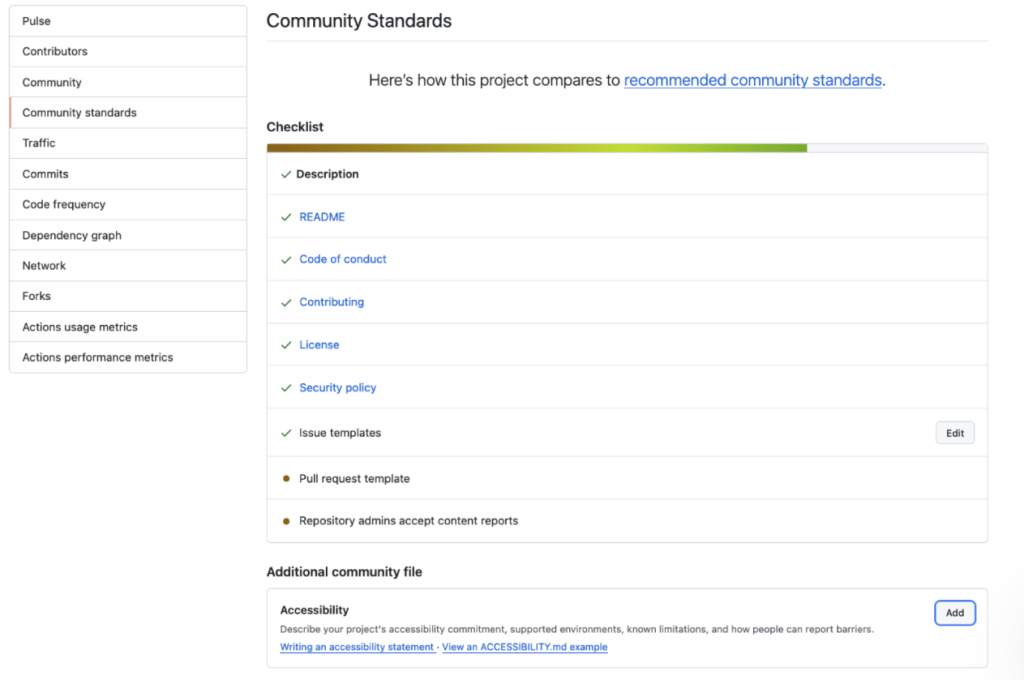
That placement matters. In GitHub's Community Standards workflow, accessibility information sits beside contribution guidelines, codes of conduct, and security policies. The result is closer to project health documentation than to a buried support transcript. New repositories also start with an accessibility issue label, so the statement can point to a place where reports are organized and tracked.
Where ACCESSIBILITY.md fits beside other information sources
Readers can compare the common homes for accessibility knowledge before deciding what to publish. The table below reflects a general editorial judgment from the documented behavior and examples rather than a formal benchmark.
| Information home | How visible it is | What it does well | When it may fail | Best paired use |
|---|---|---|---|---|
| ACCESSIBILITY.md | High: it can appear on the repository overview and inherit from organization files | Explains goals, known limits, reporting expectations, and supported environments | Becomes stale if no owner reviews it | Pair with an issue label and a tested reporting path |
| README section | Medium: users may see it, but it competes with setup and usage details | Good for a short pointer to the fuller statement | Too easy to omit or fragment | Link from README to ACCESSIBILITY.md |
| Issue tracker | Low for new users: discovery depends on search skills and vocabulary | Shows active problems, discussion, and remediation status | May feel hostile or fragmented without a starting page | Use labels and links from the statement |
| Audit report | Medium if published, but often dense or dated | Documents findings, severity, and evidence | Can sound like a one-off assessment rather than ongoing practice | Summarize outcomes in plain language |
| Team knowledge or chat | Low: depends on access and relationships | Captures nuance and workarounds | Disappears when people leave | Move durable parts into the statement |
What do concrete project examples teach us?
The most useful statements do not claim perfection. They answer two related questions: what can a user do now, and what must a contributor know before making changes. GitHub CLI is a good comparison point because it serves both users and contributors. Its accessibility statement records settings, known barriers, and workarounds. It explains that table output can be hard to follow with a screen reader and offers a command that prints pull request numbers and titles one per line instead. It also asks contributors who change prompts or output to show the results with relevant accessibility settings enabled.
That structure is practical. A person using the CLI receives a specific workaround. A person contributing to it receives a review expectation that can be checked before a pull request is merged. The statement converts a known limitation into both user guidance and contributor guidance.
The GitHub Annotation Toolkit example shows a different tradeoff. Its statement records a limitation of its Figma library: annotations use canvas position, connecting lines, and matching numbers to visually convey relationships. Access to individual canvas objects does not necessarily communicate what those relationships are. The file offers collaborators a concrete alternative: provide a structured text description that identifies each annotated element, its intended semantics and behavior, and any relevant ordering.
For developers preparing or receiving a design handoff, this explains what information needs to accompany the visual annotations. The statement also explains how to report accessibility barriers and explicitly states that the library has not undergone keyboard-only or screen-reader testing. That honesty matters: readers get practical guidance and a clear boundary on what has been verified.
Which format should your project choose?
There is no single template that fits every project. A small library, a command-line tool, a documentation site, and a large web application have different users, risks, and maintenance capacity. A useful comparison is capacity, not ambition. Plain language, descriptive links, and a clear reporting route matter more than legal or standards-heavy language.
- Small utility: start with one assistive environment, one known limit, and one reporting route.
- CLI or API: focus on output behavior, keyboard or screen-reader expectations, and review rules for contributors.
- Documentation site: emphasize language clarity, navigation patterns, captions, and a predictable contact path.
- Large application: document tested platforms, assistive technologies, remediation status, ownership, and response levels.
A practical ACCESSIBILITY.md checklist
Before publishing, make sure each section answers a question a cold reader would ask.
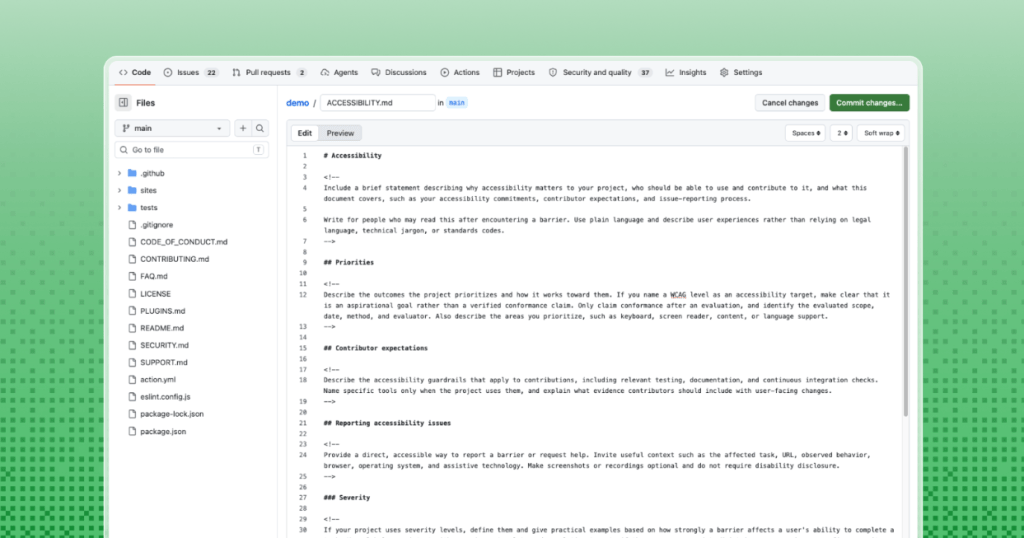
- Priorities and goals: explain why accessibility matters and which user experiences receive attention.
- Contributor expectations: describe accessibility checks, evidence, or review practices expected for changes, including instructions for human contributors and coding agents.
- Barrier reporting: provide a direct, accessible reporting path. Do not require disability disclosure, screenshots, or recordings.
- Response process: explain how maintainers acknowledge, triage, track, and communicate about accessibility issues. If severity levels are used, let maintainers assign or confirm them during triage, and include status updates, available workarounds, expected timelines when possible, and an opportunity for the reporter to verify a fix.
- Supported environments: list the platforms, browsers, input methods, and assistive technologies the project supports or has tested.
- Known limitations: describe barriers in terms of the affected experience, include available workarounds, and link to tracked remediation work.
- Ownership and maintenance: name the team, role, or maintainer responsible for keeping the statement and related practices current.
- Feedback and improvements: explain how users and contributors can suggest changes to the statement or the project's accessibility practices.
Common misconceptions to avoid
- A standard name is not proof. A project can name a Web Content Accessibility Guidelines version and level as a target, but a target does not establish verified conformance. A conformance claim requires evaluation and should identify the evaluated scope, date, method, and evaluator.
- Version numbers need context. W3C guidance recommends stating the standard applied in an accessibility statement. WCAG 2.2 became a W3C Recommendation on 5 October 2023 and was updated on 12 December 2024, but simply citing WCAG 2.2 is still not evidence that a specific repository component has been evaluated against it.
- A polished file is more useful than a perfect policy. A detailed public example is provided by the Open Source Accessibility Toolkit. A shorter starter, with prompts projects can replace with their own information, comes from the GitHub Community Standards workflow.
- Reporting guidance should not burden the person reporting. Useful guidance invites relevant context, such as the affected task, page, observed behavior, browser, operating system, and assistive technology, while making screenshots and recordings optional and avoiding requests to prove a disability.
- Known limitations should not be hidden. If a component has barriers, say what the user experiences, what workaround exists, and what the project has not yet tested.
FAQ: what general readers usually ask
Is ACCESSIBILITY.md only useful for large projects?
No. Small projects can keep the file short. The value comes from predictability, not length. Even one clear paragraph can help a user decide whether to report a barrier, try a workaround, or move on without assuming the problem is invisible to the team.
Why is the file better than a README section?
A README can introduce the topic, but the file name and repository overview placement make it easier to find and maintain. A README section is useful as a pointer; ACCESSIBILITY.md is better as the canonical location for goals, limits, support, reporting, and ownership.
Can an organization cover many repositories?
Yes. A repository can inherit a statement from an organization's .github/ repository. This can reduce duplication, but each project should still note any repository-specific limits, testing gaps, or environments that differ from the shared statement.
Should maintainers claim WCAG conformance?
Only if the claim is supported by evaluation. It is safer to name a target, describe the evaluated scope, date, method, and evaluator, and link to known issues. If no evaluation exists, publish the current known limitations and the plan to test them.
Action plan before publishing
- Choose the home. Place ACCESSIBILITY.md in the repository root, .github/, or docs/, or inherit it from an organization's .github/ repository.
- Use the visible path. For public repositories, consider Insights > Community Standards as a way to add or propose the file.
- Write only what you can sustain. If the project has not tested a workflow, say so. If a workaround exists, name it.
- Connect reporting and follow-up. Use the accessibility issue label, a clear reporting route, and a response process that maintainers can actually meet.
- Review with real changes. When prompts, output, navigation, design handoffs, or interface labels change, ask maintainers and coding agents to check the statement alongside the code.
The goal is not to create a perfect legal document on day one. It is to make accessibility work discoverable across planning, building, reporting, and improvement. When users, contributors, and maintainers can find the same starting point, projects are more likely to keep accessibility practices alive as tools and communities evolve.
References
- GitHub Docs: Adding an accessibility page to your repository
- GitHub changelog: Accessibility statements highlighted on repository overview
- W3C Web Accessibility Initiative: Developing an Accessibility Statement
- W3C: Web Content Accessibility Guidelines 2.2
- World Health Organization: Disability fact sheet