
ItInsightsWorld Explainer: DeepSeek’s “Server Busy” Day on November 3 — and What Chronic AI Outages Really Mean for You
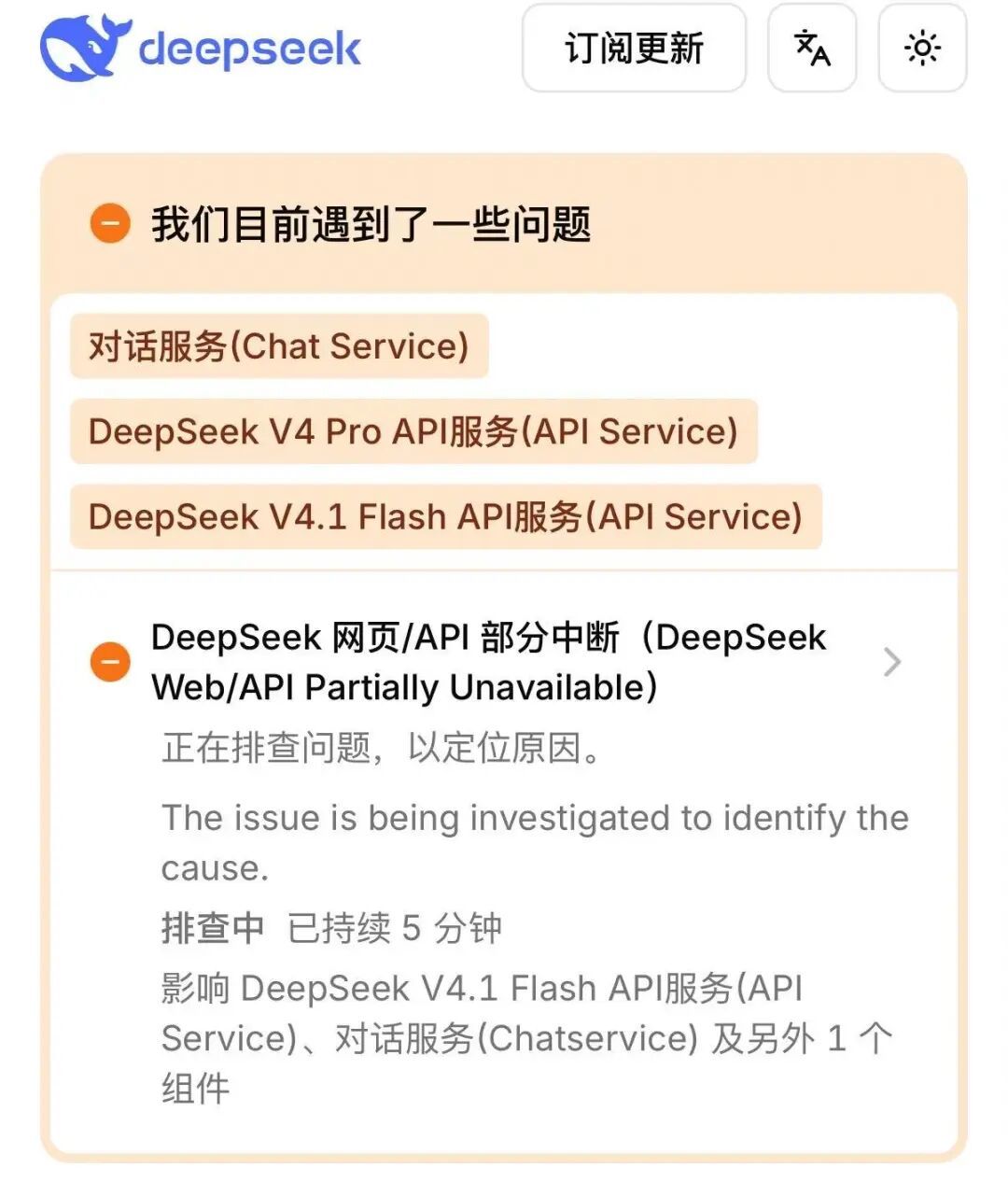
Short version, if you only have 30 seconds. On the afternoon of November 3, DeepSeek’s chat function stopped answering and the screen returned a single line: “Server busy, please try again later.” DeepSeek’s official website later reported that the earlier partial interruption of its web and API services had been fixed and was still being monitored — while DeepSeek V4 Pro and DeepSeek V4.1 Flash continued to show performance degradation on both their API and chat services. For readers who do not care about server rooms, the real story is elsewhere: DeepSeek’s official status page shows at least 10 large-scale incidents since the start of this year. Availability, not model intelligence, is becoming the soft spot of everyday AI.
How the November 3 interruption unfolded
The sequence is documented on DeepSeek’s official status page. From 16:58, the company’s web/API service was recorded as partially unavailable, with engineers investigating to locate the cause. Three layers were flagged at once: the chat layer (Chat Service), the DeepSeek V4 Pro API service, and the DeepSeek V4.1 Flash API service. That detail matters more than it looks — a fault that touches the conversational interface and two separately versioned model APIs simultaneously points to shared infrastructure upstream, not to one misbehaving model. The company then moved the incident to “fixed, monitoring”, with residual performance degradation on DeepSeek V4 Pro and DeepSeek V4.1 Flash.
A pattern, not an accident: the outage trail through the year
The November 3 event is best understood inside a longer run. DeepSeek’s status records list at least 10 major incidents since the start of this year, logged under labels such as “service unavailable” and “service anomaly”, with “performance degradation” entries appearing far more often than full outages.
| When | What users saw | Official wording | Length |
|---|---|---|---|
| Afternoon of November 3 | Chat refused messages: “Server busy, please try again later” | Partial web/API interruption at 16:58; Chat Service, DeepSeek V4 Pro API, DeepSeek V4.1 Flash API affected; later fixed and under monitoring | Degradation persisted on the two API tiers after the fix |
| Morning of October 15 | Web and app unusable; “server temporarily unavailable” appeared after sending a message | Service anomaly | About 5 hours |
| October 12 | Web pages failed to load normally | Partial web-service interruption; web and API performance degradation | Same-day event |
| September (multiple entries) | Repeated service anomalies | Service anomaly | Several occurrences |
| September 14 | Web and API partially down | Partial web/API interruption | About 3 hours |
| Earlier in the year | Longer stretches of downtime recorded | Major interruptions | Extended |
Read as a series, this is a reliability profile of a rapidly scaling service: frequent partial failures, occasional multi-hour blackouts, and a long tail of degraded performance that never gets a headline because nothing is technically “down”.
Decoding status-page language: three words that mean very different things
Most readers treat every status-page entry as either “broken” or “fine”. Industry practice says otherwise. PagerDuty’s incident-communication guidance describes a lifecycle in which an incident should move from investigating to identified and only then to monitoring a fix — the wording is a progress signal, not decoration. DeepSeek maintains the same structure publicly at status.deepseek.com, where individual events carry titles such as “DeepSeek Web/API Partially Unavailable” and are closed with an explicit resolution note.
| Wording you see | What it usually signals | Smart move as a user |
|---|---|---|
| “Partially unavailable / partial interruption” | One or more routes are failing while others work; typically a shared upstream component | Check whether the specific endpoint or model you need is listed, then switch your task rather than your device |
| “Performance degradation” | Requests succeed but are slow, time out, or drop mid-answer | Lower concurrency, save drafts, avoid batch jobs until it clears |
| “Monitoring a fix” | Repair applied, stability unproven — regressions are common in this window | Treat it as “mostly working”, keep retries capped |
Why consumer AI keeps stumbling
Three structural pressures explain the frequency, and none of them is exotic.
- One front door, many tenants. A chat interface, an API for paid developers, and mobile apps all converge on the same compute pool. Chinese tech coverage of the October 15 window noted that developer-facing endpoints such as DeepSeek V4.1 Flash were hit, meaning third-party products built on those calls failed in lockstep with the official app (finance.sina.com.cn).
- Retry storms amplify small faults. When thousands of clients re-send rejected prompts every few seconds, a capacity squeeze becomes a total refusal. Hitting “send” five times does not speed recovery; it slows it for everyone.
- Degradation is cheaper to accept than downtime. Operators prefer slow-but-alive to fully offline, which is why the log is thick with “performance degradation” entries and thin with “service unavailable” ones. It also means a service can feel broken to you while its dashboard reads green.
Four misconceptions worth dropping
- “The model got worse overnight.” An interruption changes delivery, not capability. Weights and quality benchmarks are untouched by a busy server.
- “Using the app instead of the website escapes the problem.” Both are clients of the same backend; if Chat Service is listed as impacted, switching surfaces changes nothing.
- “No incident notice means no incident.” Partial failures and degradation are often logged against a service you do not personally use.
- “A status page tells you exactly when you will be back.” It tells you where the investigation stands, not the restoration clock.
A ten-minute playbook for the next “Server busy” message
- Open the provider’s status page first (for DeepSeek: status.deepseek.com) and confirm which line item matches your symptom.
- Read the affected components list — Chat Service, DeepSeek V4 Pro, DeepSeek V4.1 Flash — and match it to what you are trying to do today.
- Stop rapid-fire retries; wait in 60-to-120-second intervals so you are not part of the pile-up.
- Save long prompts as plain text. A lost draft is a user-side loss the provider will never log.
- Queue, do not abandon: send non-urgent batch work once monitoring is confirmed, not during the outage window.
- If the task is time-critical, route it to a second model or provider — the resilience pattern known as LLM fallback, which reroutes a request when the primary endpoint fails, times out, or hits capacity (truefoundry.com).
- Log the timestamps. If you pay for API access, that record is the basis for any credit or SLA claim later.
Do the “always on” maths before you trust a promise
A useful reference point: the widely used SLA calculator uptime.is shows that a 99.9% availability target permits only 43 minutes and 50 seconds of downtime per month, or 8 hours 45 minutes 57 seconds across a year. A single roughly 5-hour morning blackout on October 15 would consume most of a year’s allowance under a three-nines commitment. That is not a claim that DeepSeek sells such a guarantee to consumers — it is free or low-cost access, and published SLA terms for a paid API tier are a separate document entirely. The arithmetic is simply the yardstick to apply when a vendor’s reliability is presented as “enterprise grade”: convert percentages into minutes and see whether the year in the incident log fits.
FAQ
Is my account or my data at risk during an outage like November 3?
An availability incident is about request handling, not data safety. Nothing in the official status records for the November 3 event described a data or security issue; the notices concerned service interruption and performance.
Why do chat and the API fail at the same time?
Because they are two doors into one house. When the shared layer is stressed, the conversational service and the model APIs — in this case DeepSeek V4 Pro and DeepSeek V4.1 Flash — degrade together.
How often does this happen?
At least 10 large-scale incidents are on record since the start of this year, with shorter service anomalies and performance-degradation entries far more numerous.
Should a business depend on a single AI provider?
Not for anything that has a deadline. Architecture guidance from gateways and platform vendors is consistent on this: multi-provider support exists to preserve continuity and limit lock-in (portkey.ai), and teams are urged to test failover paths before an incident, since streaming responses and strict output formats break naïve retry logic in production.
Trend call: what to watch next
The direction of travel is clear. Interruptions of this kind are no longer accidents inside one company’s infrastructure; they are the visible cost of running interactive AI at population scale with a narrow set of suppliers. Expect three responses over the next year: status pages that separate “chat is down” from “chat is slow”, because users make very different decisions in each case; routing layers that let one prompt fall across several model tiers without the end user noticing; and commercial terms that price availability explicitly rather than implying it. For now, the practical stance is a habit rather than a tool: read the status page, cap your retries, keep a second provider warm, and treat any AI workflow that cannot pause for 30 minutes as a risk you have chosen not to manage.
Written for ItInsightsWorld by the editorial team (James Hartley), IT Insights — contact@itinsights.com. Facts drawn from DeepSeek’s official status page and public coverage; interpretation is the author’s.