
Is Local AI Worth ₹4,99,990? An ItInsightsWorld Reality Check on the ASUS ProArt P16 and P14 in India
A four-person studio, a cloud GPU bill that never shrinks, and one client who will not let raw footage leave the building. That is the situation these machines answer. Direct answer: if your team already pays for rented AI compute and handles confidential files, the ProArt P16 (H7607BA) and ProArt P14 (H7407BA) turn a monthly subscription into a one-time asset. If you do not, buy the smaller P14 — and only after checking that your software actually runs on Arm.
What is the NVIDIA RTX Spark N1X, in plain words?
Conclusion first: it is not a graphics card squeezed into a laptop lid. It is a single Arm-based package where the processor, the graphics engine and a shared pool of memory sit on one board and talk to each other without copying files back and forth.
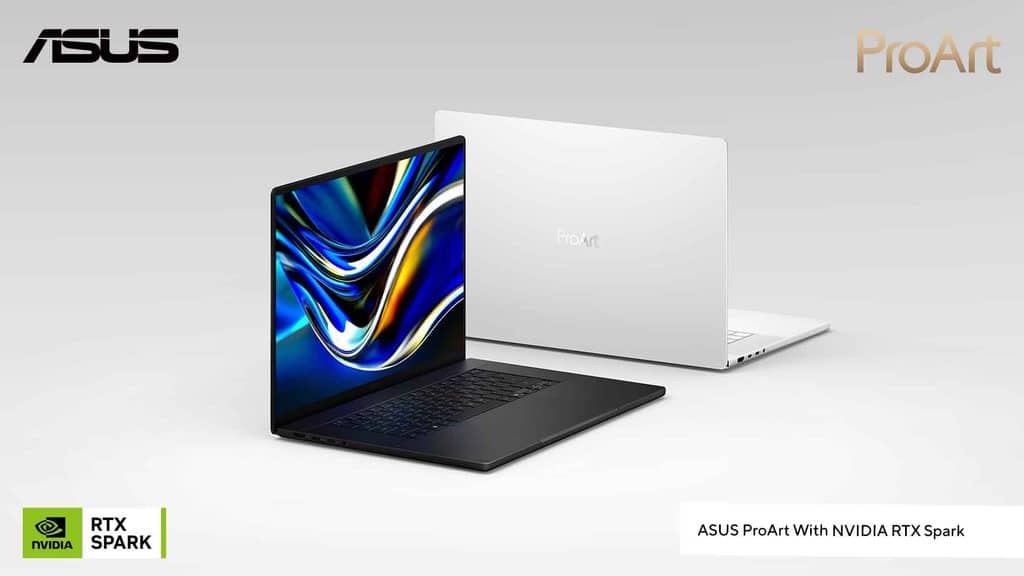
ASUS launched ProArt P16 (H7607BA) and ProArt P14 (H7407BA) in India, each built on the NVIDIA RTX Spark N1X computing platform, which runs AI and creative work locally instead of shipping it to a data centre. The company positions them for AI developers, designers and content creators who want to run more than 1,000 AI-accelerated applications — Adobe, Blender and ComfyUI are the three it names — without a rack of rented servers behind them.
The timing matters for anyone writing a hardware budget. ASUS opened global pre-orders for the RTX Spark ProArt line on 7 October 2026 and had the first units in US hands by 16 October 2026, according to the company's own pressroom release; Indian retail coverage places the local sale start at 3 November 2026. Translation: this is a rolling worldwide platform launch, not a one-market experiment.
On paper, the flagship ProArt P16 combines the NVIDIA RTX Spark N1X architecture with a 20-core central processing unit (CPU), a 6,144-core graphics processing unit (GPU) and up to 128GB unified memory. NVIDIA's launch material describes the superchip as pairing a Blackwell RTX graphics engine with a Grace CPU co-engineered with MediaTek, delivering up to 128GB of unified memory and 1 petaflop of FP4 AI performance, and claims up to 11 times faster AI image generation than the most common Windows laptop chips today. Take vendor multipliers with salt — but the memory number is the real story, because capacity determines which models physically fit on the machine.
Why put AI on a laptop instead of in someone else's cloud?
Because for most small teams, the cloud bill is the only line they control. Three reasons show up in every buying conversation I have had about local inference.
- Recurring cost versus owned asset. Rental accelerators are priced by the hour. Marketplace listings gathered by Spheron on 18 October 2026 put an H100 at $2.98 per hour on-demand, and Vast.ai's live table shows mid-range cards near $0.13–$0.60 per hour. Local silicon flips that meter off.
- File custody. Client footage, unreleased products, patient data and internal documents never leave the desk. This is usually the clause that ends the debate in a regulated business.
- Latency and offline work. Image generation, 3D design, content editing and experimenting with AI models keep running on a train, on a shoot location, or during an outage.
Both laptops manage and customise creative workflows through ProArt Creator Hub and use HapticPad controls, and the wider point is that ASUS is selling a workflow layer, not just silicon. That is worth understanding before you compare it to a plain workstation.
ProArt P16 or ProArt P14: which one fits which job?
Conclusion first: buy the P16 for memory and screen size, buy the P14 if a human has to carry it. The two share 4K and 3K OLED touchscreen display options, the ASUS HapticPad precision touch surface, and the same software hub — the split is capacity, weight and money.
| Decision factor | ProArt P16 (H7607BA) | ProArt P14 (H7407BA) |
|---|---|---|
| Compute | 20-core central processing unit (CPU) with 6,144-core graphics processing unit (GPU), up to 128GB unified memory | 18-core processor with 5,120-core graphics card, same NVIDIA RTX Spark N1X family |
| Display | 16-inch 4K ASUS Lumina Pro OLED touchscreen, 120Hz refresh rate, Pantone validation | 14-inch 3K ASUS Lumina Pro OLED touchscreen, 120Hz refresh rate, Pantone validation |
| Endurance | 99.9Wh battery | 90Wh battery |
| Carry weight | approximate 1.77kg chassis | approximately 1.48 kg |
| Entry price in India | ₹4,99,990 | ₹3,29,990 |
| Best fit | Large 3D scenes, local model fine-tuning, HDR editing on a fixed desk | Client-site editing, shooting trips, developers who compile on the move |
Two details that spec sheets bury. First, the 99.9Wh battery is not an accident: the US Federal Aviation Administration's passenger guidance allows 0–100 watt-hour batteries on aircraft without special permission, while 101–160 watt-hours requires air-carrier approval. ASUS has parked the P16 just under that ceiling, which matters if your team flies every month. Second, brightness on these panels comes from tandem OLED construction — stacked emissive layers that ASUS documents at up to 1,600 nits HDR peak with Delta E under 1 factory calibration — so the Pantone validation claim is about a genuinely different panel type, not a sticker.
What should you test before signing a purchase order?
Run a 30-day pilot on one real project, not a benchmark. My checklist:
- Software audit on Arm. NVIDIA's RTX Spark porting guide splits Windows on Arm into native Arm64 apps, x86/x64 apps running through Microsoft's Prism emulation, and the leftovers that need work. Every plugin, licence dongle driver and render farm agent in your pipeline goes on the test list.
- Throughput, not capacity. The same NVIDIA documentation describes the memory pool as a 256-bit interface running around 300 GB/s, shared by CPU and graphics. 128GB tells you what fits; bandwidth tells you how fast tokens come out. Measure both.
- Sustained load versus plugged-in load. Note render and generation times on battery and on the wall. Creative laptops throttle; the gap is your real-world productivity tax.
- Colour handoff. A Pantone validated panel still needs your calibration profile, viewing environment and export settings checked against a reference monitor before you trust a client proof.
- Travel and warranty fit. Confirm the battery rule with your carrier, and read the service terms for your market before assuming on-site cover exists.
- Input chain. ASUS also shipped ProArt Mouse MD301 (8,000 DPI sensor, glass tracking system, six programmable buttons, multi-device connectivity, ₹8,499) and ProArt Keyboard KD300 (small 65% layout, low-profile optical switches, touchpanel for customisations, ₹14,999). Budget them in; they are part of the workflow, not gifts in the box.
What does the total cost actually look like?
Conclusion first: the sticker price is not the number that decides this purchase. The configuration ladder is.
ProArt P16 starts from ₹4,99,990 and ProArt P14 starts from ₹3,29,990 in India. Indian retail reporting adds the piece most launch stories skip: at launch the ₹4,99,990 tag sits on a 64GB unified-memory build, while a 128GB model with a 1TB drive is listed near ₹6,49,990, and a 48GB version was said to follow. The headline also covers no-cost EMI from ₹13,750 per month and a paid damage-protection add-on, with offers dated to 30 November 2026, sold through ASUS Exclusive Stores, Croma, Reliance Digital, Flipkart, Amazon and the ASUS eShop. Treat those terms as a limited window, verify them at checkout, and note that ASUS's own release says the 64GB and 128GB configurations are handled mainly through direct and business channels — so procurement lead time, not shelf stock, is your risk.
Now the payback maths, and I am flagging this as analysis rather than a vendor claim. The standard formula is simple: break-even hours equal device price divided by rental hourly rate. If your team's cloud usage bills near $3 per GPU-hour, a machine in the roughly $6,000 class needs on the order of 2,000 rented GPU-hours to look cheaper — about four hours of accelerator time every working day for two years. Teams below that line should keep renting. Teams above it, or teams blocked by data-custody rules, get a different answer.
One supply-side caution for anyone planning a bigger fleet: memory, not compute, is the pinch point for AI hardware. Our explainer on what the NVIDIA memory ask means for AI hardware buyers covers why large memory pools are negotiated with fabs rather than simply ordered.
Which claims about these laptops are overhyped?
- "128GB means any model runs fast." It means the model fits. Speed depends on shared bandwidth and how well your tool uses the NVIDIA RTX Spark N1X GPU, which exposes up to 6,144 GPU cores.
- "This is a gaming laptop with a paintbrush." Arm compatibility, colour-validated panels and a 99.9Wh battery point at workstation priorities, not frame-rate marketing.
- "OLED touch screen equals accurate colour." Panel plus factory calibration plus your profile equals accurate colour. Skip one link and you are proofing blind.
- "Only creators need this." The boring, valuable buyer is the IT team that wants document summarisation and code assistance running on local files.
- "Wait for the next version." With Dell, HP and Lenovo units on the same platform already reported, prices will move — but a two-year depreciation clock starts the day you buy, not the day you wait.
What does this launch mean over the next 18 months?
Trend judgement, mine rather than ASUS's: the ProArt line is the first time Arm has been pushed into the high-performance creative segment as a serious architecture rather than a battery-life compromise. Three effects follow. Component selection shifts toward unified memory sizing, because up to 128GB unified memory on a laptop redefines what a small studio can run at home. Software vendors get a real reason to ship native Arm64 builds, which removes the last objection for cautious buyers. And local inference moves from hobbyist demo to a line item that a finance department can approve, since it replaces a subscription with a depreciating asset.
Frequently asked questions
Is the ProArt P16 the same as the older Ryzen-based ProArt P16?
No. The model covered here is ProArt P16 (H7607BA), built on the NVIDIA RTX Spark N1X computing platform with a 20-core central processing unit (CPU) and 6,144-core graphics processing unit (GPU).
Will my existing Adobe, Blender and ComfyUI projects open on it?
ASUS says the machines support more than 1,000 AI-accelerated applications including Adobe, Blender and ComfyUI. Still test your plug-ins and scripts on Arm first — that is the single most common pilot failure.
Which model should a two-person video team buy?
If footage is edited at a desk and 3D or local model work is planned, take the 16-inch 4K ASUS Lumina Pro OLED ProArt P16. If the edit happens on client premises, the approximately 1.48 kg ProArt P14 at ₹3,29,990 is the better spend.
Can I fly with the 99.9Wh battery?
Under US Federal Aviation Administration passenger guidance, batteries up to 100 watt-hours are allowed without carrier approval. Confirm with your own airline before travel.
Are ProArt Mouse MD301 and ProArt Keyboard KD300 required?
Not required. They are optional input tools at ₹8,499 and ₹14,999, useful if you want programmable controls tied into ProArt Creator Hub.
Next step: what to do this week
Pick one job that currently costs you cloud hours or makes legal nervous. Write down its wall-clock time on rented compute for four weeks, then buy a single unit — the ProArt P14 unless the memory audit proves you need the P16 — and run that same job locally for the same period. Compare minutes, not vibes. Most teams do not have a tool shortage; they have a missing decision about which workload is finally worth owning. That pilot gives you the number that makes the decision.
Sources
- ASUS Pressroom — ProArt RTX Spark Windows PC pre-order dates and configuration-channel notes (press.asus.com).
- NVIDIA Newsroom — RTX Spark launch facts on unified memory, FP4 AI performance and MediaTek co-engineering (nvidianews.nvidia.com).
- NVIDIA RTX Spark Windows on Arm Porting Guide — app models, Prism emulation, memory interface and bandwidth (docs.nvidia.com).
- US Federal Aviation Administration — passenger battery watt-hour guidance (faa.gov).
- Gizmochina — India launch pricing, memory tiers, EMI and retail channels, 3 November 2026 (gizmochina.com).
- ASUS — tandem OLED Lumina Pro display explainer (asus.com).
- Spheron and Vast.ai — cloud GPU hourly rate listings, October 2026 (spheron.network, vast.ai).