
Apple Weather's Minus 30°C Glitch vs. a Real Cold Snap: How to Judge Which Screen to Trust
By James Hartley | IT Insights, ItInsightsWorld
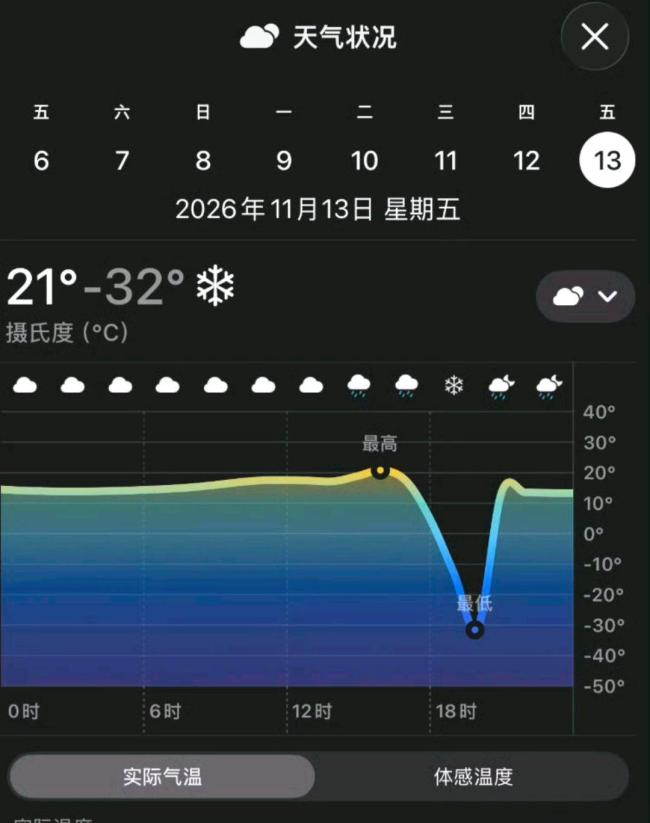
A frightening number on a screen is not the same thing as a frightening forecast. On November 4, in the early hours of the morning, people using the built-in Weather app on the iPhone found that the minimum temperature for November 13 was labeled as around minus 30°C across Beijing, Shanghai and Xiamen, with some locations pushed all the way down to minus 32°C. The correction came fast: Apple's official customer service said early troubleshooting pointed to a system port abnormality rather than any fault in the handset hardware, that its technical team had completed an emergency fix, and it apologized for the disruption. Up to now the China Meteorological Administration has released no forecast of extreme cold anywhere near those figures, and the readings inside Apple Weather have returned to normal. What readers actually get out of this episode is not a weather story but a judgment method: a two-minute routine for deciding whether a weather screen is describing the sky or describing its own data pipeline.
What happened, and who said what
- The display: dozens of cities, one future date (November 13), and the same implausible minimum of around minus 30°C — as low as minus 32°C in some places.
- Apple's explanation: China News Jingwei reported that Apple's official customer service attributed the problem, after initial troubleshooting, to an abnormality in the system port, confirming that the phone hardware was not at fault and that engineers had already completed the repair.
- The location theory, rejected: Apple customer service denied that the data had jumped to another region. Its reasoning was cleanly logical — if positioning had drifted, the days around November 13 should have looked wrong too, while the anomaly here was pinned to one specific date instead of being a continuous location error.
- The meteorological reality check: The Beijing News reported that a staff member at the China Meteorological Administration said that if weather this extreme were genuinely approaching, meteorological authorities would certainly notify the public in advance; as of now, no such extreme low-temperature forecast had been published.
- The blunt one-liner: the Public Meteorological Service Center of the China Meteorological Administration, answering through its official China Weather account, said there is simply no such temperature difference, and told the public not to worry.
- Where things stand: currently, the temperature data for the affected dates in the Apple Weather app is displaying normally again.
The shape of the error is the tell. Real cold waves arrive as a slope across several days and differ from city to city; a pipeline fault arrives as a flat, repeated constant stamped onto one column of a table. Seeing minus 32°C in both a coastal Fujian city and a northern metropolis is not a weather signal — it is a software signature.
Three screens, three jobs: how the sources compare
Most people check the weather through one of three layers. They are not interchangeable, and knowing which layer broke changes what you should do next.
| Layer | What it really is | Strongest at | Weak spot | Trust it for |
|---|---|---|---|---|
| Apple Weather app (preinstalled on the iPhone) | A presentation front end. It assembles third-party forecast feeds rather than producing its own official outlook; Apple's own support note states that on iOS 15.2 or earlier some temperature and precipitation data was supplied by The Weather Channel (support.apple.com, document 105038). | Convenience: zero install, widgets, hourly layout, one glance on the lock screen. | Single points of failure upstream — an interface port, a cache, a partner feed — surface as wrong numbers on a perfect-looking screen. | Routine dressing choices and quick hourly checks. |
| Official meteorological channels (China Meteorological Administration, National Meteorological Center, the China Weather account) | The authoritative source of warnings and public forecasts for the country. | Warning issuance. China runs a four-tier, colour-coded severe-weather ladder — red most severe, then orange, yellow and blue (english.www.gov.cn). | Not designed as a slick daily app; fewer customization options on third-party devices. | Anything involving risk: travel, outdoor work, school closures, a screenshot you are about to repost. |
| Commercial third-party weather apps | Independent front ends, usually on different provider stacks. | Cross-checking. Independent accuracy audits, including ForecastWatch's Global and Regional Weather Forecast Accuracy Overview 2021-2024, found The Weather Channel to be the most accurate provider overall globally (forecastwatch.com). | Different apps can still share the same upstream feed, so agreement is not proof. | A second opinion when one app shows an outlier value. |
One structural detail explains why an Apple Weather fault tends to hit so many people at once. Apple's forecast stack has consolidated over the past decade: it absorbed the hyper-local technology of Dark Sky after the 2020 acquisition and now exposes its data through the WeatherKit API, which replaced the retired third-party Dark Sky interface on March 31, 2023, as reported by Kuaikeji (chinaz.com). Consolidation is efficient, but it means one upstream glitch propagates to every widget and lock-screen card in the same second.
Not the first crack in the pipeline
Placing this incident in a longer list makes the trade-off clearer. On April 28, 2026, Apple's own system status page logged a service interruption for Apple Weather that began at 22:45 Beijing time and was resolved at 2:30 on April 29 — roughly 3 hours and 45 minutes during which some users saw an endless loading spinner and others saw no temperature or precipitation figures at all (macrumors.com; finance.sina.com.cn). No technical cause was published for that outage either. Reporting at the time also pointed at the supply chain rather than at Apple's servers, noting that a partner data platform experienced its own server problems, and that some users were advised to restart the handset or reset network settings.
Compare the two failure modes, because the right response differs:
- Blank data (the April case): the app cannot reach the feed. Local actions — reopen the app, refresh, restart, switch between mobile data and Wi-Fi — can genuinely help.
- Plausible-looking wrong data (the November 4 case): the app is functioning exactly as designed and faithfully rendering bad input. No amount of restarting will help; only the upstream fix will, and in this instance the repair was completed by Apple's technical team.
The free sanity check almost nobody uses
Extreme cold is not something a national weather service keeps quiet about. In China, cold-wave alerts move up a four-step colour ladder — blue, yellow, orange and red, with red the most serious (english.www.gov.cn). That gives any reader a zero-cost verification test: an app claiming a minimum of minus 32°C in early November for a city on the southern coast should be accompanied by a red-level warning covering that region. If no warning exists, the burden of proof sits with the app, not with the meteorological authorities.
Common misconceptions
- "My iPhone must be broken." No. Apple's official customer service stated the cause was a system port abnormality, explicitly not a hardware failure.
- "My location drifted to another region." Denied by Apple customer service, on the reasoning that a positioning error would corrupt neighbouring dates as well.
- "The preinstalled app is an official weather authority." It is a delivery layer over external feeds; official warnings originate with meteorological authorities.
- "Deleting and reinstalling will fix it." Local resets address local faults. A source-side data problem resolves only upstream.
- "The screenshot is harmless." Corrections rarely travel as far as the original image — which is exactly why the China Weather account felt obliged to answer with a flat denial that such a temperature gap exists.
A two-minute verification checklist
- Look at the date spread. One bad day inside otherwise normal rows suggests software; several consecutive days trending downward suggests weather.
- Look at the city spread. Identical extremes in climatically different places are the fingerprint of a bug.
- Ask your own climate knowledge. Xiamen is a subtropical coastal city; treat any deep-freeze figure there as guilty until proven innocent.
- Open one independent source. A commercial app or the official channel is enough — but remember that two apps drawing on one provider are not two witnesses.
- Check for an official warning colour. No alert on the scale being claimed means the claim is unsupported.
- Check the vendor status page. Apple maintains a system status page covering the weather service; it is the fastest way to learn whether you are one of many or the only one.
- If nothing reconciles, wait and refresh. Reopening the app after service restoration is usually all that is required — as was the case once the November 4 fault was repaired.
Frequently asked questions
Was this a forecast error or a display error?
A display and data-delivery error. The China Meteorological Administration published no such extreme low-temperature forecast, so there was never a real forecast to get wrong.
Should I stop using the built-in app?
Not necessarily. Keep it for the daily glance — its convenience is real — but promote official meteorological channels to final authority for anything involving risk, and keep one independent app as a tiebreaker.
Is Apple Weather's underlying data generally unreliable?
No evidence supports that broad conclusion. Its principal global feed has topped independent accuracy audits, and the November 4 incident was a delivery fault on a single date, not a systemic forecasting weakness.
The number still looks wrong on my phone. What now?
Force-refresh the screen, reopen the app, toggle the Weather app's location permission, and switch networks. If the figures persist after service restoration elsewhere, report the case rather than sharing the screenshot.
Can we correct you if something here is off?
Yes. Corrections and follow-up questions on this story can be sent to the IT Insights editorial desk at contact@itinsights.com.
The verdict: match the source to the decision
- Deciding your morning jacket: the preinstalled app, no second opinion needed.
- Deciding a trip, an outdoor shift, or a heating plan: official meteorological channels and any issued warning colour, full stop.
- Deciding whether to repost a dramatic screenshot: verify first. That is the step at which a minus 30°C glitch stops being a joke and starts being misinformation.
Weather apps have quietly become infrastructure: hundreds of millions of people act on a number they never interrogate. The November 4 episode is a useful, low-cost lesson in that gap. The faulty figure was fixed within hours, the apology was issued, and the official position — that no such extreme cold was ever forecast — was delivered without drama. What is worth holding on to is the habit underneath it: read the pattern before you read the number, and let the authority that owns the warning own the final word.
Reported by James Hartley for ItInsightsWorld. Sources consulted: China News Jingwei, The Beijing News, Apple Support document 105038, english.www.gov.cn, forecastwatch.com, macrumors.com.