
ItInsightsWorld AIapplications Playbook: How a three-watt NPU Turns Raspberry Pi 5 into a Local Vision and Language System
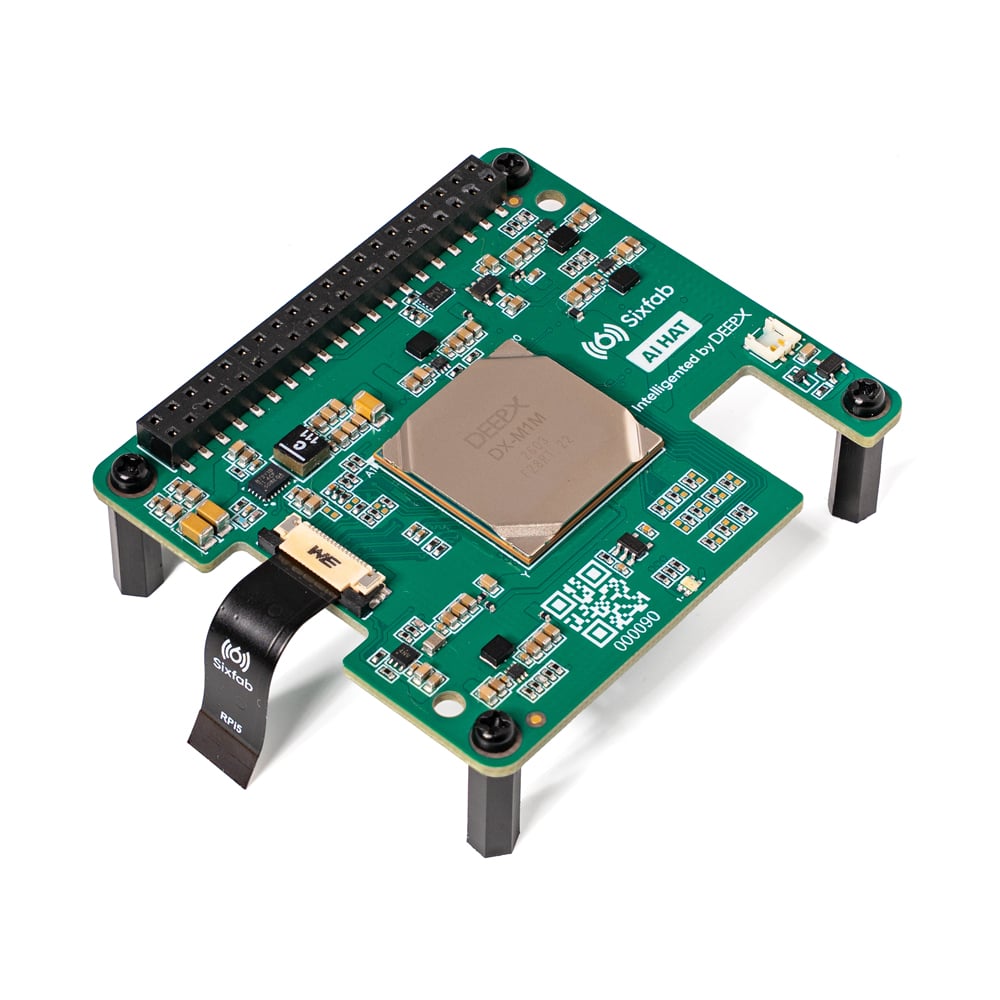
For product teams, the useful question is not whether a board can run a model once, but whether it can run the right model continuously, locally, and within a fixed power envelope. Raspberry Pi has helped millions of engineers, students and makers explore AI development. On Raspberry Pi 5, options include the AI HAT+ and HAT+ 2, along with boards from the wider Raspberry Pi ecosystem. This ItInsightsWorld AIapplications guide examines the Sixfab AI HAT+ for Raspberry Pi 5, built around DEEPX DX-M1M, and explains where a three-watt NPU is a practical fit for local vision, compact VLM and SLM work while the Raspberry Pi CPU keeps responsibility for camera handling, application logic, connectivity and device control.
Why three watts become the real design constraint
Top-line compute numbers are easy to compare, but an edge product usually fails or succeeds on power, heat, enclosure size and the headroom left for the rest of the system. The Sixfab AI HAT+ adds 25 TOPS of dedicated NPU acceleration while leaving the Raspberry Pi host responsible for non-AI tasks. The article by Sixfab and DEEPX emphasizes that the accelerator can remain around 3 W under sustained NPU load, a condition that can make smaller passive or lightly cooled designs possible for always-on applications.
ENGINEERING NOTE: The ~3 W figure refers to typical sustained NPU power for the 25 TOPS DX-M1M option, not complete system wall power. Teams should measure the final Raspberry Pi 5 setup with its actual camera, storage, workload and cooling.
One NPU, three classes of application intelligence
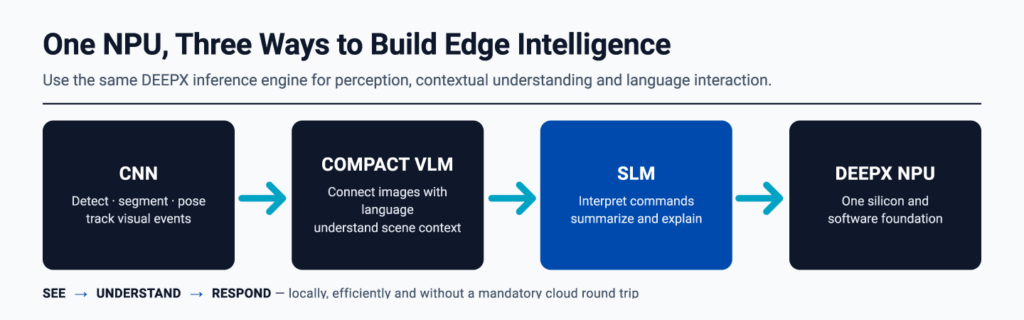
Most products begin with perception, then add context and finally an interface. The DEEPX platform is positioned for that progression with one toolchain and one module family. The relevant application classes are:
Perception layer: CNN workloads
Object detection, classification, segmentation, pose estimation, depth and image enhancement convert camera pixels into structured events. The DEEPX ModelZoo includes pre-optimised examples such as YOLO-family detectors, segmentation and pose models. DX-Stream helps assemble them into GStreamer-based camera pipelines.
Context layer: compact VLM workloads
A compact vision-language model can describe a scene, answer a focused question about an image, or interpret an event in natural language locally. The original positioning is that the data can stay on the device.
Interface layer: SLM workloads
A small language model can interpret a user command, summarise local events, or generate a concise explanation. That creates a natural interface for cameras, robots and machines without routing every interaction through the cloud.
Memory check: model size feasibility
Language models at the edge first raise a memory question: can the module hold the model and workload? The DX-M1M module carries 2 GB of dedicated on-module LPDDR4x, which the source describes as comfortable for VLM and SLM workloads alongside vision models.
Accuracy-aware deployment is more important than a peak benchmark
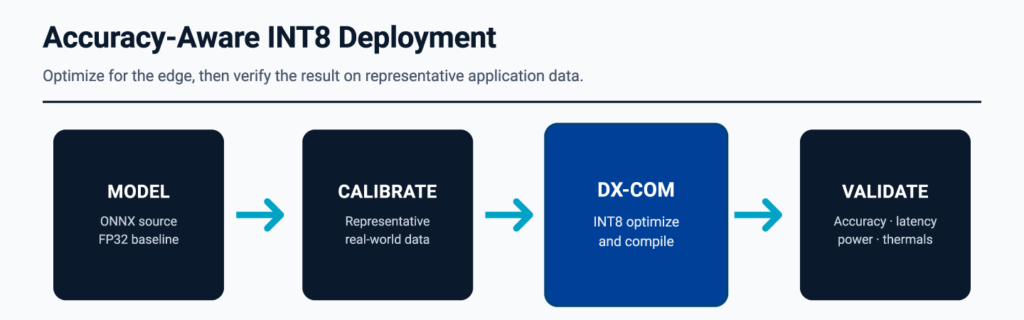
Edge AI only helps if the model remains correct under the images and conditions that the application actually sees. DEEPX treats INT8 optimisation as an accuracy-aware process, not a single conversion step. A credible deployment review should check both efficiency and retained accuracy.
- Record an FP32 accuracy baseline and define the application metric that matters.
- Calibrate with representative data from the real deployment environment, not only clean sample images.
- Compile and optimise the supported ONNX model with DX-COM into a portable .dxnn deployment artifact.
- Compare accuracy, latency, power and thermal behaviour on the final Raspberry Pi 5 system.
Low light, glare, motion blur, occlusion and unusual angles are the difficult conditions edge cameras meet. Those conditions should define the acceptance test.
Benchmark snapshot for Raspberry Pi 5
The source reports figures measured on a Raspberry Pi 5 (8 GB) running the shipping Sixfab software release, comparing the DX-M1M and DX-M1 NPUs:
| Workload | DX-M1M (NPU) | DX-M1 (NPU) |
|---|---|---|
| mobilenet_v2, 240×240 | 2361 FPS | 3223 FPS |
| deeplabv3plus, 512×512 | 155 FPS | 231 FPS |
| Qwen3-1.7B, 96 prefill tokens | TTFT: 599.04 ms TPS: 4.64 tok/s | TTFT: 544.58 ms TPS: 11.60 tok/s |
* The DX-M1 uses LPDDR5, while the DX-M1M uses LPDDR4X; the performance difference results from their memory bandwidths.
Quick-start checklist from boot to first inference
The fastest way to judge the platform is to verify the hardware, run a packaged model and watch the NPU under load. On Raspberry Pi OS, follow this sequence:
- Install the repository package with
sudo apt update && sudo apt install apt-repo-sixfab. - Install the runtime package with
sudo apt update && sudo apt install sixfab-dx. - Run
dxrt-cli -sto confirm device and software status. - Run
run_hello_worldto execute a packaged example. - Run
dxtopto observe the NPU in real time.
From the first inference, choose an optimised ModelZoo workload or bring a supported ONNX model through DX-COM. The resulting .dxnn file runs through DX-RT C++ or Python APIs, while the Raspberry Pi application continues to handle cameras, business logic, user interfaces, networking and control.
Software stack at a glance for application teams
| Component | Application-team view |
|---|---|
| DX-COM | Optimises and compiles supported ONNX models into DEEPX .dxnn artifacts. |
| DX-RT | Runs .dxnn models through C++ or Python APIs on the target device. |
| DX-Stream | Builds GStreamer-based capture, inference and post-processing pipelines. |
| ModelZoo | Pre-optimised examples across detection, classification, segmentation, pose and more. |
| dxrt-cli / dxtop | Shows device status, utilisation, temperature, clocks and memory at a glance. |
Application scenarios from workbench pilots to production pilots
Home and maker proof cases
Start with small, closed-loop tasks. A workbench camera can recognise when a 3D print has failed and send a snapshot with a one-line description. A front-door camera can distinguish a courier, a neighbour's cat and someone loitering, then summarise the day's events locally. A garden or pet monitor can alert only about events worth seeing. In each case, the same loop appears: a CNN detects the event, a compact VLM adds context, an SLM explains it or interprets the next command, and the Raspberry Pi application decides and acts.
Industrial and commercial deployment patterns
The same pattern can scale into product requirements: continuous local detection in smart cameras with reduced cloud dependence; low-power visual quality and safety monitoring beside a production line; perception and compact multimodal intelligence on robots while Raspberry Pi runs ROS 2 and control logic; and privacy-aware occupancy and behaviour analytics in retail and smart spaces.
Where this local AI route is not the right fit
The platform does not try to replace cloud inference. Applications that need broad world knowledge, very long conversational context or continuous learning will run better where compute and memory are effectively unconstrained. The DX-M1M is best for tightly scoped, always-on intelligence next to a camera or sensor. In those cases, privacy, latency, offline operation and a single-digit-watt power budget are the requirements that decide the design. That honest boundary helps application teams know when the platform is trustworthy inside its range.
Decision checklist for AIapplications planners
- Use the NPU only for workloads that the CPU cannot meet within the required latency, power or accuracy budget.
- Start with a small set of camera events that must run continuously.
- Validate with real deployment data, not only clean benchmarks.
- Measure system-level power, heat and enclosure headroom, not only ~3 W NPU behaviour.
- Keep language models compact and scoped to local summarisation, explanation or command interpretation.
Common misconceptions the original material corrects
- Peak TOPS is not the same as a deployable product profile.
- INT8 optimisation is not a one-step conversion that automatically preserves application accuracy.
- Not every edge workload needs a dedicated accelerator; many still belong on the CPU.
- Local AI does not require all intelligence to live on the device; long context, broad knowledge and continuous learning may remain cloud-side.
FAQ: practical questions for product owners
Can the Sixfab AI HAT+ replace the Raspberry Pi CPU?
No. The intended split is that the NPU handles accelerated inference while the Raspberry Pi CPU continues to manage cameras, application logic, connectivity and control.
Can a compact VLM or SLM run with vision models?
Yes, within the stated module boundary: the DX-M1M carries 2 GB of dedicated on-module LPDDR4x, which the source describes as comfortable for VLM and SLM workloads alongside vision models.
Is three-watt power enough for a complete system?
The ~3 W figure refers to typical sustained NPU power for the 25 TOPS DX-M1M option, not complete system wall power. Teams still need to measure the full Raspberry Pi 5 configuration.
Action recommendations before a pilot
- Select one perception task with a measurable failure condition, such as an object event, segmentation boundary, pose check or abnormality alert.
- Record FP32 accuracy and then test INT8 calibration against representative images from the site.
- Use DX-COM to produce the .dxnn artifact and verify DX-RT C++ or Python integration on the target board.
- Run the packaged example through run_hello_world, then observe sustained behaviour with dxtop and dxrt-cli -s.
- Expand from CNN to compact VLM and SLM only after the perception loop is stable within power and thermal limits.
Community, documentation and availability
Everything needed to go deeper is public in the material described by Sixfab and DEEPX: DX-AllSuite and the ModelZoo are on GitHub, while the DEEPX Developer Portal hosts documentation, guides and support channels where developers can ask questions and file issues.
The 25 TOPS Sixfab AI HAT+ for Raspberry Pi 5 is available now from Sixfab, with the 13 TOPS version expected to launch toward the end of 2026. The Sixfab AI HAT+ Quickstart and DEEPX DX-M1 product information provide further detail.