
ItInsightsWorld AIapplications Review: Survival LLM Offline Deployment for Mac and Windows
When connectivity cannot be assumed, application owners need an assistant that remains usable on endpoint hardware. Survival LLM is one such local tool, paired with an emergency reference set that can be searched without network access. Its distribution footprints are 212 MB for Mac and 25 MB for Windows; setup is the only phase that calls for a connection. The project also exposes its source under a free, open license, which makes its architecture inspectable but does not remove the need for user verification.
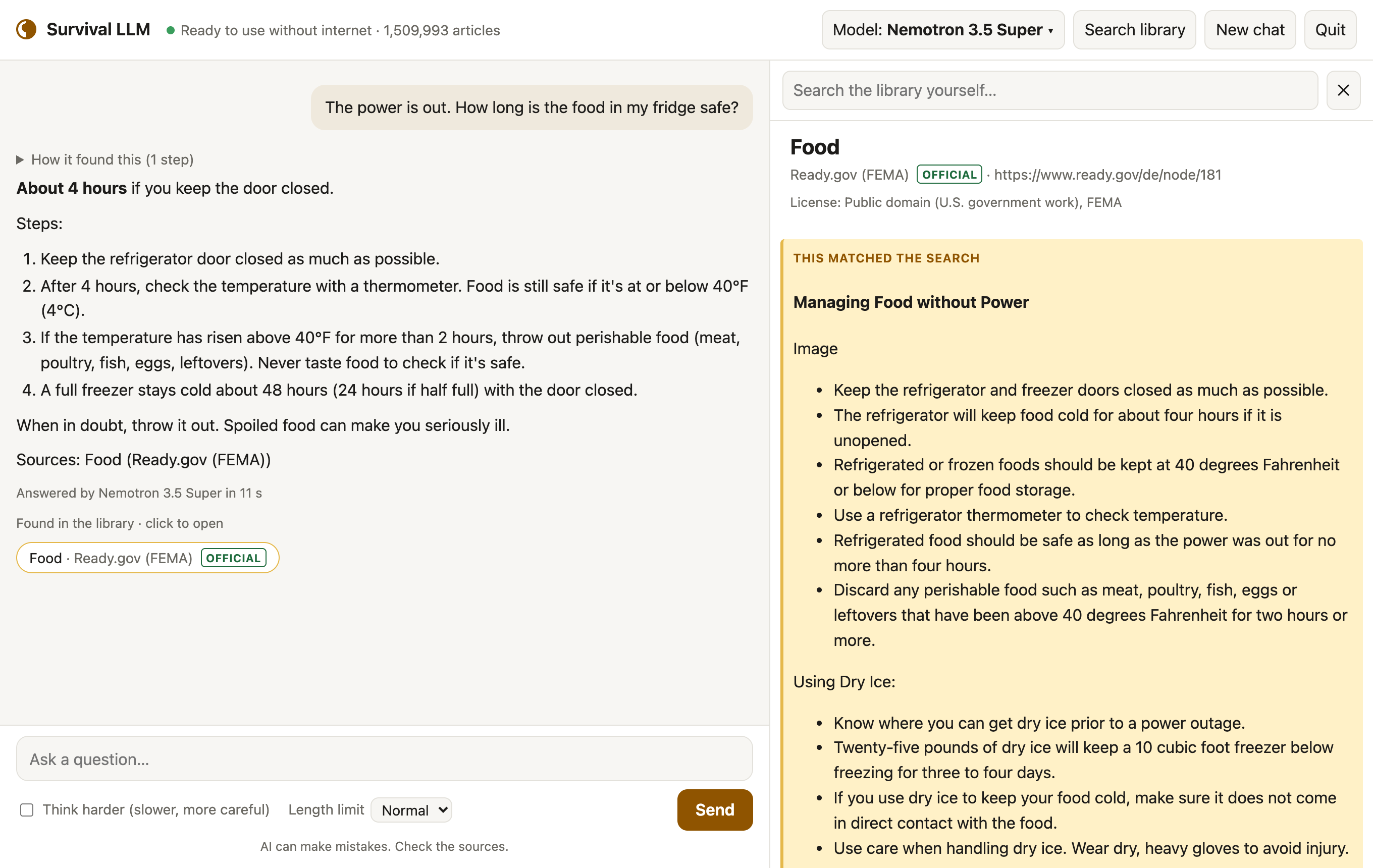
Deployment case: outage support as an AI application scenario
For IT teams, product managers, and operations leads, the useful question is not which model family sits underneath, but whether the assistant can guide ordinary staff through a power loss, a first-aid prompt, or a water-purification task while the internet is unavailable. In this scenario, the value driver is availability plus traceability. The assistant stores the model and reference material on the device, so nothing asked leaves it. Each answer names the articles it consulted, and clicking one reveals the underlying article with the exact passage highlighted. That citation behavior is important because smaller models make more mistakes, and the app always shows the source so a user can check before acting.
The evaluation also benefits from an explicit test frame: a set of blackout and first-aid questions drawn from official guidance. The app does not present the answer as an unreviewable black box; it presents an answer and a verification path. For emergency applications, that combination is the difference between a demo and a workflow an operator can trust enough to use while staying cautious.
Core capability checklist
- Offline operation: the AI model and library are stored on the user's computer, and once setup is complete, it can work without internet.
- Visible sourcing: each answer lists the articles it read; clicking one lets the user read the reference and see the exact passage highlighted.
- Emergency subject coverage: the collection includes medical references, FEMA and CDC guidance, survival manuals, how-to guides, repair guides, and about 930,000 Wikipedia articles.
- Local-only privacy posture: there is no account and no tracking; questions never leave the computer once the app is set up.
- Personal document extension: users can add PDFs, Word documents, ebooks, and notes, such as a generator's manual or a family emergency plan, and the AI searches them too.
- Update behavior: at the bottom of the app, Check for updates installs a new version in one click and keeps models, library, and files.
- Power profile: on a MacBook Pro, measurements showed about 100 W while it answers, for 5 to 40 seconds per question; a full battery answers roughly 100 to 300, and it runs easily on a small generator or power station.
Model selection and emergency test comparison
The application is identical across supported platforms. On launch, it checks the computer's memory and downloads the AI model that fits the device, so more memory can mean a smarter model. This is a practical deployment pattern: the installer does not force the user to select a model manually, and the selection logic is tied to local resources rather than a fixed cloud tier.
| Device class | Selected AI model | Emergency test result | Model download |
|---|---|---|---|
| Mac with 128 GB or more memory | NVIDIA Nemotron 3.5 Super | 21 of 22 right | 80 GB |
| Mac with 32–96 GB | Qwen3.8 27B | 21 of 22 right | 18 GB |
| Windows PC with 32 GB or more | NVIDIA Nemotron 3.5 Lightning | 19 of 22 right | 25 GB |
| Mac or PC with 16–31 GB | IBM Granite 4.2 8B | 14 of 22 right | 6 GB |
"Right" means the model got the main point of official guidance right on 22 blackout and first-aid questions. These results were graded blind in tests on an earlier build of the library. Because smaller models make more mistakes, the app always shows the source to check.
Storage, library, and compatibility requirements
Before a pilot team commits to a device, it should plan storage separately for the app, the model, the reference library, and temporary expansion during installation. The library is a 9 GB download for everything, or 19 GB once installed, or 1.3 GB, becoming 3 GB installed, without Wikipedia and iFixit. Free disk space needed is the model's size plus 5 GB, plus about 27 GB while the full library installs, or 10 GB for the smaller one. Compatibility requires Apple Silicon Macs (M1 or newer) with macOS 14 Sonoma or newer, and 64-bit Windows 10 or 11.
Setup tutorial in three steps
Depending on the computer and the internet speed, setup can take 20 minutes to about 2½ hours. Clicking only takes about 5 minutes; the rest is downloading.
- Download Survival LLM for Mac or Windows, then unzip it. On Windows, right-click the zip and choose Extract All.
- Launch it. On a Mac, double-click Survival LLM. On Windows, open the extracted folder and double-click Survival LLM.bat.
- Complete the setup. The app opens in its own window and downloads the AI engine, which is built into the Mac app, plus the AI model that fits the computer and the reference library; let the process finish while online.
On first open, the computer warns the user because the app is not sold through an app store. On Mac, click Done, open System Settings > Privacy & Security, scroll down to "Survival LLM was blocked", click Open Anyway, and confirm with the password. This only needs to be done once. On Windows, click More info, then Run anyway.
Reference library contents
The library holds plain-text copies of openly licensed, some for non-commercial use only, and public-domain references. Search response is described as a fraction of a second, which matters in a triage-like workflow where a user needs confirmation rather than a long wait.
- about 930,000 of Wikipedia's most-read articles
- WikiMed medical encyclopedia
- MedlinePlus, from the U.S. National Library of Medicine
- UK Medicines A to Z, public sector information
- WikEM emergency medicine
- Ready.gov (FEMA) emergency guides
- CDC travelers' health
- U.S. military medicine and survival manuals
- risk references for estimating micromorts: life tables and U.S. death rates
- wikiHow how-to guides
- iFixit repair guides
- Appropedia, appropriate technology
- Q&A on home repair, cooking, gardening, the outdoors and ham radio from Stack Exchange
Every article shows the license of its own source; see the full list with licenses.
FAQ for application owners
Does the assistant work without internet after installation?
Yes. You only need internet during setup; after that it needs none, because the model and library remain on the device.
Can users rely on an answer without reading the source?
No. AI models make mistakes, and small models make mistakes more often. The safer workflow is to treat the answer as a route into the cited reference, then confirm the passage before acting.
What happens to questions and added files?
They stay local. There is no account and no tracking, and added PDFs, Word documents, ebooks, and notes remain on the user's computer.
Should teams choose a model by themselves?
The app handles this during launch by checking available memory and selecting the model that fits. The table above shows how memory tiers change both model selection and test performance.
Is it suitable for high-risk emergency decisions?
It is useful as a local guide and source browser, especially when official guidance may not be reachable. It is not a replacement for professional judgment when immediate danger exists, because model output can be wrong.
Common misconceptions about offline AI rollouts
- Offline means infallible. It does not. Local execution improves availability, not correctness. The built-in citation path is there to reduce overtrust.
- A small download guarantees acceptable quality. The library can be trimmed to 1.3 GB without Wikipedia and iFixit, and model choices change with memory. Smaller or lower-memory configurations can produce more mistakes.
- Open source means every embedded reference can be used freely. Source content shows its own license, and some items are limited to non-commercial use.
- Power draw makes field deployment impractical. The measured MacBook Pro figure is about 100 W during answering, but a full battery can handle roughly 100 to 300 responses, and a small generator or power station is described as sufficient.
Action recommendations for an ItInsightsWorld AIapplications pilot
- Audit the device inventory for memory, disk space, and operating-system compatibility before promising deployment. Use the table to map Mac with 128 GB or more memory, Mac with 32–96 GB, Windows PC with 32 GB or more, and Mac or PC with 16–31 GB.
- Decide whether the pilot needs the full library or the smaller library without Wikipedia and iFixit, then reserve the extra space required during installation.
- Run a documented 22-question review with blackout and first-aid prompts, and require every reviewer to open at least one cited article before accepting the answer.
- Add the organization's own PDFs, Word documents, ebooks, or notes only after checking licensing, retention, and local-storage expectations.
- Train users on the update workflow, the first-run security prompt, and the expectation that sources, not model confidence, are the final check.