
ItInsightsWorld AIapplications: Meta Style Sketch Builds a Virtual Wardrobe from Social Photos
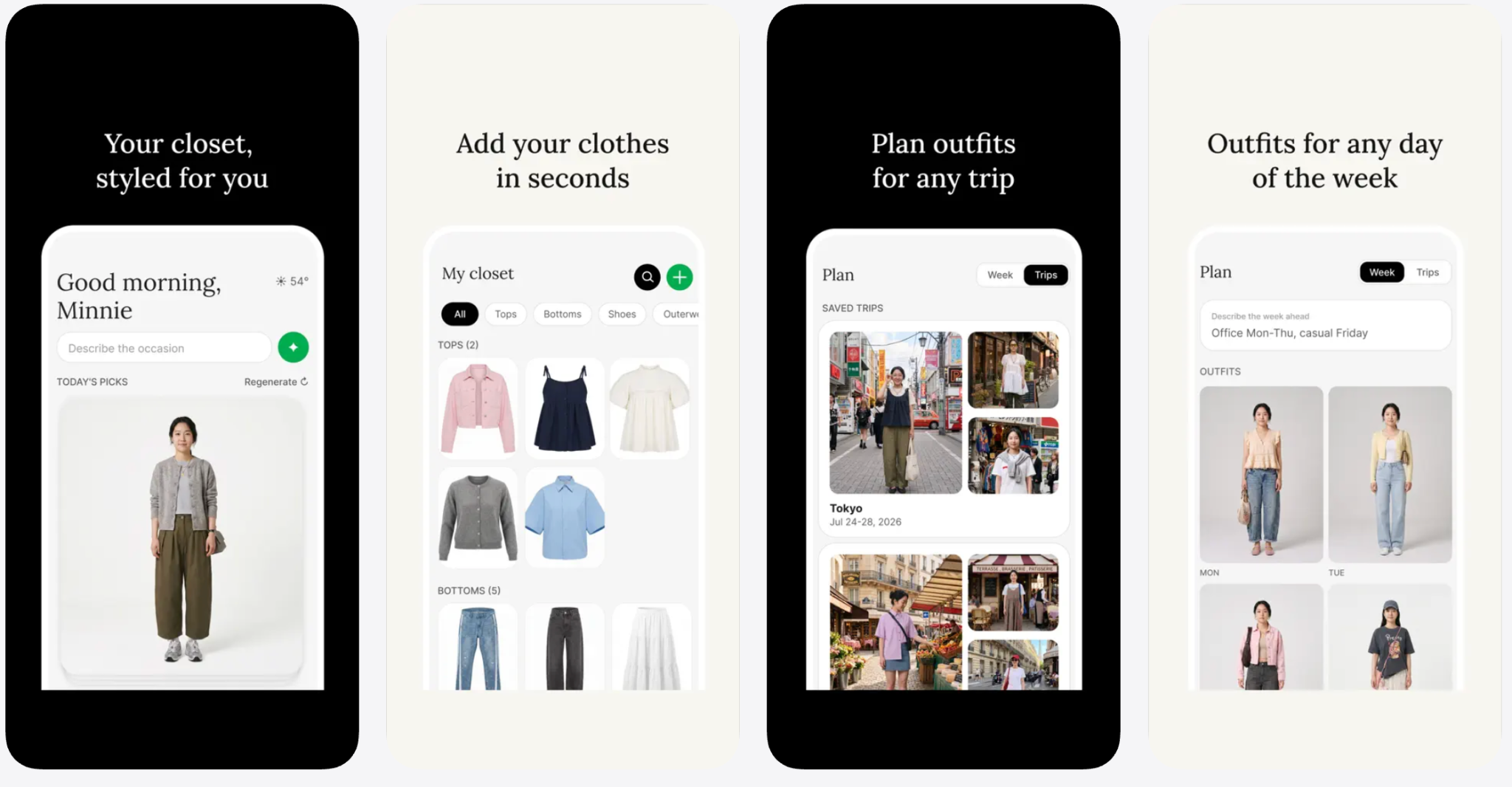
For application-focused teams, Meta’s Style Sketch is a practical example of embedding generative recommendation into a personal routine. It uses existing visual records from Facebook or Instagram, as well as item photos, short videos, or phone-album imports, to assemble a virtual wardrobe. The result is an AI-assisted workflow for outfit planning, weather-aware suggestions, and travel packing, without requiring users to begin with a fully catalogued closet.
Why this case fits the AIapplications column
The interesting part is not a model benchmark or a new neural architecture. It is the placement of AI in a real user process: social photos become structured fashion inventory, user preferences become recommendation inputs, and generated suggestions become shareable daily or trip-oriented outputs. That pattern is useful for enterprise readers who need to assess whether an AI application can turn already available content into an operational decision aid.
What Style Sketch does with existing photos
The application can connect to Facebook or Instagram and build the wardrobe from images the user has already shared. It also supports capturing individual clothing items, recording short videos, or importing pictures from the phone gallery. This multi-source input approach lowers setup friction because users do not need to photograph every garment before receiving value.
Outfit generation: style, body shape, weather, and travel
Once the wardrobe exists, recommendations are based on available clothing, the user’s style, and body shape. The interface can render suggestions on virtual models matched to the user’s body type and skin tone. Users can also select one item and request new pairings around it. The tool can combine weather conditions with daily outfit advice. For travel planning, the user enters a destination, trip length, and planned activities, and receives day-by-day outfit and packing suggestions. It also supports browsing trend inspiration and sharing chosen looks with friends.
Step-by-step: how to pilot Style Sketch as a personal wardrobe workflow
- Start with one account connection or one image source: link Facebook or Instagram, import a selected phone-album set, photograph a few items, or record a short video of clothing pieces.
- Build the first wardrobe from the imported or captured content, then review whether the available clothing pool represents your everyday range.
- Set the preference inputs the application uses for recommendations, including style direction and body shape, and verify the virtual model appearance settings.
- Request suggestions for one existing item and compare generated pairings against your own judgment.
- Test weather-aware daily advice before relying on it for a schedule.
- Try one travel scenario by entering the destination, number of days, and planned activities, then inspect the day-by-day outfit and packing plan.
- Use the sharing feature only after reviewing the suggested outfit, and keep trend browsing as an inspiration layer rather than the decision layer.
Input-method comparison
| Input method | What the application uses | Best fit | Point to watch |
|---|---|---|---|
| Facebook or Instagram import | Photos the user has already shared on those platforms | Faster setup for users with fashion-relevant image history | The shared history may be incomplete, inconsistent, or more public-facing than desired |
| Individual item photos | Captured clothing pieces | More controlled wardrobe inventory | Requires clearer photos of items that matter to recommendations |
| Short video capture | Video content showing clothing | Useful when items need motion or multiple angles | Users may need to review which parts are interpreted as wardrobe content |
| Phone-album import | Selected local images | Best starting point for a limited pilot | Private images should be selected deliberately |
Checklist before using the app
- Decide whether the wardrobe should be built from social posts, personal photos, captured items, or a mix.
- Check which regions currently support the app: Indonesia, Singapore, and Thailand.
- Install the iOS or Android version only if you are comfortable with a free app that may process personal information and user content such as photos and videos.
- Review privacy-related disclosures, including the Google Play note that data is encrypted during transmission and that users can request data deletion.
- Use a small test set of images before connecting a broad social account.
- Evaluate output quality with known items and planned activities rather than judging only by visual appeal.
Scenario case: planning a trip without a pre-catalogued closet
A traveler in one of the supported regions could use the application as an AI-assisted packing helper. Suppose the wardrobe is partly assembled from Facebook or Instagram images, then supplemented with photos of a jacket, trousers, and shoes. The user enters a destination, trip length, and activities such as meetings and casual evenings. The application can generate daily outfit combinations and a packing plan based on those inputs. This example illustrates the workflow described by the feature set: it converts available clothing images into contextual suggestions, but the practical value still depends on the completeness of the wardrobe and the accuracy of the stated preferences.
Availability and privacy boundaries
The app is currently available on iOS and Android in Indonesia, Singapore, and Thailand, and can be downloaded free. Meta has not stated whether it will be released in other regions. The app-store privacy disclosure notes that Style Sketch may process personal information and user content, including photos and videos. The Google Play page states that data is encrypted in transit and that users may submit a deletion request. For a consumer application that analyzes visual history, those disclosures define the most important risk boundary: convenience comes from using existing content, and that content may be processed.
Common misconceptions
- A virtual wardrobe is not a clothing store: the application organizes and recommends from images and inputs provided by the user.
- Recommendations are not independent of input quality: the wardrobe can be built from social photos, item photos, videos, or album images, and those sources determine what the tool can work with.
- The output is not only an outfit list: it can include virtual model rendering, weather-based suggestions, travel plans, trend browsing, and sharing.
- Free availability should not be read as data absence: privacy disclosures state that personal information and user content may be processed.
Action recommendations for readers evaluating this kind of AI application
- Treat Meta Style Sketch as a reference pattern for using existing visual data as the cold-start input for an AI assistant.
- For pilots, start with a narrow image set and one clear task, such as daily outfit suggestions or a short trip plan.
- Measure usefulness by workflow reduction, such as how much manual cataloging or packing effort is avoided, rather than by novelty alone.
- Document privacy expectations before onboarding, especially when photos, videos, and account content are involved.
- Keep final judgment with the user; use generated looks as candidates to review, not as automatic purchases or commitments.
FAQ
Is Style Sketch an AI fashion app from Meta?
Yes. Meta introduced Style Sketch as an AI fashion application that builds a virtual wardrobe from user-provided or user-linked visual content.
Which data sources can create the wardrobe?
It can connect to Facebook or Instagram, capture individual item photos, record short videos, or import pictures from the phone album.
What can users ask it to do after the wardrobe is built?
Users can get outfit suggestions based on style and body shape, see options on virtual models matched to their body type and skin tone, pair outfits around a selected item, receive weather-aware daily advice, generate travel-day outfit and packing plans, browse trend inspiration, and share looks with friends.
Where can the app be downloaded?
The app is available for iOS and Android in Indonesia, Singapore, and Thailand. Meta has not confirmed whether the rollout will extend to other regions.
What privacy information is disclosed?
The privacy disclosure says the app may process personal information and user content such as photos and videos. The Google Play page says data is encrypted in transit and that users can request deletion.
Bottom line
As an application-layer example, Meta Style Sketch shows how AI can turn scattered visual memories into a structured wardrobe and a set of contextual outfit actions. For ItInsightsWorld AIapplications readers, the lesson is not that social photos alone create value; it is that low-friction data entry, preference-aware recommendation, and task-specific outputs can make an assistant feel usable. The remaining questions for any similar product are straightforward: Does it use available content responsibly, can the user verify the inputs, and does the output reduce the effort of planning what to wear?