
ItInsightsWorld AIapplications Review: Firefox Smart Window Tests Automated Form Filling
Firefox is testing one new AI feature called Smart Window, also described as an Intelligent Window. Mozilla presents it as a tool that can understand webpage content and help users complete online forms by entering information into fields that would otherwise require repeated manual input. For AIapplications readers, the relevance is practical: this is an application-layer experiment in which a browser assistant is not asked to answer questions, but to perform a small, repetitive web task.
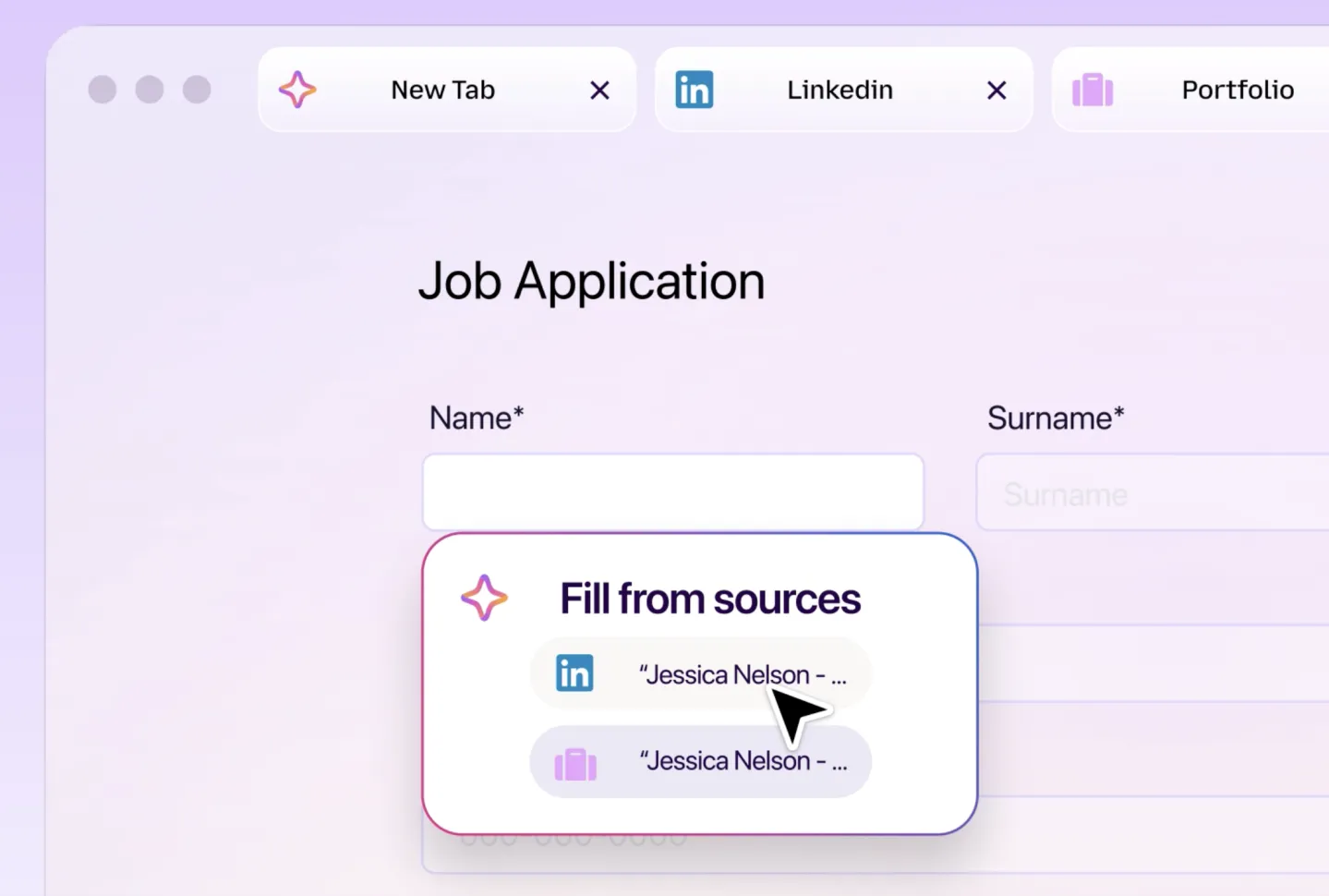
The task being automated: form entry rather than conversation
The demonstration centers on forms. A user can speak to the assistant in natural language, describing a goal such as filling a job application, booking a service, or completing an online registration flow. The system then analyzes the current page, identifies input fields, and maps supplied information into those fields. One key detail is that the user can inspect the information before it is submitted.
What the Smart Window demonstration shows
The example shown by Mozilla is a job application on a website. Smart Window reads the application page, extracts information from materials such as a resume, and places values such as name, contact details, and work experience into the corresponding fields. The page itself becomes the context for the task, while the user remains the final reviewer.
Why this is different from a chatbot sidebar
Mozilla says Smart Window is not only a chatbot. Traditional browser AI sidebars are often used for search and question answering. The tested feature is positioned as an assistant that can understand and operate webpage content, meaning it interacts with form controls rather than only producing text.
Privacy as one of the emphasized design boundaries
Privacy is one of the areas Mozilla emphasizes. The company says the feature will follow Firefox’s long-standing privacy protection principles and aims to keep data use and processing transparent. Users can control the range of information the AI can access and decide which data may be used to complete a task.
Comparison: text assistant versus page-operating assistant
| Dimension | Text-focused browser AI sidebar | Smart Window as described by Mozilla |
|---|---|---|
| Primary role | Answer questions, search, summarize | Understand a live webpage and help complete a form |
| Output mode | Generated text or retrieved information | Suggested entries in webpage fields |
| Interaction target | Chat interface | Current page elements such as input fields |
| Human control point | User reads and follows up | User reviews and can modify content before submission |
| Stated privacy emphasis | Not the focus of this article | Controlled data access scope and transparency are highlighted |
Application checklist for teams evaluating similar AI capabilities
- Identify one repetitive web input workflow, such as registration, applications, support forms, or service requests.
- Map which fields require personal or business data and where that data is stored.
- Define a human review checkpoint before any automated entry is submitted.
- Restrict the information that the assistant can read, mirroring the data-scope control described for Smart Window.
- Track failure patterns, including mismatched fields, incorrect extraction, or user edits.
Step-by-step user path implied by the test
- Open a web page that contains a form.
- Invoke the sidebar-style assistant.
- State the task in natural language, such as asking it to complete a job application.
- Provide or reference information such as a resume.
- Let the assistant analyze the page fields.
- Review the proposed entries before they are submitted.
- Edit or confirm the information to keep the human in control.
Industry signal: multiple vendors are moving AI toward execution
Multiple browser vendors and AI companies are trying to move AI from providing information to executing tasks, such as shopping help, form filling, booking services, and managing online affairs. The Firefox test indicates Mozilla is joining that competition. However, the feature remains in testing, and no official general availability date has been announced.
Common misconceptions to avoid
- This is not a universally released Firefox feature yet; it is still in testing.
- This is not merely another answer box; Mozilla describes it as a capability meant to understand and operate webpage content.
- This is not a fully autonomous agent; the demonstration includes user review before submission.
- This is not a replacement for privacy controls; Mozilla highlights user-controlled access to information.
FAQ
What is Smart Window in Firefox?
Smart Window, also referred to as an Intelligent Window, is the English-language feature name used for Mozilla’s tested browser assistant. It is designed to understand webpage content and help users fill online forms.
What can the assistant do in the demonstration?
In the example shown by Mozilla, it can read a job application page, extract relevant information from a resume, and enter details such as name, contact information, and work experience into the appropriate fields.
Does Smart Window submit forms without permission?
No. The demonstration indicates that the system shows the information it plans to use, allowing the user to inspect and modify the content before submission.
Why does this matter for AIapplications readers?
It matters because form filling is a concrete application-layer use case. If similar assistants become stable, controlled, and transparent, they could reduce manual data entry friction in browser-based workflows.
Action suggestions
For product, operations, and digital teams, the immediate action is to monitor the pattern rather than assume availability. Use the Smart Window demonstration as a reference model when assessing AI form-filling features: define the task boundary, limit data access, require human review, and evaluate whether the assistant is truly completing a workflow or only generating text.