
ItInsightsWorld AIapplications: Document Crunch's CrunchAI Risk Review for Trimble Construction Workflows
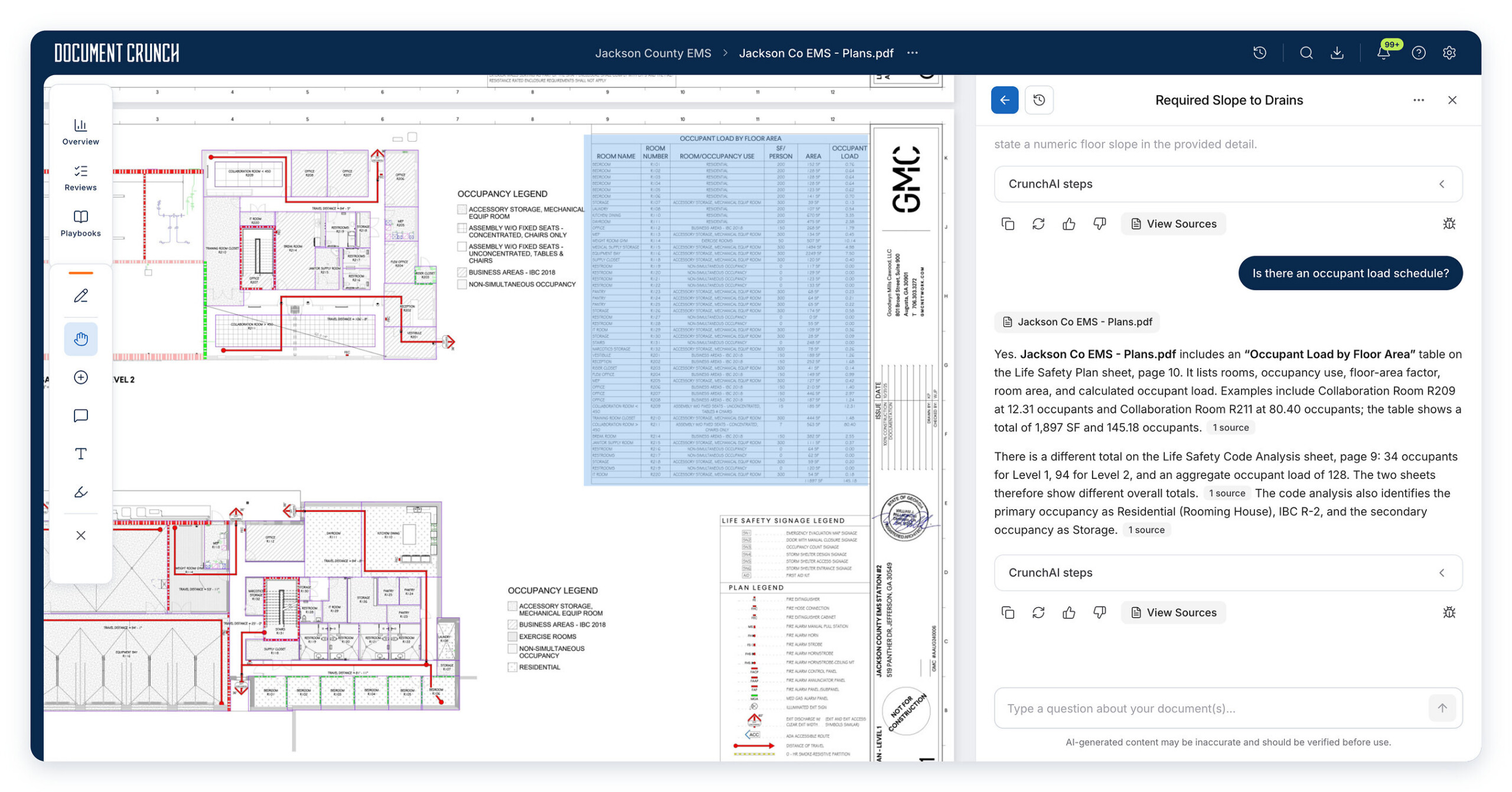
For readers tracking AI application layers, Document Crunch's new construction risk review capability shows where embedded AI can help during precontract document work. The feature is positioned to let project users query a full set of linked construction records—drawings, contracts, specifications, and related documents—so teams can inspect scope gaps, conflicting requirements, and potential risks before a build phase begins.
Case view: a project-level document risk workflow
Document Crunch, a Trimble company, introduced project-level risk intelligence capabilities for contractors. The stated use case is narrow and operational: contractors need to examine construction drawings alongside contract terms and specification content, rather than reviewing each document type separately. CrunchAI is presented as the technology used to search and query those complete project document sets, helping teams surface issues that may otherwise remain hidden across a large set of project files.
Why the workflow needs application-layer structure
General-purpose AI models may have difficulty handling large, text-heavy drawing sheets and linking requirements across multiple project documents. That gap can make contradictions and omissions among drawings, contracts, and specifications harder to detect. CrunchAI is described as built for construction workflows. It can pull relevant language from drawing sets, including notes, allowances, and scope-related statements distributed across multiple sheets, then let users ask cross-document questions through a chat interface.
The release also notes that responses are prepared for construction workflows using pre- and post-processing methods with agentic optimization. Findings are not left as free-form answers alone: users can trace responses back to source documents through citations. In the shared project environment, security and collaboration features support discussion of identified issues, review tracking, and monitoring of risk responses. Teams can move results into standardized reviews and assign follow-up and resolution tasks.
Preconstruction review checklist
- Bid-set checks: confirm whether sheet indexes are complete, whether required sheets or specification sections are missing, and whether discipline-level discrepancies appear during preconstruction.
- Conflict checks: compare drawing content with contract and specification requirements to uncover conflicting instructions, scope gaps, and unclear responsibility boundaries.
- Standard checks: run consistent internal review checks across drawing sets and related documents so teams apply the same baseline.
- Pre-award resolution: settle requirement and scope questions before contract award so fewer open items move into execution.
Comparison table: document review challenge and application-layer support
| Review challenge or need | What the announcement describes | How the application layer responds |
|---|---|---|
| Large, text-heavy drawing sheets | General-purpose AI may struggle to process such sheets. | CrunchAI indexes relevant drawing-set text, including notes, allowances, and scope language spread across sheets. |
| Cross-document contradictions | Connecting requirements across multiple project documents can be hard. | Users can query drawings, contracts, and specifications together and investigate scope gaps or conflicting requirements. |
| Trust in generated findings | Risk review needs traceable evidence. | Responses can be verified through citations linked to source documents. |
| Response preparation for construction workflows | Generic answers may not align with project review tasks. | Pre- and post-processing methods with agentic optimization are used for construction workflow responses. |
| Turning findings into action | Identified issues still require review ownership and follow-up. | Teams can discuss issues, track reviews, monitor risk responses, move findings into standardized reviews, and assign tasks. |
Step-by-step review path
- Define the project document scope: drawings, contracts, specifications, and other linked records.
- Use the chat interface to ask questions across the complete document set.
- Investigate scope gaps and conflicting requirements that emerge from the review.
- Verify each response by following citations to the relevant source document.
- Discuss findings in the shared project environment with security and collaboration controls.
- Track review activity, monitor how risks are addressed, move results into standardized reviews, and assign follow-up and resolution tasks.
FAQ: what this release changes for construction document review
What is the core capability?
Document Crunch has introduced project-level risk intelligence capabilities supported by CrunchAI. The intended use is to let contractors examine construction drawings together with contracts, specifications, and other project documents.
What does the review aim to find?
The capability is positioned to identify scope gaps, conflicting requirements, and potential risks before construction begins.
How is the answer tied to source material?
Responses can be verified through citations linked to source documents, and project teams can discuss and track identified issues in the shared environment.
Is the capability available?
Document Crunch's construction drawings review capability is available to all users. It sits inside existing Document Crunch workflows and supports review of drawings alongside contracts, specifications, and other project documents.
Common misconceptions and risk boundaries
- Not a generic document chatbot. The described capability is built for construction workflows and is intended to connect drawing content with contract and specification requirements.
- Not untraceable output. Source-document citations are part of the described review process, which helps teams validate findings.
- Not a replacement for issue ownership. The workflow includes team discussion, review tracking, risk monitoring, standardized reviews, and assigned follow-up or resolution tasks.
Action advice for application owners
Application owners should start by mapping which drawing sets, contract documents, specification sections, and project records will be queried together. They should also confirm how citation checks will be performed and how review outputs will be routed into standardized checks, issue tracking, follow-up assignments, and resolution monitoring. The goal is to use the capability as a preconstruction risk control, not as an isolated answer engine.
The broader AIapplications takeaway is practical: embedded AI becomes useful when it connects to a defined business problem, preserves traceability, and hands off findings to the people who must close them. In this construction use case, the focus is earlier detection of scope gaps and document conflicts within existing workflows before execution begins.