
Chrome Plus Gmail Plus Gemini: A Task-Aware Autofill Playbook for AI Application Teams
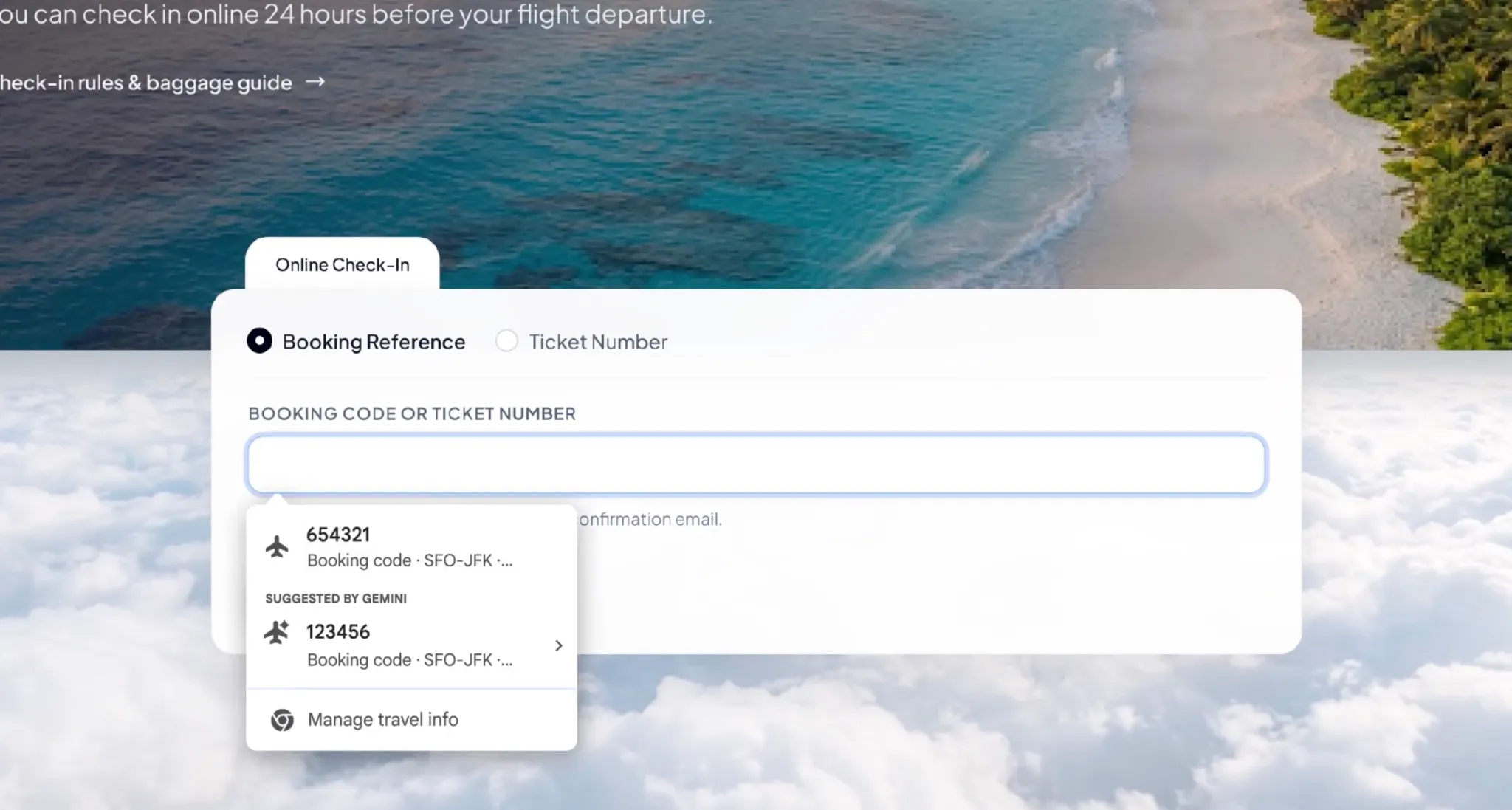
AI features usually get evaluated on capability scores, but they get adopted on something far smaller: whether the model shows up inside a task the user is already performing. Google's enhanced autofill for the Chrome browser is a clean example of that discipline. The task is trivial on paper — fill in a web form — yet the friction is real, the retrieval source is explicit, consent is a precondition, and every suggested value carries its own provenance. For product, operations and digital teams deciding how to embed a model into a workflow, the feature is worth reading as a reference implementation rather than as browser news.
What actually changed at the application layer
For years, autofill behaved as a memory tool. The Chrome browser stored what a person had typed before and replayed it on request: name, address, phone number, credit card details. The new capability, built on Gemini and Personal Intelligence, moves the system from remembering information the user has already saved to finding the information needed for the current task from connected services. Concretely, Chrome can now reach into the user's Gmail mailbox while a form is being filled and propose values such as order numbers, package tracking numbers and flight booking details, matched against the fields detected on the current page.
Two design choices matter more than the added field types. First, Personal Intelligence only operates with user authorisation, drawing on information held in the connected Google services to assist a specific task — the model is not given a free-standing view of the mailbox. Second, the AI output arrives as a candidate entry inside the existing autofill menu, with the source of each suggestion displayed, so verification and refusal are part of the interaction rather than a separate review step. Narrow scope, explicit permission, visible provenance, one-click veto: that is the pattern application teams can copy.
Two scenarios, decomposed
Case 1 — parcel enquiry on a logistics site
Map the manual chain first: the user opens a carrier's tracking page, switches tabs, searches Gmail for the shipping notice or the order confirmation, copies the tracking number, returns to the carrier page, pastes it, submits. With enhanced autofill, Chrome attempts to retrieve the tracking number from those same messages and surfaces it in the autofill menu, removing the copy step. Nothing in the underlying process changes — same mailbox, same carrier site, same number — but two context switches disappear from a task that repeats many times a week.
Case 2 — airline check-in
Check-in forms typically ask for a booking reference and related itinerary details that live in the airline's confirmation email. Chrome can extract that information from the confirmation message and offer it against the fields it recognises, again with the originating message shown. The user decides whether to accept the suggestion instead of hunting for the value.
Google's own framing of the target audience is instructive: people who shop online frequently, travel often or handle large volumes of orders — precisely the population that runs the email-to-form loop dozens of times per week. That is how you scope a pilot: pick the users whose repetitive steps are already documented, not the users who complain loudest about AI.
Classic autofill versus task-aware autofill
| Dimension | Classic Chrome autofill | Enhanced autofill with Gemini and Personal Intelligence |
|---|---|---|
| Retrieval source | Values the user previously saved in the browser | Information in the connected Gmail mailbox, under user authorisation |
| Typical field coverage | Name, address, phone number, credit card information | Plus order numbers, package tracking numbers, flight booking information |
| Trigger logic | Field-type match against stored profiles | Task and context understanding of the current form |
| Provenance shown | Not applicable — the value is the user's own record | Each suggestion displays its information source |
| User control | Accept, edit or delete saved entries | Review before use, delete individual suggestions, or turn enhanced autofill off entirely |
| Handling of sensitive data | Stored profile data managed by the user | Google states that sensitive information involved in autofill is encrypted |
| Status in this update | Already standard | Rolling out: US users, desktop Chrome, and Chrome users on iOS and Android who use the Gemini features in Chrome |
| Planned extension | None | Additional information sources, including safely drawing relevant information held in images stored in Google Photos, at a later stage |
The build-out behind this release
This is not a single drop. In recent years the coverage of autofill inside Chrome has widened steadily. In 2025, Google added smarter form understanding so the browser could cope with more complex data such as passport numbers, driver's licence information and vehicle identification numbers. In 2026, some advanced autofill capabilities were extended to mobile devices and the integration between Chrome and Google Wallet was strengthened. The Gmail connection is the step that changes the character of the feature, because the browser stops relying only on what the user already stored.
Availability is deliberately uneven. Google says the rollout has begun with US users and covers desktop Chrome as well as users on iOS and Android who are working with the Gemini features in Chrome; Personal Intelligence must be enabled for the Gmail-connected experience to work. Not every Chrome user gets it immediately — real availability depends on account eligibility, relevant settings and the pace of the staged rollout.
A pilot path for teams and heavy individual users
- Inventory the loop. Write down the tasks where people already jump between an inbox and a web form: order status checks, returns, booking management, warranty registration. Record how many switches each task costs.
- Confirm prerequisites. Personal Intelligence enabled, the relevant Google services connected, and the feature present for the account. Because rollout is staged, verify per account rather than per team.
- Start with low-sensitivity fields. Track one workflow where the value being autofilled is a tracking number or booking reference before touching anything more sensitive.
- Read the source label every time, for a fixed trial window. The suggestion shows where the information came from; use that to judge whether the model picked the right message.
- Log the misses. Wrong order, duplicated bookings, expired confirmations, or a field the browser failed to recognise — these are your evaluation data, not support tickets.
- Set the permission posture deliberately. Decide which connected services and which information classes are in scope, and record the decision so it can be reviewed.
- Scale only where the loop count justifies it. If a role repeats the email-to-form cycle rarely, the convenience gain does not offset the added data reach.
Risk boundaries: what the upgrade asks from users
The privacy position is stated clearly: sensitive information involved in autofill is encrypted, users keep control over whether the function is enabled and which information it may access, and individual suggestions can be deleted or the whole enhanced autofill switched off. Google says the settings live inside Chrome, where the feature and its data-access permissions can be managed.
The unresolved part is the scope debate the upgrade has triggered. A Gmail mailbox normally holds purchase records, travel plans, bills, order confirmations and other sensitive correspondence. Once the browser can search that content against whatever page is open, convenience rises and so does the question of which data is read, when it is called upon, and how tightly that reach can be limited. Google has indicated that users still need to build that understanding through hands-on use and the settings documentation — how the feature selects messages, how it judges that a piece of information is relevant to the current form, and which content ends up displayed in the suggestions.
Common misconceptions
- "The AI submits the form for me." No. Suggestions appear in the autofill menu when Chrome thinks a field may need a value; the user reviews and chooses, rather than the browser completing the task unattended.
- "This is a new model that got smarter." It is an integration: Gemini and Personal Intelligence embedded into an existing browser flow, which is why the interaction, not the architecture, is the interesting part.
- "Everyone has it today." Availability depends on region, platform, account eligibility, enabled settings and staged rollout progress.
- "It can already read my photos." The Google Photos source is a planned later extension and is not part of this update.
- "More field types means less risk." Broader retrieval increases accuracy and exposure at the same time; the control surface matters more than the vocabulary.
FAQ
Which information can Chrome suggest now?
Alongside the classic saved entries, the enhanced experience targets order numbers, package tracking numbers and flight booking information pulled from the user's Gmail mailbox.
Do I have to trust the suggestion blindly?
No. Suggestions appear inside the autofill menu with their information source visible, and the user decides whether to use them. Unwanted suggestions can be deleted and enhanced autofill can be turned off.
Who can use it first?
Google says rollout started with US users, on desktop Chrome and for users on iOS and Android working with the Gemini features in Chrome, provided Personal Intelligence is enabled. Actual access depends on account eligibility, settings and rollout progress.
Is my mailbox data protected?
Google states that sensitive information involved in autofill is encrypted and that users control whether the feature is on and which information it can access. Permissions are managed in Chrome settings.
What is the next step for the feature?
Google plans to widen the information sources safely, including retrieving relevant information contained in images stored in Google Photos, at a later stage.
Why does this matter beyond Chrome?
Because it demonstrates where an assistant ends up living: not in a separate chat window, but inside the browser, mail and cloud services as an underlying capability that understands context, extracts information and performs supporting actions.
Action recommendations
- Copy the pattern, not the feature. When you embed an AI capability into a workflow, ship it as a suggestion with a visible source inside the interface people already use.
- Make consent a precondition, not a toggle buried in policy text. Retrieval from connected services should require explicit enablement, per task scope.
- Measure the eliminated context switches. That is the honest unit of value for task-aware autofill, and it transfers to your own assistants.
- Design the failure review first. Decide who checks mis-selected orders or stale bookings and how corrections are handled before volume grows.
- Gate by data class and by role. Roll out where the repetitive loop is documented and the information involved is defensible.
- Expect staged availability. Build your evaluation around per-account verification rather than a launch date.
Google's update is not really about adding a handful of fillable data types; it is the moment a browser begins using the context sitting in a user's mailbox to help complete the task on screen. For teams shipping AI applications, the useful lesson sits in the guardrails as much as the capability: accurate field recognition across many different sites, resistance to picking up expired orders or near-identical booking records, and genuinely easy control over data access will decide whether this kind of assistant earns its place. Convenience, accuracy and personal data control are the three variables that have to be balanced before task-aware retrieval becomes an everyday default.