
ItInsightsWorld AIapplications Guide: How Apple's Intelligent Assistant Embeds OpenAI-Powered Work in Pages, Keynote and Numbers
For enterprise teams, the useful question about AI is no longer whether a model can generate text, but whether it can sit inside the documents, decks and spreadsheets that already carry business decisions. The latest Apple software update points in that direction: Pages, Keynote and Numbers are getting an Intelligent Assistant, supported by OpenAI models, that can read the context of the active file and act on natural-language requests such as drafting, rewriting, slide creation, formula generation and data cleanup.
For ItInsightsWorld AIapplications readers, this is a concrete example of AI moving from a separate chat interface into everyday productivity workflows. The assistant is not presented as a general-purpose question answering tool only. It is named Intelligent Assistant, and Apple and OpenAI models are the support layer. Its relevance is behavioral: the assistant works around what the user is already editing, then helps create or revise content.
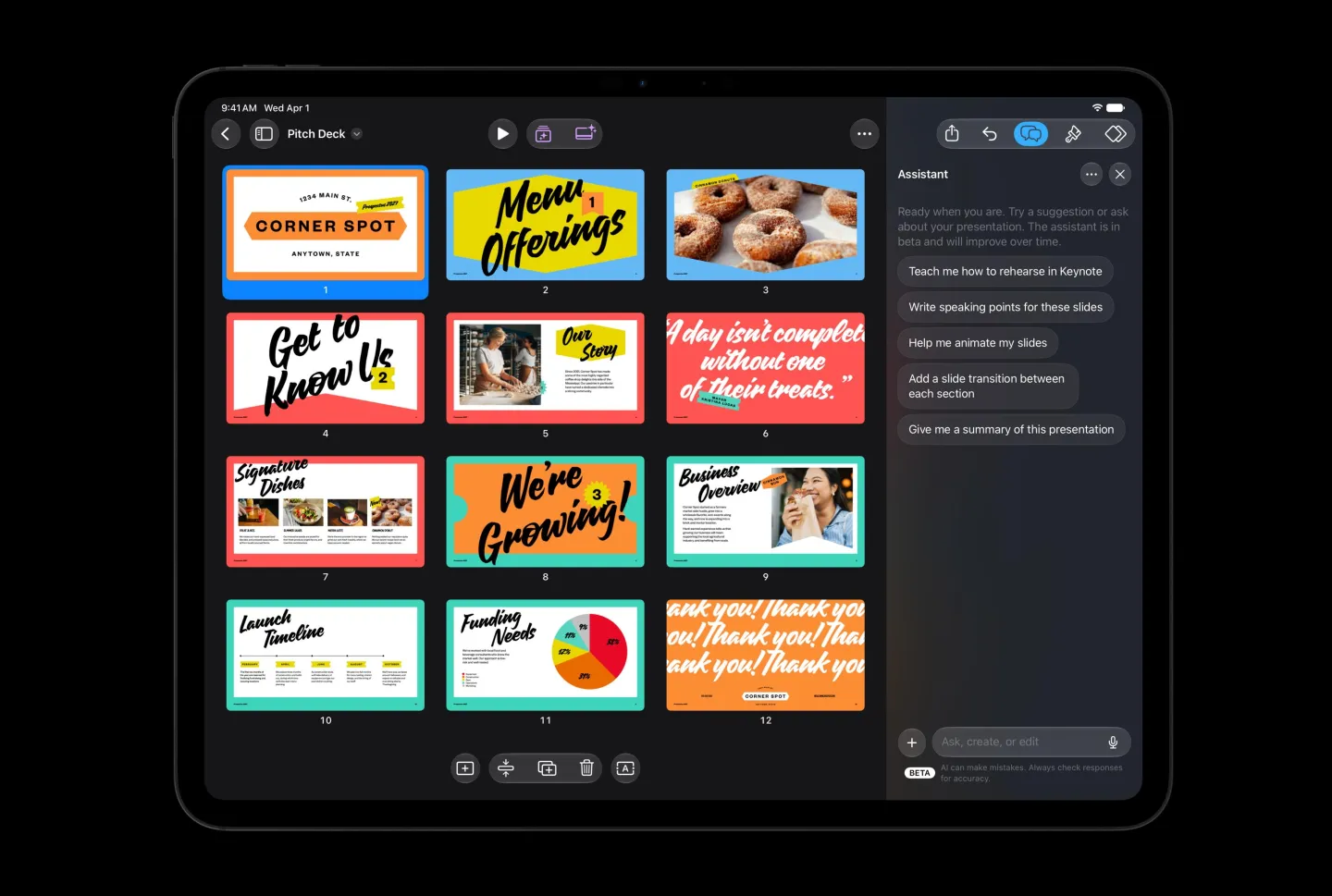
Application-by-Application Use Cases
In Pages, the assistant can draft sections, reorganize paragraphs, adjust tone and edit existing text. It may also generate images or graphic elements, retrieve the latest information on a topic and bring relevant content into the document. For users less familiar with Pages advanced features, it can explain how particular tools work and give suggestions for improving the current document. Compared with asking an AI in a standalone chat window, working inside the document may reduce copy-and-paste and app switching.
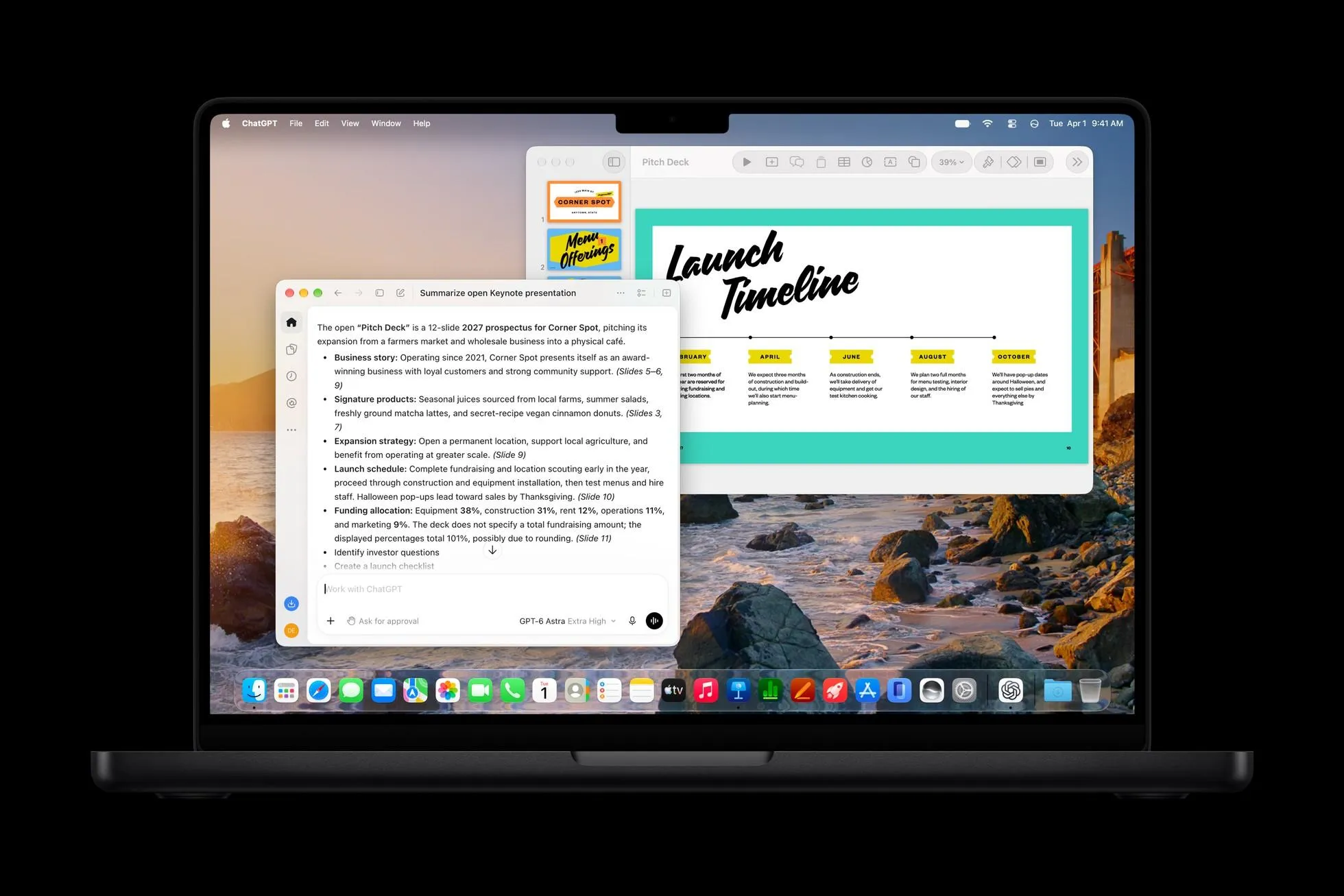
Keynote's use cases focus on presentation construction. Users can ask the assistant to create presentation content around a topic, generate slides, write speaker notes, add animation and refine existing pages. It can also create images and graphic elements, helping users establish the visual structure of a deck more quickly. For people who regularly build business reports, teaching slides or project review materials, this is a practical shift: the user describes the goal in words, while the software helps with information organization, layout, visual structure and narrative.
In Numbers, the assistant can look for patterns in tabular data, generate complex formulas, create custom tables and recommend suitable data visualization charts. A user can describe a calculation need in natural language rather than relying on mastery of spreadsheet functions. Example requests include analyzing the trend in a dataset, creating a summary table or producing a formula for a specific calculation. For people who handle data but do not have professional analytics training, the feature can lower the usage barrier. The key boundary is verification: AI-generated formulas and analytical results still need review, especially in finance and business decision contexts.
Model Context Protocol Opens Office Workflows to Third-Party AI Agents
The update also includes a structural change: Apple is beginning to allow third-party AI agents to connect to its office applications. Pages, Keynote and Numbers support the Model Context Protocol, also called MCP, on macOS 27 and later versions, so qualifying third-party AI agents can interact with these apps.
MCP is an open protocol designed to connect AI models with external tools, data sources and application workflows. Its practical meaning is that AI is no longer limited to generating text. With authorized access, an AI agent can invoke relevant tools and carry out more concrete tasks. For office software, the result is a broader interface layer: users may later operate documents, presentations and spreadsheets through different AI assistants, instead of depending exclusively on Apple's built-in Intelligent Assistant.
The Intelligent Assistant is currently available as a beta feature. It requires devices that support Apple Intelligence and runs on iOS 27, iPadOS 27 or macOS 27 and later versions. Feature availability is still constrained by language and subscription conditions, so not every user can access the complete set of functions at this stage.
Creative Application Upgrades: Pixelmator Pro, Logic Pro and Final Cut Pro
Apple is also extending AI upgrades beyond office files. Pixelmator Pro adds Generate Fill, a feature that lets users modify a specific area of an image through text description. The system tries to match the surrounding light, perspective and texture so the changed content blends more naturally into the original image. This can simplify operations that previously required complex selections, layers and retouching tools. Users describe what should be added, removed or changed, and the model attempts to produce the result. The quality still depends on the image content, the prompt and how well the model understands the scene.
Logic Pro for Mac and the iPad version are also scheduled to receive an interface update in the Liquid Glass visual style and an AI assistant. Apple says users can create the basic setup of a vocal recording track through one prompt, and can ask the assistant to help modify an existing music project. The Mac version of Logic Pro will also redesign the browser and use on-device artificial intelligence to automatically analyze, classify and label imported sound materials.
For music producers, asset organization is often time-consuming. Automatic identification of sound types and labeling may help users find suitable audio and recording clips more quickly. AI-assisted track setup may also reduce the operation complexity of parts of the production process.
Final Cut Pro is planned to integrate MotionVFX templates, graphics, titles and transition effects directly inside the application. Final Cut Pro will also include a built-in Content Hub, offering a material library for creators, including stock video, photos and background assets. Apple says these creative application updates will be available to existing Creator Studio subscribers for free in November.
The same November timing applies to the creative software updates as part of the broader offering. That repetition matters for users who subscribe to Creator Studio: the upgrade path is not treated as a separate paid add-on, but as part of the existing subscription access.
Comparison Table: Where the Intelligent Assistant Fits in AI Office Work
| Scenario | What the app can attempt | Business value | Boundary to watch |
|---|---|---|---|
| Pages drafting and revision | Draft sections, rewrite tone, organize paragraphs, explain advanced Pages tools, insert relevant topic information | Faster first drafts and fewer context switches | Need editorial review for fact, compliance and style |
| Keynote presentation building | Generate slide structure, speaker notes, animation suggestions and visual elements | Helps bridge data organization, narrative and design | Need slide-level review for accuracy and visual quality |
| Numbers analysis and formulas | Find patterns, build complex formulas, create summary tables and recommend charts | Lowers spreadsheet skill barrier and speeds exploration | Need independent verification for financial or decision-critical results |
| MCP third-party agent access | Connect external AI agents to office apps through Model Context Protocol on macOS 27 and later | Broader agent options beyond built-in assistant | Authorization, governance and tool selection become critical |
| Creative tools | Generate Fill in Pixelmator Pro, one-prompt vocal track setup in Logic Pro, on-device tagging in Mac version of Logic Pro, MotionVFX and Content Hub in Final Cut Pro | Reduces manual media preparation and editing friction | Output quality depends on source assets, prompts and review |
Step-by-Step Pilot Checklist for AIapplications Teams
- Map the current workflow and identify repetitive tasks inside Pages, Keynote or Numbers, such as first drafts, slide outlines, formula creation or data summaries.
- Start with a low-risk document: an internal outline, a draft announcement, a non-client-facing slide or a nonfinancial table.
- Write instructions that include the objective, target audience, desired tone and known constraints, then ask the Intelligent Assistant to revise or generate content in context.
- Check every generated output: verify facts, formulas, numbers, slide meaning, media alignment and whether the assistant misunderstood the document state.
- Measure the practical effect by comparing time to first draft, revision cycles, editing effort and the number of manual steps reduced.
- Before using MCP-based third-party AI agents, confirm access scope, data permissions and who reviews agent actions.
Illustrative Adoption Pattern for a Business Review Deck
A practical pilot pattern can be framed as a business review deck. The user enters a topic into Keynote, asks the assistant to draft slides and speaker notes, requests a visual structure and animation suggestions, then manually corrects any inaccurate claims and tightens the narrative. This does not create a new workflow by itself; it compresses three traditionally separate activities: organizing information, designing pages and producing presentation notes. For teams that create recurring status reports, the assistant can be a drafting accelerator, not the final owner of the document.
The same logic applies in Numbers. A user may ask the assistant to summarize a dataset, create a trend analysis or build a formula for a recurring metric. The benefit is reduced manual searching and faster table creation. The risk is trusting a generated formula without independent recalculation. In AI application rollouts, the useful principle is: use the assistant to produce the next working draft, then keep human accountability for the decision.
FAQ About Apple, Pages, Keynote, Numbers, Intelligent Assistant and MCP
Which applications are covered by the new AI assistant?
Pages, Keynote and Numbers are the office applications described in this update. The Intelligent Assistant works with the context of the current document, presentation or spreadsheet.
Is Apple's Intelligent Assistant connected to OpenAI?
Yes. The feature is supported by Apple and OpenAI artificial intelligence models. It can perform editing and creation tasks around the document rather than only answering questions.
What devices and software versions are required?
Devices supporting Apple Intelligence need iOS 27, iPadOS 27 or macOS 27 and later versions. Third-party AI agent support through MCP is described for Pages, Keynote and Numbers on macOS 27 and later versions.
Can third-party AI assistants use the same office applications?
Apple is opening support for the Model Context Protocol, known as MCP. This creates a path for qualifying third-party AI agents to interact with the office apps, provided they meet the required conditions and access is authorized.
Do creative applications also receive AI features?
Yes. Pixelmator Pro includes Generate Fill; Logic Pro for Mac and the iPad version receive a Liquid Glass interface adjustment and an AI assistant; the Mac version of Logic Pro gains automated sound material analysis and classification; Final Cut Pro adds MotionVFX assets and a built-in Content Hub.
When are creative updates available for Creator Studio users?
Apple says the updates will be offered to existing Creator Studio subscribers for free in November.
Common Mistakes to Avoid
- Treating generated text, slides, formulas or media edits as final outputs without review.
- Assuming every Apple Intelligence device, language or subscription plan receives the same features.
- Using Numbers-generated formulas in finance or operational decisions without independent validation.
- Overlooking that standalone chat assistants and embedded office assistants solve different problems: one answers, the other edits context.
- Connecting third-party AI agents through MCP without defining permissions, audit paths and failure boundaries.
Why This Matters Beyond Apple Software
The broader signal is that AI productivity software is moving from chat interfaces toward embedded tools that participate in the user's active work. Apple is also responding to Microsoft and Google, which have been bringing AI into office products. Competition may shift from simple editing features to whether software can understand intent, work on the existing file and assist with a complete task.
Action Recommendations
For AI applications teams, start with one task loop rather than a broad rollout. Use the Intelligent Assistant to create first drafts in Pages or slide structures in Keynote, then keep human review as the final gate. In Numbers, require formula verification before any business report uses the output. If you evaluate MCP later, begin with read-only or narrow-authority agent pilots. The most practical adoption rule is to measure whether the assistant reduces manual steps, not whether it can produce attractive text.
For editors, producers and product teams, the creative app updates suggest a different priority: test the assistant on low-stakes assets first. Pixelmator Pro's Generate Fill, Logic Pro's one-prompt setup and Final Cut Pro's Content Hub may accelerate routine tasks, but they still require the professional judgment that defines publication-quality work. The update is less about replacing expertise and more about reducing friction between intent and execution.