
ItInsightsWorld AIapplications Guide: Agentic Front Ends for Engineering Apps
Controlled engineering apps exist because rare analysis expertise often must reach many users at once. Instead of editing code, models, or test routines, colleagues run predefined workflows, inspect outputs, compare scenarios, and use the results for decisions. The application-layer decision becomes sharper when the user base grows and the most valuable interactions are the questions that follow the first result.
For product and operations owners, the issue is not whether an interface can host chat. It is whether a grounded workflow benefits from a front end that only moves among approved actions when the next step depends on what the user has just seen.
What an agentic front end adds to a controlled app
An agentic front end is a chat-style layer placed in front of actions the app author has already approved. Its job is not to redefine engineering analysis, create new routines, or alter models. It selects which approved action to run from the tools exposed by the application. The loop described by MathWorks is narrow: the user asks in ordinary language, the agent chooses from approved tools, the existing engineering code does the work, the app displays the result, and the user reviews the output before continuing.
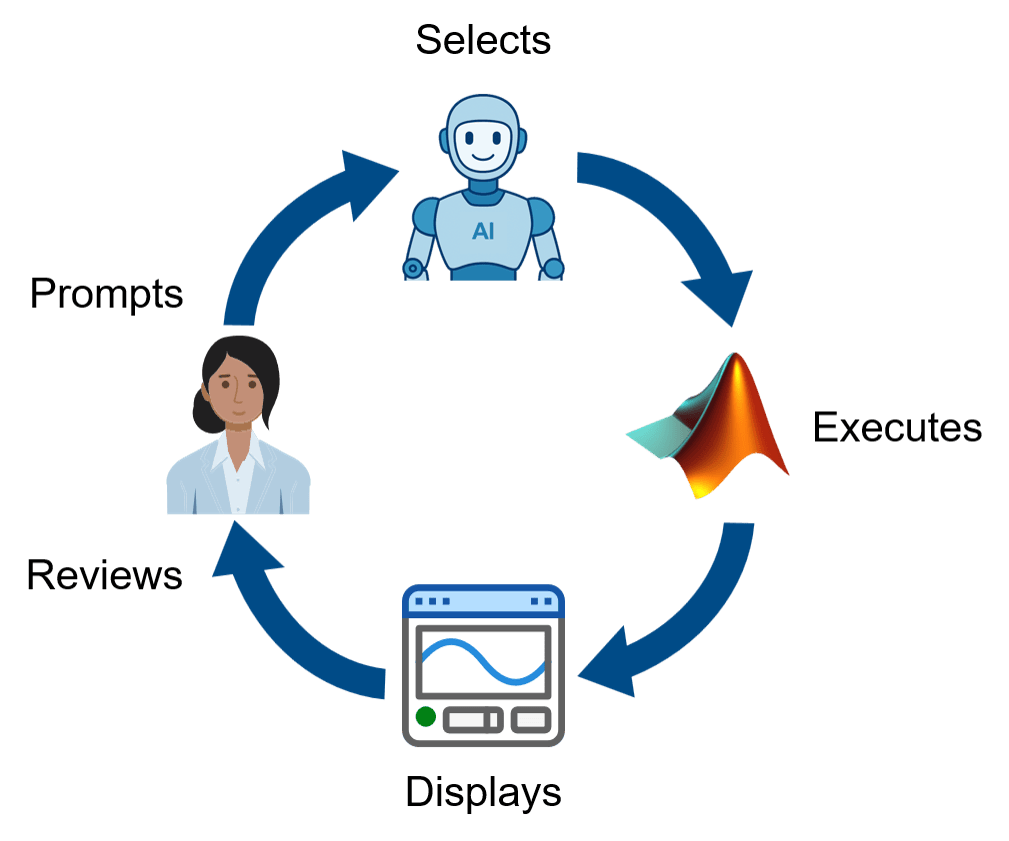 Figure 1: The agentic loop: user enters prompt -> agent selects approved function(s) -> functions execute -> app displays results -> user reviews results. Source: MathWorks
The promise is not to turn the app into an open-ended system. The promise is to keep governance intact while making the next approved step easier to request.
Where grounded workflows meet flexible interaction
The pattern that fits best is a workflow already owned by the engineering team: a custom app provides inputs, plots, tables, and reports; the workflow owner controls the implementation; users on related teams or elsewhere in the organization run the analysis without editing the code or model behind it.
That model works when the path is predictable: choose a file, select data, press a button, inspect a plot, export a report. It becomes less efficient when users keep moving from result to result. As they compare cases, check anomalies, and ask what changed, the app cannot easily predefine every useful follow-up with another button, panel, menu, or help text.
The engineering logic may already be well defined. The hard part is the question space around its results. A bounded agentic layer can reduce that complexity by letting users navigate the existing workflow without turning the application into a map of every possible path.
Case: battery test analysis
A battery test engineer reviewing lab data may see a baseline case, a high-temperature case, and a degraded case. The first prompt might be show me the high-temp run. Once the plot appears, the next prompt depends on the data: compare it with the baseline, check for anomalies, or ask what stands out. This is a data-dependent conversation, not a fixed form.
Traditional app design can still support this work by exposing a set of tools: add buttons, add a comparison panel, add an anomaly tab, add menus for follow-up questions, and add help text so users know where functions live. Such applications can be the right solution, as MathWorks engineers have seen in customer work. Yet at some point the interface can feel less like guidance and more like a dense route map. That can slow users and return more support and maintenance work to the workflow owner.
Battery lab assistant in MATLAB
Consider a small battery lab assistant built in MATLAB as a concrete example. The app shows a chat panel on the left and analysis results on the right. The agent is allowed to list available runs, display a run, compare two runs, and run anomaly detection. These are not arbitrary capabilities. Each one is an approved MATLAB function with defined inputs and outputs selected by the app author. They form the boundary of what the agent may do on behalf of the user.
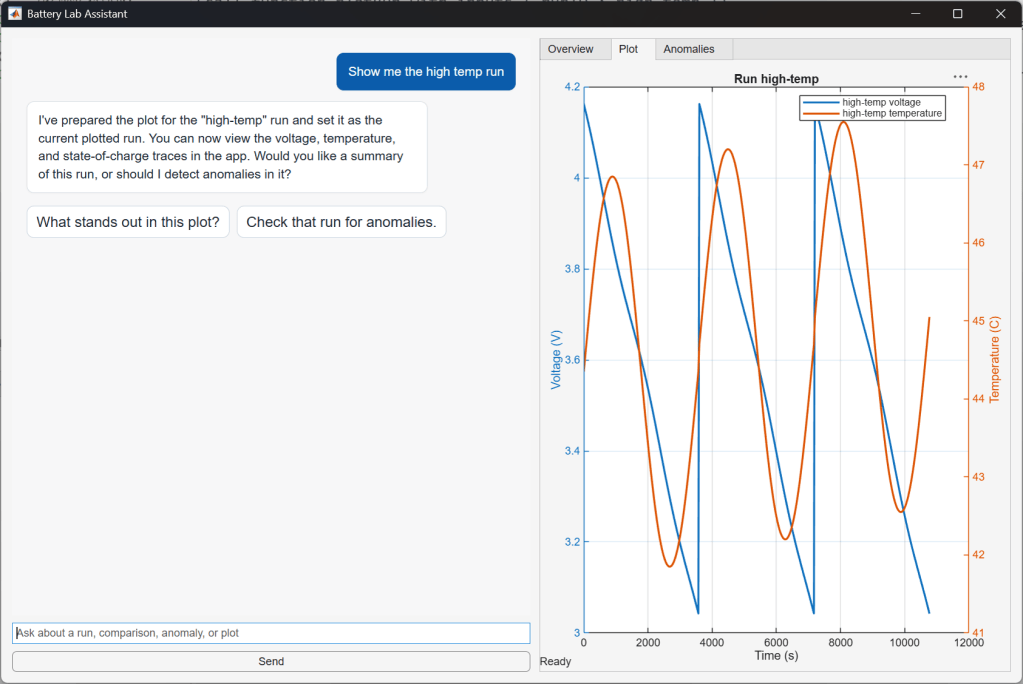 Figure 2: Full view of the app with message "show me the high-temp run" and results. Source: MathWorks
The loop is visible here. The agent does not invent a display method. It calls the approved function for showing a run, uses the high-temperature run as input, and lets the app render the output for review. If the user wants to continue, the next natural prompt can be compare with the baseline.
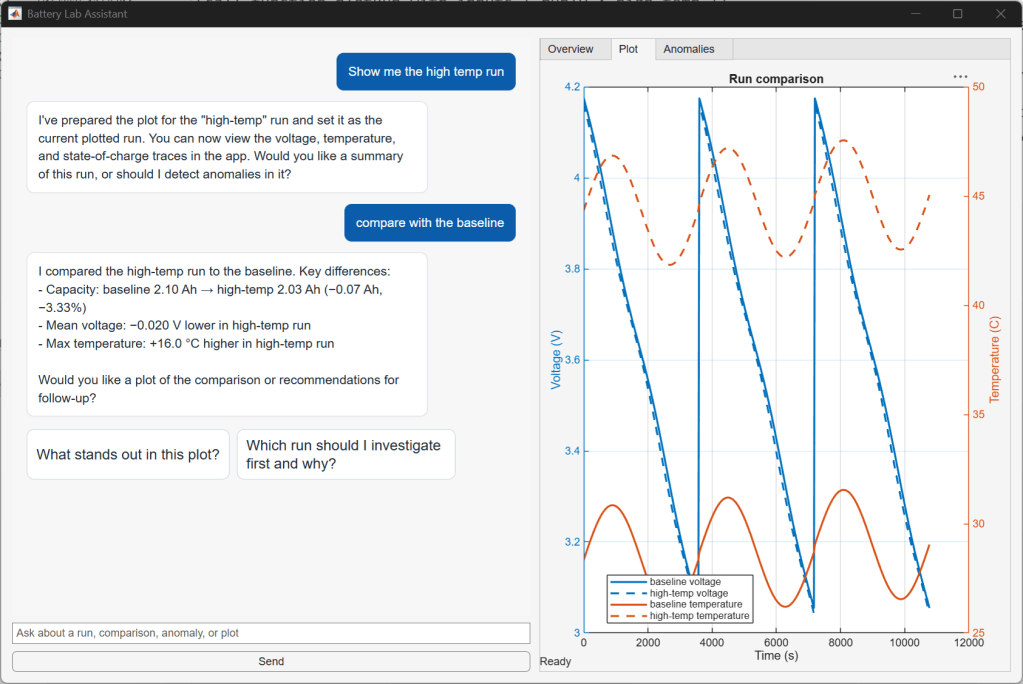 Figure 3: Screenshot of app showing message "show me the high-temp run" and chat response, followed by "compare with the baseline" and the response. Source: MathWorks
Step tutorial
- User enters a prompt, such as show me the high-temp run.
- The agent selects one of the approved tools; it does not generate a new analysis routine.
- MATLAB function executes with defined inputs.
- The app displays results for user review.
- The user decides whether to continue, for example with compare with the baseline.
SDK layer
The MATLAB AI Agent SDK is the framework used for this example. It supports connecting to a large language model, keeping message history, registering MATLAB functions as callable tools with defined inputs and outputs, and managing shared agent state. The exact code matters less than the shape of the design. The important step is deciding which MATLAB functions become tools available to the agent and what they return to the app.
Design checklist for exposed tools and data flow
A traditional app already has approved actions behind buttons and menus. With an agentic front end, the author also provides a written description of each tool, so the agent can choose among them based on the prompt. The design choice is not only which actions to expose, but also what information the model receives: raw data, summarized results, metadata, or only the user prompt and tool outputs.
- Which tools should be exposed?
- What data should be sent to the model?
- What should be logged?
- Where should human review stay in the loop?
Comparison: traditional controls vs bounded agent
| Dimension | Traditional controls | Grounded agentic front end |
|---|---|---|
| Predicted next step | The author adds buttons, panels, tabs, menus, and help text for known paths. | The user asks for the next step, and the agent chooses among approved functions. |
| Best fit | Linear, stable workflows where the next action is obvious. | Exploratory review where the next question depends on the latest result. |
| Governance model | Approved actions are reached through UI affordances. | Approved actions are described to the agent and executed only as exposed tools. |
| Failure mode | Too many branches can create a confusing route map and maintenance burden. | Unclear tool boundaries or data handoffs can make logging and review decisions harder. |
When to add, when not to
An agentic front end should not be added to every app. If an app has three actions and the design team knows when to use them, ordinary controls are often clearer; a chat panel may add more work than value. The stronger candidates are applications where the author knows the action set but cannot predict every useful path. Battery test review is one example. Parameter studies, lab data checks, signal-processing reports, simulation result triage, and other similar engineering applications can have the same shape.
Common misconceptions
- The core design question is not "where can we add chat?". A more useful question is "which approved actions should users be able to do through chat?".
- An agentic layer does not replace the app, the underlying algorithms, or engineering judgment.
- It does not give the model authority to create new analysis routines. The boundary remains the approved tool set.
- It does not remove the need for governance. Logging, data selection, and human review remain central design decisions.
FAQ
Does the agent invent analysis?
No. It chooses among approved functions defined by the workflow owner. The engineering analysis remains grounded in the existing code, models, and test workflow.
Is chat always better than buttons?
No. Buttons remain effective when the path is known and the next action is clear. Chat becomes useful when users repeatedly decide what to inspect next after seeing a result.
What data should the model see?
The app author can choose raw data, summarized results, metadata, or only the user prompt and tool outputs. That choice shapes how much information is disclosed, what must be logged, and where review is required.
What belongs in the loop?
The agent can list runs, display a run, compare two runs, or run anomaly detection only if those capabilities are exposed as approved MATLAB functions. Each action has defined inputs, outputs, and boundaries.
Where should human review sit?
Review should remain where the user inspects app-generated results and decides the next prompt. That preserves engineering accountability while making the interaction more flexible.
Action recommendations
- Map the approved actions already behind existing controls, and document each candidate tool with its input, output, and returned data.
- Identify workflows where the next useful step depends on what the user just saw, such as lab review or simulation triage.
- Choose the minimum tool set that covers real follow-up questions, rather than exposing every function to the agent.
- Decide what data the model receives and what must be logged before pilot testing.
- Keep human review explicit after each app-generated result, then expand the tool set only when the workflow remains governed.
Conclusion
Engineering apps already sit on top of grounded workflows. The application-layer opportunity appears when those workflows outgrow fixed controls, not when chat is added for its own sake. For the builder, the pressure to predict every next click can fall, while control over functions, data, and outputs remains with the author. For the user, less of the experience is spent on UI mechanics and more on the engineering question. The value shows up when the interface stays bounded, but the path through it can change.